
Video Subtitle Removal Models: Global Comparison
Hard-Subtitle Erasing · Text Detection · Temporal Inpainting · Generative Fill — Open Source & Closed Source — September 2026
Repair Quality · Temporal Consistency · Detection Automation · Speed & VRAM · Ease of Use · Cost · Privacy & Compliance
Executive Summary
Subtitle removal is a discipline of its own in 2026, distinct from watermark removal: it targets hard subtitles burned into the frame — fixed in position, large in area, frequently overlapping characters and complex textures, and therefore far more demanding on “reconstruction” rather than “covering.” The open-source camp is defined by a single tool: video-subtitle-remover (VSR) packages PaddleOCR text detection plus three repair engines (STTN / LaMa / ProPainter) into a double-click installer, and has become the de facto standard in both Chinese and international communities. At the academic layer, ProPainter (ICCV 2023, the ceiling of propagation-based repair) and E2FGVI (CVPR 2022, the speed-quality sweet spot) form a two-horse race. The closed-source camp has completed a generational swap in 2025–2026: the older HitPaw / Media.io spatial-smearing algorithms now carry the “blurry box” label, while a new generation — EchoSubs, Vmake, and Mali — shifted to temporal inpainting and generative fill, upgrading the experience from “smudging” to “rebuilding.”
One-sentence conclusion: the competitive question has shifted from “can it be removed” to “can viewers tell it was removed.” On plain or dark backgrounds, free open-source tools are already invisible to the human eye; when subtitles sit on moving faces or complex textures, every tool — Adobe After Effects included — can only reach 85–95 out of 100. That is the physical limit of burned-in text (the original pixels are destroyed), not an algorithm gap. The real dividing lines are engineering-side: VRAM thresholds (ProPainter can demand ~25GB at 720p), detection automation (hand-drawn masks vs. automatic), and batch capability.
Key findings:
- Open-source VSR is the value anchor of the entire field. Free, local, no cloud upload, multi-language OCR auto-detection — overall score 8.4, ranked #1. The price: an NVIDIA GPU is required (no CPU-only support) and there is a command-line-grade tuning curve.
- Closed-source newcomer EchoSubs (8.2) proves the “local + paid” route works. A ProPainter-grade temporal engine packaged for ordinary users, with Apple Silicon and NVIDIA support, 4K batch processing — the most notable closed-source product of 2026.
- The older online generation has fallen behind. HitPaw (7.6) wins on interface and brand; Media.io (6.3) was repeatedly flagged in reviews for visible smearing and aggressive subscription upsells. Both share a structural ceiling: cloud processing forces export compression, capping output quality below local tools.
- The technological divide: spatial smearing → temporal propagation → generative fill. Spatial algorithms (older HitPaw/Media.io) squeeze surrounding pixels inward and blur; temporal algorithms (VSR/ProPainter/EchoSubs) carry clean background from frames before the subtitle appears; generative models (Runway, DiffuEraser-class) “invent” background when no clean frame exists. Three routes, three use cases — no all-round champion.
- Privacy splits the market in two. Open-source and local closed-source tools keep footage on your machine; cloud SaaS hands it to a server — a hard constraint for unreleased cuts and corporate material. And removing subtitles from copyrighted content for redistribution is a matter of usage, not tooling.
1. Subtitle Removal ≠ Watermark Removal: A Separate Track
Treating subtitle removal as a sub-task of watermark removal is a common mistake. In engineering terms the difficulty structures differ completely:
| Dimension | Subtitle Removal (this report) | Watermark Removal (see watermark report) |
|---|---|---|
| Target traits | Fixed position (usually bottom safe area), large area, frame-persistent, continuous text | Arbitrary position, small area, often semi-transparent logos/corners |
| Detection | Text detectors (PaddleOCR / DBNet) can locate automatically — batch without hand-drawn masks | Mostly hand-drawn; automatic detection limited to fixed watermark templates |
| Repair difficulty | Subtitles sit on subjects and dialogue scenes — large occlusion + semantically sensitive | Watermarks occupy corners and backgrounds — mostly small occlusion |
| Failure modes | Inter-frame flicker (temporal instability), text ghosting (mask too small), smearing | Brightness shifts, edge halos, tiled watermarks unsolvable |
| Tool shape | Two-stage pipeline: detection + repair (VSR as the archetype) | Single-stage select-and-erase (one-click products) |
In short: subtitles are more detectable but less repairable — automation can be higher than watermark removal, yet the floor of per-frame repair quality is harder to guarantee. This is why the scoring system below treats “detection automation” as its own dimension and raises “temporal consistency” to near-equal weight with “repair quality.”
2. Open-Source Camp: A Two-Layer Architecture
The open-source ecosystem divides labor cleanly: academic models (STTN / LaMa / ProPainter / E2FGVI) solve only the “repair” half — video plus mask in, completed frames out; engineering integrations (VSR, IOPaint) chain text detection, mask generation, engine routing, and A/V muxing into a complete pipeline. Running academic models directly means writing your own detection and pre/post-processing — ordinary users should enter through VSR or IOPaint.
| Solution | Developer | Approach | Best At | Notes |
|---|---|---|---|---|
| video-subtitle-remover (VSR) | YaoFANGUK (China) | PaddleOCR detection + STTN/LaMa/ProPainter tri-engine | End-to-end multilingual hard-subtitle automation | Windows GPU bundle, out of the box; no CPU-only support |
| STTN | researchmm (NTU et al.) | Spatio-temporal Transformer propagation | Live-action footage, natural motion, fast | VSR’s default engine; detection can be skipped for speed |
| LaMa | advimman (Samsung AI) | Fourier-convolution image inpainting (single frame) | Anime, typography, static backgrounds | No temporal modeling — flickers on video; IOPaint adds a Web UI |
| ProPainter | sczhou (NTU S-Lab) | Dual-domain propagation + mask-guided sparse video Transformer | Intense motion, complex textures, quality ceiling | PSNR 35.33 / SSIM 0.9748; ~25GB VRAM at 720p |
| E2FGVI | MCG-NKU (USTC) | Flow-guided end-to-end video inpainting | Fixed cameras, batch shorts, speed-first | CVPR 2022; the “standard mode” workhorse |
| IOPaint (ex lama-cleaner) | Sanster | Web UI aggregating 15+ backends (LaMa/STTN etc.) | Images first, basic video support | Use it to give LaMa a graphical interface |
| DiffuEraser | pixeli99 (ByteDance internship project) | Generative diffusion inpainting (BrushNet + AnimateDiff) | Large occlusion on static backgrounds | Flagship of the generative route; an order of magnitude slower |
| MiniMax-Remover | MiniMax (China) | 6-step distilled diffusion (Wan2.1-1.3B) | Large occlusion needing semantic reconstruction | NeurIPS 2025; an order of magnitude faster than DiffuEraser |
Mali, a Chinese local+cloud hybrid, is scored in section 7 but carries no outbound link here because its official site could not be reliably verified.
video-subtitle-remover (VSR) Best Open Source 8.4
The de facto standard in both Chinese and international communities. Its value is not any single algorithm but the whole pipeline — detection → mask → routing → repair → A/V muxing — packed into one extract-and-run bundle: live-action goes to STTN (fast), anime to LaMa (accurate), intense motion to ProPainter (best). Its scene-cut detection module (ContentDetector) prevents subtitle regions from bleeding across shots — the most common pitfall when using the academic models raw.
Pros
- Multilingual OCR auto-detection, batch without hand-drawing
- Three engines cover the widest material range in open source
- Free, local, no cloud — privacy and cost both optimal
- Bundle + GUI + CLI; easiest entry in the open-source camp
Cons
- NVIDIA GPU required; no CPU-only mode, no AMD support
- ProPainter tier demands heavy VRAM (~25GB at 720p)
- Commercial use requires a separate license
- Utility-grade UI, not a consumer product experience
ProPainter Quality Ceiling 7.0
The ceiling of propagation-based repair. Dual-domain propagation keeps textures continuous when subtitles sit on moving characters or complex urban fabric, and its flicker control clearly outperforms flow-based methods; the price is a double burden of VRAM and inference time — the slowest, most hardware-hungry of the three engines, and the only one “worth the wait” on intense-motion footage.
Pros
- Quality ceiling of propagation-based repair; unmatched on complex motion
- Best temporal consistency and flicker control
- Apache 2.0; widely integrated by VSR and commercial products
Cons
- No text detection — raw use requires building a mask pipeline
- Highest VRAM threshold; long videos need segmentation
- Slowest of the three; unfriendly to batching
Source: github.com/sczhou/ProPainter
E2FGVI Speed-Quality Sweet Spot 6.8
The engineering “standard mode”: stable on plain backgrounds, fixed shots, and small subtitle regions, fast enough to batch short videos and lecture clips. Its weakness is optical flow — camera cuts or violent motion make the flow unreliable, producing slight jitter; route such footage to ProPainter.
Pros
- Best speed-quality balance; batch friendly
- Deliverable quality on simple backgrounds
- Permissive Apache 2.0 license
Cons
- Flow-dependent; temporal instability on intense motion
- Blurring appears on large occlusions sooner than ProPainter
- No detection layer; same raw-use barrier as ProPainter
Source: github.com/MCG-NKU/E2FGVI
STTN Value Engine 6.6
Repairs like a dictionary lookup: it finds patches most similar to the subtitle region in neighboring frames and copies them over — fast and accurate on live-action with natural motion and repetitive backgrounds. Propagation becomes inaccurate on complex textures or large occlusions, but within its comfort zone its speed advantage is an order of magnitude.
Pros
- Fastest of the three engines; the batch pick
- Speed and quality both strong on live-action
- Skip-detection mode makes fixed-subtitle material extremely efficient
Cons
- Propagation inaccurate on complex textures and large occlusions
- Weaker than LaMa on anime and typography
- 2020 architecture; quality ceiling surpassed by ProPainter
Source: github.com/researchmm/STTN
LaMa / IOPaint Anime & Image Specialist 6.0
LaMa has long topped image-inpainting leaderboards, and its reconstruction of line structures (anime outlines, typography, architectural edges) is the most natural among all single-frame models — exactly what anime subtitle removal needs. But it processes every frame independently with zero temporal modeling; on live-action video it inevitably flickers, which confines it to the “anime and images” niche in this discipline.
Pros
- Most natural repair on anime/typography/line structures
- IOPaint adds a Web UI — usable without coding
- Quality benchmark for image-based removal
Cons
- No temporal modeling — per-frame flicker on live-action
- Weaker semantic reconstruction than generative models
- A component, not a complete video workflow
Source: github.com/advimman/lama
3. Closed-Source Camp: A Generational Swap from “Blurry Box” to “Rebuilding”
The closed-source spectrum is wide: the older generation (productized 2023–2024) uses spatial smearing — subtitles removed but a blur blob left behind, tagged “blurry box” on Reddit; the newer generation (2025–2026) moved to temporal propagation and generative fill, with EchoSubs and Mali shipping ProPainter-grade engines as local products while Vmake and Pollo AI take the cloud-generative route. When buying closed source, first ask which generation the algorithm belongs to.
| Product | Form | Algorithm Generation | Best At | Pricing |
|---|---|---|---|---|
| EchoSubs AI | Desktop (Win / Mac, Apple Silicon optimized) | Temporal inpainting (new generation) | Hard-subtitle batch, 4K, privacy-sensitive footage | Free trial + one-time / subscription |
| HitPaw Video Object Remover | Desktop + web | Spatial + temporal hybrid | Subtitle/watermark/object all-in-one, friendly UI | $29.99/mo or $109.99/yr |
| Vmake.ai | Cloud SaaS | Generative / temporal (new generation) | Quick short-video cleanup, no install | Credits, pay as you go |
| Mali | Desktop + mobile + mini-program | Local + cloud dual mode | Chinese short video, rolling subtitles, batch 4K | Free tier + paid unlock |
| Media.io | Cloud SaaS | Spatial smearing (older generation) | Lightweight emergency processing | 3 free credits/day; from $13.99/mo |
| Runway (Generative Fill) | Cloud pro tool | Diffusion generative | Semantic reconstruction, creative scenes | Subscription from $12/mo |
| AniEraser | Desktop + mobile | Lightweight AI erasing | Subtitles + watermarks + clutter in one click | Credits (conversion rate undisclosed) |
| Pollo AI | Cloud SaaS | Generative fill | Anime subtitle removal | Monthly subscription |
| Morph Studio | Cloud SaaS | Temporal inpainting | Free fallback: 10 min / 50MB, 720p export | Free tier + paid |
| CapCut | Desktop + mobile | Covering / cropping | Quick edge-subtitle handling | Free (membership features extra) |
| Adobe After Effects | Desktop professional | Content-Aware Fill + motion tracking | Film-grade repair, dynamic / rolling subtitles | $22.99/mo subscription |
| Premiere Pro | Desktop professional | Matte / crop + AE round-trip | Subtitle fixes inside the editing timeline | $22.99/mo subscription |
Mali’s official site could not be reliably verified, hence no outbound link. Products excluded from scoring (AniEraser / Pollo / Morph / CapCut / Premiere): general-purpose erasing, covering-based approaches, or overlapping with a same-category scored entry — their capabilities are described in the table above.
EchoSubs AI Best Closed Source 8.2
The biggest closed-source variable of 2026: it takes the temporal-inpainting engine already validated by the open-source community and packages it into a double-click local product, while keeping the two hard advantages of local tools — offline privacy and original-quality export. It explicitly positions itself against the “blurry box” older tools, targets anime raws and batch workflows, and adds auto-transcribe to re-attach soft subtitles afterward — a rare “remove, then restore” closed loop.
Pros
- Highest productization among local tools; near-consumer ease of use
- Temporal engine quality on par with VSR’s ProPainter tier
- Uncompressed 4K export + season batching + offline privacy
Cons
- Closed source — no self-audit, no customization
- Unlimited batching requires purchase; costlier than free open source
- Vendor-stated quality figures lack third-party verification
Source: echosubs.com
HitPaw Video Object Remover All-in-One Veteran 7.6
The veteran all-in-one: its edge is a mature interface and coverage — subtitles, watermarks, passers-by, logos in one tool, a reassuring choice for users who don’t want multiple apps. The desktop version keeps footage local, preserving the privacy baseline. The weakness is algorithm generation — reviews still find smearing on complex-background subtitles — and a desktop subscription that is the most expensive form for low-frequency use.
Pros
- Subtitles/watermarks/objects in one tool; broad coverage
- Friendly interface; lowest learning curve tier
- Desktop version local; good 4K support
Cons
- Visible smearing remains on complex-background subtitles
- Subscription is the worst value at low frequency
- Web version uploads footage — weaker privacy than local
Source: hitpaw.com
Vmake.ai Cloud Newcomer 7.4
The representative of the new cloud generation: its algorithm generation has caught up with local open source (reviewed as less smeary than the older HitPaw), and no-install, any-device convenience is something desktop tools cannot offer. The cost is the classic SaaS trio — export compression, unpredictable credit-based costs, and handing unreleased footage to a server.
Pros
- New-generation algorithm; leading quality among cloud tools
- No install; works on any device (including iPad)
- Queue rendering; zero local hardware requirements
Cons
- Footage must go to the cloud — a hard privacy handicap
- Export compression caps quality below local tools
- Credit billing makes batch costs unpredictable
Source: vmake.ai
Media.io Older-Generation Online 6.3
The archetype of the all-in-one online tool, with direct URL parsing (YouTube/TikTok) as its signature feature. But the older algorithm is a hard handicap: spatial smearing leaves obvious blur blobs on complex backgrounds — exactly the “blurry box” complaints — while a thin free tier and aggressive subscription pushes make the experience feel like a conversion funnel.
Pros
- Direct URL parsing; convenient for footage collection
- Broad feature coverage; minimal operation
- No install, instant use
Cons
- Spatial-smearing algorithm; obvious blur on complex backgrounds
- Thin free tier; aggressive subscription funnel
- Export compression plus cloud upload — a double cost
Source: media.io
Runway Generative Pro 6.7
The benchmark of the generative route: when no clean frame exists to copy from (large occlusion, background never revealed), propagation methods can only blur through, while diffusion models can “invent” plausible background — which is why reviews grant it the highest repair scores. But it is not a subtitle tool: no automatic detection, metered billing, and it demands the operating literacy of a creation suite. Treat it as a specialist weapon for professional scenes, not a daily driver.
Pros
- Strongest semantic reconstruction on large occlusions with no clean frames
- Complete professional creation ecosystem (post-production included)
Cons
- No automatic subtitle detection; fully manual masking
- Uncontrollable generation (hallucination); frame-to-frame coherence needs manual QC
- Metered billing spirals on long videos
Source: runwayml.com
4. Capability Matrix
| Solution | Auto-Detect | Temporal | Complex BG | Anime | Batch | Offline | 4K | Learning Curve |
|---|---|---|---|---|---|---|---|---|
| VSR | ✓ OCR auto | ✓ STTN/ProPainter | △ ProPainter tier | ✓ LaMa tier | ✓ CLI dirs | ✓ local | ✓ | Mid (NVIDIA GPU) |
| EchoSubs | △ hand-drawn | ✓ | ✓ | ✓ | ✓ seasons | ✓ local | ✓ | Low |
| Mali | ✓ | ✓ | △ | △ | ✓ | △ dual mode | ✓ | Minimal |
| HitPaw | △ semi-auto | △ | △ smearing | △ | ✓ | ✓ desktop | ✓ | Low |
| Vmake | ✓ | ✓ | ✓ | △ | △ credits | ✗ cloud | △ compressed | Minimal |
| Runway | ✗ manual | △ | ✓ generative | △ | ✗ | ✗ cloud | ✓ | High |
| Adobe AE | ✗ manual + tracking | ✓ | ✓ ceiling | △ | ✗ | ✓ local | ✓ | Very high |
| ProPainter (raw) | ✗ DIY | ✓ best | ✓ | △ | △ slow | ✓ local | ✓ | High (25G VRAM) |
| E2FGVI (raw) | ✗ DIY | △ flow | △ | △ | ✓ fast | ✓ local | ✓ | High |
| STTN (raw) | ✗ DIY | △ | ✗ weak texture | ✗ | ✓ fastest | ✓ local | ✓ | High |
| LaMa / IOPaint | ✗ manual | ✗ none | △ single frame | ✓ best | ✓ image batch | ✓ local | ✓ | Low (Web UI) |
| Media.io | ✓ | ✗ | ✗ blur | △ | △ quota | ✗ cloud | △ | Minimal |
| CapCut | △ covering | — (not inpainting) | ✗ | △ | △ | ✓ local | ✓ | Minimal |
How to read this: the “Auto-Detect” column is the structural advantage of open-source VSR and Mali over most closed-source products — closed tools cut per-frame auto-detection for simpler UX, forcing hand-drawn masks or templates in batch. The “Offline” column is the structural victory of open source and local closed source (VSR / EchoSubs / AE) over cloud SaaS.
5. Scenario Recommendations
Anime collectors: cleaning hard subs off raws
Line structures are LaMa’s strongest suit; VSR’s auto-detection locates subtitles without hand-drawing and batches entire seasons. Free — at the cost of an NVIDIA GPU and waiting.
Lectures / interviews: fixed bottom subtitles in batch
Fixed cameras with fixed subtitle zones are STTN’s comfort zone; skip-detection pushes throughput up another notch — the most efficient route for long-video batching.
Film & drama: subtitles over characters and textures
Only the propagation ceiling survives intense motion. With ~25GB VRAM, take VSR’s ProPainter tier; without a GPU, buy EchoSubs — nearly the same peace of mind.
Creators: Chinese short video, rolling subtitles, batch
Local + cloud dual mode, dedicated rolling-subtitle support, best Chinese-ecosystem experience across devices; the free tier covers light use.
No-GPU laptop / emergency jobs
Cloud queue rendering with zero hardware demands. Vmake for quality; Morph has a free tier (10 min / 720p) for emergencies. Only if the footage may go to the cloud.
Post-production: multi-layer / variable-speed rolling subs
Motion tracking plus frame-perfect reconstruction at zero quality loss — the final backstop for commercial delivery. Highest skill and subscription cost; usually paired with Premiere.
6. Decision Framework
Four Questions, In Order
Q1: Can the footage leave your machine? Unreleased cuts, corporate material, private content → local only (VSR / EchoSubs / HitPaw desktop / AE). Cloud is acceptable → every option opens up.
Q2: Do you have an NVIDIA GPU? Yes → start with VSR (free); talk money only if unsatisfied. No → local closed source (EchoSubs / HitPaw) or cloud (Vmake).
Q3: What is behind the subtitles? Plain / dark / static → the STTN tier suffices (fast). Moving characters / complex textures → ProPainter tier or EchoSubs. Large occlusion with no clean frames → generative (Runway / diffusion class).
Q4: How much footage? One emergency clip → online tools, use and go. Batch / full seasons → local batch (VSR CLI / EchoSubs); credit-based cloud pricing spirals at scale.
Remember the order: compliance → privacy → hardware feasibility → quality → cost. Reverse it, and the money saved up front gets paid back with interest.
7. Scoring and Head-to-Head Evaluation
Methodology disclosure: the scores below are this report’s unofficial ratings, synthesized from published paper metrics (ProPainter DAVIS PSNR/SSIM, E2FGVI paper data), community field reports (Tencent Cloud developer articles, Toutiao roundups, Reddit threads, vendor comparison pages), and pricing pages. Dimension scores are integers from 0–10; the overall score is the weighted sum. Repair quality varies enormously with the material — always test on your own footage.
7.1 Dimensions and Weights
| Dimension | Weight | Rationale |
|---|---|---|
| Repair quality | 25% | Per-frame naturalness — the necessary condition for “invisibility” |
| Temporal consistency | 20% | Inter-frame flicker is the discipline’s first failure mode |
| Detection automation | 15% | Hand-drawn vs. automatic masks decides batch feasibility |
| Speed & VRAM | 15% | Hardware thresholds and runtime decide real-world viability |
| Ease of use | 10% | Onboarding barrier and interface maturity |
| Cost | 10% | True total cost across free / one-time / subscription / credits |
| Privacy & compliance | 5% | Local vs. cloud; license openness |
7.2 Overall Scores (13 solutions)
| Rank | Solution | Camp | Overall | Rating |
|---|---|---|---|---|
| 1 | VSR (integration) | Open source |
8.4
|
★★★★★ |
| 2 | EchoSubs AI | Closed · local |
8.2
|
★★★★★ |
| 3 | Mali | Closed · hybrid |
7.8
|
★★★★★ |
| 4 | HitPaw | Closed · desktop |
7.6
|
★★★★★ |
| 5 | Vmake.ai | Closed · cloud |
7.4
|
★★★★★ |
| 6 | ProPainter (raw) | Open · engine |
7.0
|
★★★★★ |
| 7 | Adobe After Effects | Closed · pro |
6.9
|
★★★★★ |
| 8 | E2FGVI (raw) | Open · engine |
6.8
|
★★★★★ |
| 9 | Runway | Closed · cloud |
6.7
|
★★★★★ |
| 10 | STTN (raw) | Open · engine |
6.6
|
★★★★★ |
| 11 | CapCut | Closed · free |
6.5
|
★★★★★ |
| 12 | Media.io | Closed · cloud |
6.3
|
★★★★★ |
| 13 | LaMa / IOPaint | Open · engine |
6.0
|
★★★★★ |
The low scores of raw academic models do not diminish their algorithmic value — their detection/usability dimensions are structurally missing (they were never end-user products); integrated into VSR they form a complete solution. Mali’s score relies on public review information without a verifiable official site, and carries lower confidence than the other entries.
7.3 Dimension Detail (strong ✓ / mid △ / weak ✗)
| Solution | Repair | Temporal | Detection | Speed/VRAM | Ease | Cost | Privacy |
|---|---|---|---|---|---|---|---|
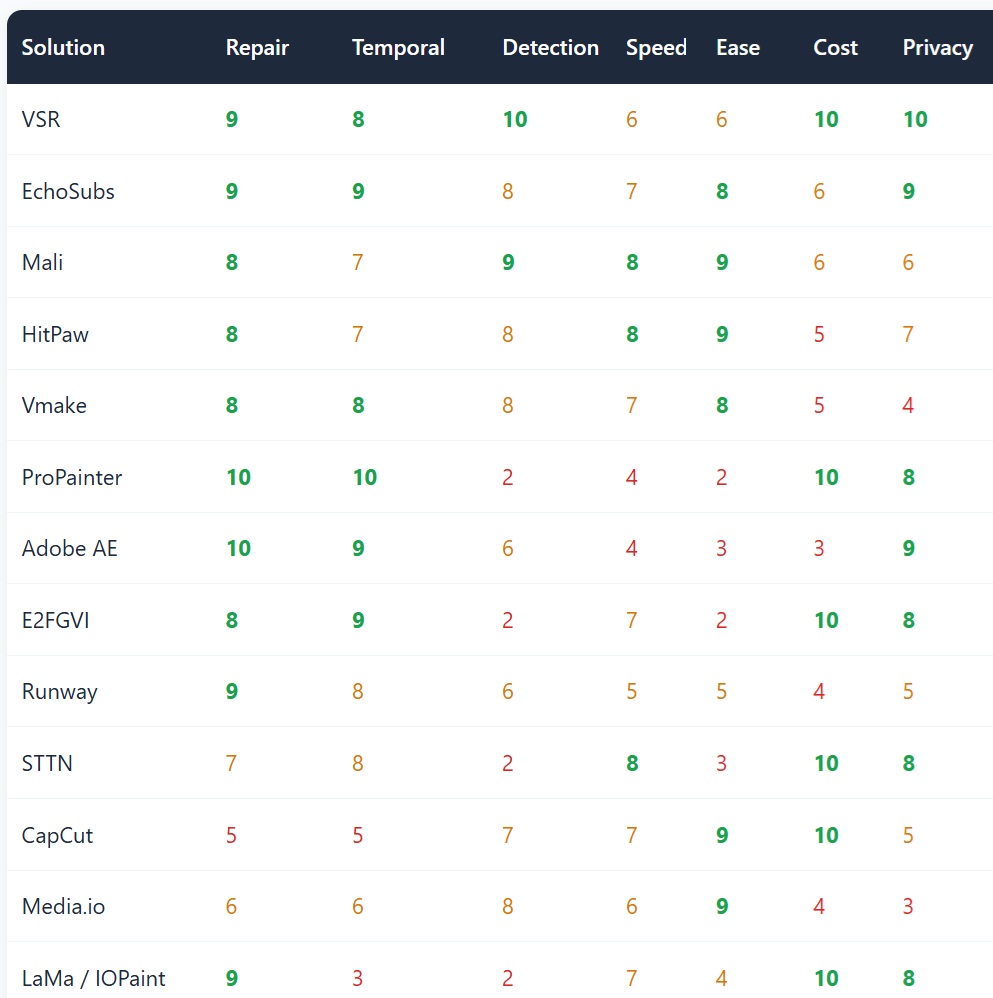
| VSR | 9 | 8 | 10 | 6 | 6 | 10 | 10 |
| EchoSubs | 9 | 9 | 8 | 7 | 8 | 6 | 9 |
| Mali | 8 | 7 | 9 | 8 | 9 | 6 | 6 |
| HitPaw | 8 | 7 | 8 | 8 | 9 | 5 | 7 |
| Vmake | 8 | 8 | 8 | 7 | 8 | 5 | 4 |
| ProPainter | 10 | 10 | 2 | 4 | 2 | 10 | 8 |
| Adobe AE | 10 | 9 | 6 | 4 | 3 | 3 | 9 |
| E2FGVI | 8 | 9 | 2 | 7 | 2 | 10 | 8 |
| Runway | 9 | 8 | 6 | 5 | 5 | 4 | 5 |
| STTN | 7 | 8 | 2 | 8 | 3 | 10 | 8 |
| CapCut | 5 | 5 | 7 | 7 | 9 | 10 | 5 |
| Media.io | 6 | 6 | 8 | 6 | 9 | 4 | 3 |
| LaMa / IOPaint | 9 | 3 | 2 | 7 | 4 | 10 | 8 |
7.4 Category Champions
10 tied: the academic metric ceiling and the film-industry backstop each hold one pole
Dual-domain propagation + sparse Transformer — the strongest flicker control in the field
Per-frame PaddleOCR auto-location plus skip-detection fast mode
Fastest of the three engines; skip-detection leads batching by an order of magnitude
9 tied: multi-device coverage and browser instant-use each excel
10: free and local — the only cost is electricity
10: auditable open source, fully local, multilingual
Most natural line-structure reconstruction; the pick for anime raws
7.5 Head-to-Head Verdicts
① VSR vs EchoSubs: free integration vs paid productization
Pure quality is a tie (same generation of temporal engines); VSR wins on price and detection automation, EchoSubs on usability, Apple Silicon support, and zero tuning. Zero budget: VSR. Time is money: EchoSubs — together they have pushed the older closed-source generation out of the top tier.
② ProPainter vs E2FGVI: quality vs speed
ProPainter wins outright on complex motion and wide subtitle zones (PSNR/SSIM and flicker control), at ~25GB VRAM and multiples of runtime; on fixed cameras with simple backgrounds the two are indistinguishable and E2FGVI is far faster. Tier your material: E2FGVI as the standard route, ProPainter only for hard footage — VSR’s three-tier routing is exactly this strategy productized.
③ New generation (EchoSubs/Vmake) vs old generation (HitPaw/Media.io)
The algorithm generation gap is decisive: spatial smearing leaves blur blobs on complex backgrounds, while the new temporal/generative methods rebuild from adjacent clean frames. Brand maturity and all-in-one breadth are the old guard’s only remaining advantages; in 2026 there is no longer a reason to pay specifically for last-generation algorithms.
④ Local vs cloud SaaS (Vmake/Media.io/Runway)
Cloud wins on zero hardware requirements and any-device access; local wins on original-quality export (cloud forces compression), privacy (footage stays put), and total batch cost (credits spiral on seasons). For long videos, unreleased footage, and batches, local wins decisively; cloud is rational only for one emergency clip on a GPU-less machine.
8. Technical Outlook: 2026–2027
Trend 1: the detection-repair pipeline becomes standard. The open-source community has settled “OCR detection → mask → engine routing” as the canonical pattern, and closed products are catching up (EchoSubs’ transcribe-and-reattach loop, Mali’s rolling-subtitle specialization). The next battleground is detection robustness: stylized fonts, outlined subtitles, and dynamically positioned text.
Trend 2: generative repair enters the workflow. DiffuEraser / MiniMax-Remover proved diffusion can turn “no clean frame to copy” from blur into semantic reconstruction; as distillation accelerates (MiniMax-Remover is already an order of magnitude faster), a generative engine will join VSR-class integrators as a fourth tier, routing complementary to propagation.
Trend 3: local closed source eats the middle market. The market is compressing older SaaS from both ends: free open source moving up in usability (VSR bundles), local closed source moving down in price (EchoSubs one-time licensing). Pure-cloud products on last-generation algorithms that don’t ship a temporal engine by 2027 will retreat to the “URL parsing + emergency” niche.
Trend 4: privacy becomes a procurement hard requirement. Keeping unreleased cuts and corporate footage off the cloud is shifting from preference to policy, and local processing (open source or local closed source) keeps gaining weight in professional purchasing.
9. Key Takeaways
Boundaries of Use: What Tools Can Do ≠ What You May Do
- Removing subtitles from your own footage is tooling; removing them from copyrighted content for redistribution is another matter. Re-uploading or commercializing a subtitle-stripped copy of someone else’s work requires the rights holder’s permission — compliance depends on usage, not on whether the tool is free or paid.
- Burning subtitles destroys information. The original pixels under the text no longer exist; AI makes informed guesses — up to ~95/100 on simple backgrounds, 80–85 on complex motion. Marketing that promises “100% flawless” should not be trusted.
- Hidden costs of cloud tools: export compression, opaque credit pricing, and data-retention policies that must be checked per vendor before processing sensitive footage.
1. Open-source VSR is the top recommendation of the entire field. 8.4 overall: perfect scores on detection automation (10), cost (10), and privacy (10) form an engineering moat harder to breach than any single algorithmic edge. The one hard prerequisite: an NVIDIA GPU.
2. The closed-source camp has completed its generational swap, and the new king is EchoSubs. 8.2: a ProPainter-grade temporal engine packaged for zero-friction local use, with uncompressed 4K, season batching, and offline privacy. The algorithmic handicap of the old guard — HitPaw (7.6) and Media.io (6.3) — is repeatedly confirmed in public reviews.
3. Evaluate “engines” and “tools” separately. ProPainter (7.0), E2FGVI (6.8), and STTN (6.6) score modestly raw because detection and usability are structurally absent; they are weapons, and VSR is the factory that assembles them. Ordinary users should always enter through the integration.
4. Material type decides the engine tier — no all-round model exists. Live-action goes to STTN (fast), anime to LaMa (accurate), intense motion to ProPainter (best), and large occlusions without clean frames to generative methods. Any claim of a single model mastering everything contradicts field results.
5. Manage expectations against the physical ceiling. When subtitles cover moving faces or complex textures, 85–95 is this generation’s ceiling; run a 10-second sample on your own footage before committing — it beats any review.
Subtitles Removed. Next: Dubbing and Localization
Subtitle removal is only step one of footage prep. DeepVideo turns your footage into multilingual masters with AI video translation: 30+ language Voice Clone, 100+ preset voices, integrated TTS and lip-sync — 100% local processing, footage never touches the cloud.
Try DeepVideo Free
Realistic AI Video Dubbing at Just $0.17/minHigh quality · Low price · Local client · Security
Free tier: 18 minutes total + 2 minutes daily · Local processing, no cloud upload
DeepForgeHub Research · September 2026 · Scoring methodology declared in section 7