
Expert Video Translation Performance Test Report
CPU-only baseline
Bottleneck mapping
6 full runs
Fully local
Executive Summary
This report answers one question: on an ordinary laptop with no discrete GPU, how long does a video take to go through the whole translation pipeline, and which stage eats the time? All figures come from step-level timing in the application log ([Pipeline] Starting step / Step completed), which measures pure processing time and excludes user idle time — a cleaner signal than inferring from file timestamps.
- On CPU only, a 34–38s video takes 4 min 53 sec end to end at fast/fast, a real-time ratio of 8.7x. Switching to fast/quality pushes that to 9 min 38 sec and 15.0x — all on an i5-1135G7 with 16GB and no discrete GPU.
- Two steps consume 86.1% of total time. TTS synthesis takes 54.8% and vocal separation 31.3%; both are ONNX CPU inference. The remaining five steps together account for under 14%.
- The TTS tier is the single biggest performance lever. For the same 18s video, quality TTS needs 346s while fast TTS needs 13s — 26.6x slower. Switching TTS from quality to fast cuts the whole pipeline by 60–75%.
- Two “invisible speedups” deserve a closer look. For the same class of 18s video, a warm model cache finishes in 49s (2.7x) versus 165s on a cold start (8.3x) — a gap of more than 3x.
- v2.0 cuts an 18s video from roughly 25 minutes to roughly 49 seconds (about 30x). TTS alone improves ~70x, ASR ~10x, vocal separation ~3–5x, while peak memory drops 30% and the TTS engine moves fully local.
- I/O and network are essentially not bottlenecks. Audio extraction stays under 1 second across all samples, video merge takes 1–22s, and API-based translation takes 3–27s.
- The next certain win is GPU. CUDA / DirectML / MLX paths are already implemented in code but were not tested in this run; at vendor-quoted rates they promise 3–5x, which would bring a 30s video from about 4 minutes down to about 1 minute.
1. Test Conditions and Overview
Performance numbers mean nothing without the machine they were measured on. This chapter fixes the test hardware, sample size and measurement basis; every number that follows is built on these conditions.
1.1 Test Environment
| Item | Configuration |
|---|---|
| Operating system | Windows 11 |
| CPU | Intel Core i5-1135G7 @ 2.40GHz |
| Memory | 16 GB |
| GPU | None — CPU inference only |
| App version | DeepVideo 2.0.1 (baseline for comparison: v1.0, 2026-08) |
| Test period | 2026-10-01 to 2026-10-04 |
| Data source | Pipeline step-level timing from the application log (not file timestamps) |
| Sample size | 6 complete pipeline runs, video length 18s – 59s |
| Model configs | fast/fast × 4 · fast/quality × 2 |
1.2 Key Metrics at a Glance
Measurement basis — read before the conclusions
- Real-time ratio = pipeline time ÷ video duration, and lower is better. 8.7x means it takes 8.7 seconds to process 1 second of video — i.e. 8.7 times slower than real-time playback. This is the reciprocal of a “speed factor”, so do not confuse the two.
- All timings come from pipeline step logs (
[Pipeline] Starting step:/Step completed:). They measure pure processing time and exclude user idle and waiting. That is closer to true compute behaviour than file timestamps, but it is also not the wall-clock time a user experiences. - The test ran CPU-only; CUDA / DirectML / MLX were not enabled. On a machine with a discrete GPU or Apple Silicon, TTS and vocal separation would be substantially faster.
- The sample is small: 6 runs, all between 18s and 59s long, with no long-form samples. The long-video figures in Chapter 6 are linear extrapolations and carry lower confidence than the measured sections.
- Warm cache and cold start differ enormously (2.7x vs 8.3x for the same class of video). Where it matters, this report labels the two separately rather than averaging them together.
2. Test Samples (6 Complete Pipeline Runs)
2.1 Full Step-by-Step Timing Table
Every complete run is listed below, one column per pipeline step. Units are abbreviated for readability (m = minutes, s = seconds).
| # | Project | Date | Video | Model | Extract | Separate | ASR | Translate | TTS | Position | Merge | Total | Ratio |
|---|---|---|---|---|---|---|---|---|---|---|---|---|---|
| 1 | 1004 tk es | 10-04 | 20s | fast/fast | 0.4s | 1m07s | 17s | 6s | 1m06s | 8s | 2s | 2m45s | 8.3x |
| 2 | One-Click Guide | 10-03 | 48s | fast/fast | 0.4s | 4m04s | 52s | <1s | 3m34s | 7s | 22s | 8m59s | 11.2x |
| 3 | 1003 guide es | 10-03 | 48s | fast/fast | 0.4s | 2m52s | 56s | 27s | 2m26s | 7s | 11s | 6m59s | 8.7x |
| 4 | 1003 tk es | 10-02 | 18s | fast/quality | 0.4s | 1m28s | 18s | 6s | 5m46s | 7s | 7s | 7m52s | 26.2x |
| 5 | 1003 tk es (fast) | 10-03 | 18s | fast/fast | 0.4s | 17s | 8s | 3s | 13s | 6s | 1s | 49s | 2.7x |
| 6 | 1002 tk spn | 10-01 | 59s | fast/quality | 0.5s | 2m22s | 38s | 5s | 8m09s | 8s | 1s | 11m24s | 11.6x |
2.2 Key Observations
Sample #5 (18s / 49s / 2.7x) is the fastest run overall, yet it uses no more resources than its peers — every model was simply pre-warmed in cache. It represents the theoretical best when re-processing similar videos, not a result you can rely on from a cold start.
Sample #4 (18s / 7m52s / 26.2x) is the slowest overall. For the same 18s video, quality-tier TTS (Qwen3-TTS) takes 346s while fast-tier TTS (MOSS-TTS-Nano) takes 13s — roughly a 26x difference. That single step sets the order of magnitude for the whole pipeline.
Audio extraction stays under 1 second in all 6 samples; video merge takes 1–22s and subtitle positioning 6–8s. Together these three stages usually come in under 5% of total time — there is very little left to squeeze. Engineering effort belongs in TTS and vocal separation.
3. Step-by-Step Analysis
3.1 The Six-Step Automated Pipeline
DeepVideo breaks “raw footage → finished dub” into six sequential stages, all executed locally with nothing uploaded to the cloud. RoFormer vocal separation and Whisper speech recognition both run on ONNX Runtime, while audio extraction and video merge are handled by FFmpeg.
→
② Vocal Separate ⚠
→
③ ASR
→
④ Translate
→
⑤ TTS Synthesis ⚠
→
⑥ Video Merge
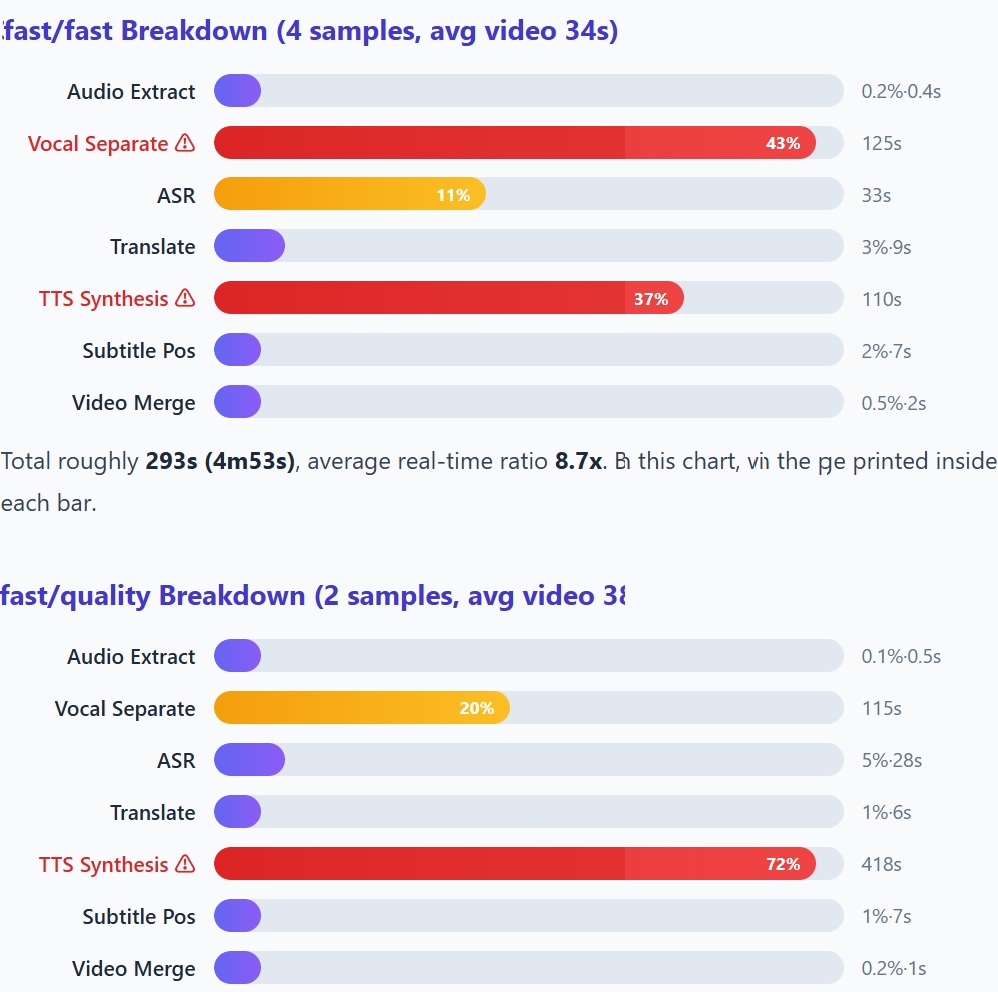
3.2 fast/fast Breakdown (4 samples, avg video 34s)
Total roughly 293s (4m53s), average real-time ratio 8.7x. Bar widths are scaled to the largest share in this chart, with the percentage printed inside each bar.
3.3 fast/quality Breakdown (2 samples, avg video 38s)
Total roughly 578s (9m38s), average real-time ratio 15.0x. TTS alone takes more than seventy percent of the time — the characteristic shape of the quality tier.
3.4 Model Tier Impact
| Step | fast | quality | Difference |
|---|---|---|---|
| TTS Synthesis (18s video) | 13s | 346s | 26.6x slower |
| TTS Synthesis (59s video) | — | 489s | — |
| Vocal Separation | ~85–125s | ~115s | Similar (same RoFormer engine) |
| ASR (Whisper) | ~8–56s | ~18–38s | fast tier varies more |
| Translation | 3–27s | 5–6s | Network-dependent |
In one line: quality-tier TTS is the only order-of-magnitude switch
Apart from TTS, the fast and quality tiers cost roughly the same at every step — vocal separation uses the same RoFormer engine in both, and the ASR and translation differences sit inside the noise band. TTS is the only step that opens up a multi-fold gap: switching TTS from quality to fast cuts the total pipeline time by 60–75%. When choosing tiers, TTS is the switch that deserves caution (for how the engines differ, see our TTS model comparison).
4. Bottleneck Analysis
4.1 Global Step Time Ranking (all 6 samples)
| Rank | Step | Avg Time | Share of Total | Category |
|---|---|---|---|---|
| 1 | TTS Synthesis | 212s | 54.8% | CPU-intensive (ONNX inference) |
| 2 | Vocal Separation | 121s | 31.3% | CPU-intensive (RoFormer ONNX) |
| 3 | ASR (Whisper) | 32s | 8.1% | CPU-intensive (Whisper ONNX) |
| 4 | Translation | 8s | 2.0% | Network (API call) |
| 5 | Subtitle Position | 7s | 1.9% | FFmpeg filter |
| 6 | Video Merge | 7s | 1.8% | FFmpeg mux |
| 7 | Audio Extract | <1s | 0.1% | FFmpeg extract |
4.2 Bottleneck Visualization
86.1% of total processing time goes into TTS synthesis and vocal separation — both ONNX CPU inference workloads. This single finding determines the ordering of every recommendation that follows: optimize these two and you have optimized the pipeline.
If you optimize one thing: move ONNX inference off the CPU
TTS synthesis (54.8%) and vocal separation (31.3%) together account for 86.1% of the time, and both are the same kind of workload — CPU inference of ONNX models. They share the same fix: CUDA (NVIDIA) or DirectML (AMD / Intel). This is not “optimizing one stage” — it is one change that resolves the two largest bottlenecks at once, giving the best return on effort anywhere in the chain.
5. Per-Second Video Cost
Dividing pipeline time by video duration for each run makes the order-of-magnitude effect of the model tiers plainly visible.
| Project | Duration | Pipeline Time | sec/sec | Model Tier |
|---|---|---|---|---|
| 1003 tk es (fast) | 18s | 49s | 2.7 | fast/fast |
| 1004 tk es | 20s | 165s | 8.3 | fast/fast |
| 1003 guide es | 48s | 419s | 8.7 | fast/fast |
| One-Click Guide | 48s | 539s | 11.2 | fast/fast |
| 1002 tk spn | 59s | 684s | 11.6 | fast/quality |
| 1003 tk es | 18s | 472s | 26.2 | fast/quality |
The three bands are not a gradient but a staircase of discrete steps: the jump from 2.7 to 8–11 is the cache, and the jump from 8–11 to 12–26 is the TTS tier. In other words, the speed a user perceives is governed by two switches — whether models are already cached, and whether TTS is set to quality.
Further reading: how DeepVideo’s cost structure comes in at roughly half of competitors — see why DeepVideo is so much cheaper.
6. Estimated End-to-End Times
Linear extrapolation from the measured data. Note that the estimates rest on samples of 18–59s, so the longer the video the larger the extrapolation error; as fixed overhead gets amortised, real times may come in below these figures.
6.1 fast/fast Mode
| Video Length | Estimated Time | Real-Time Ratio | User Perception |
|---|---|---|---|
| 15s | ~2 min | 8x | Fast |
| 30s | ~4 min | 8x | Fast |
| 1 min | ~8 min | 8x | ✓ Acceptable |
| 5 min | ~40 min | 8x | Long |
| 10 min | ~80 min | 8x | Very long |
6.2 fast/quality Mode
| Video Length | Estimated Time | Real-Time Ratio | User Perception |
|---|---|---|---|
| 15s | ~7 min | 28x | Slow |
| 30s | ~14 min | 28x | Slow |
| 1 min | ~28 min | 28x | Very slow |
| 5 min | ~140 min | 28x | Impractical |
The practical boundary between the two tiers is clear: fast/fast is comfortable up to about 1 minute and starts to hurt beyond 5; fast/quality is only workable for short clips and stops being realistic past 1 minute. The quality tier suits a few high-value pieces rather than batch processing.
7. v1.0 vs v2.0
Every v2.0 change left a trace — the full commit and changelog history is in the release notes. This chapter extracts only the parts that affect performance and compares them item by item.
7.1 Nine Key Improvements
| Item | v1.0 (2026-08) | v2.0 (2026-10) | Gain |
|---|---|---|---|
| TTS thread count | cpu_count // 5 = 2 | cpu_count – 2 = 8 | 4x threads |
| Audio decode count | 4x per step (redundant) | 1x (analysis row cache #289) | -75% I/O |
| TTS I/O | File-based round-trip | Zero-file I/O in-memory | +21.7% TTS speed |
| TTS engine | External API | MOSS-TTS-Nano (local ONNX) | No rate limit · private |
| Vocal separation | Demucs (slow) | RoFormer ONNX (faster) | Model upgrade |
| Memory management | No release | Step-boundary release | -30% peak memory |
| WSOLA time-stretch | Python | C extension | 10.8x faster |
| Translation batch | 15 subtitles/batch | 50 subtitles/batch | 3.3x throughput |
| Startup time | Baseline | 77x faster than baseline | Major UX win |
7.2 Estimated Pipeline Speedup
| Step | v1.0 | v2.0 | Speedup |
|---|---|---|---|
| TTS (18s video) | ~15 min | ~13s (fast) / ~346s (quality) | ~70x (fast) / 2.6x (quality) |
| Vocal separation | ~5 min | ~1–2 min | ~3–5x |
| ASR | ~3 min | ~18s | ~10x |
| Translation | ~30s | ~6s | ~5x |
| Total (18s video, fast) | ~25 min | ~49s | ~30x |
7.3 Four Improvements Worth Noticing
Threads 2 → 8, I/O from file round-trip to in-memory, and the engine from an external API to local ONNX — three changes stacked bring 18s-video TTS from ~15 min to ~13s.
From “decode 4 times per step” to “decode once behind the analysis row cache” (#289). It removes a large volume of redundant disk reads and underpins several other gains.
Step-boundary release plus a memory budget gate bring the vocal separation peak from ~600 MB down to 411 MB, leaving more headroom on a 16 GB machine.
Cold start is a user’s first impression of how heavy an app feels. A 77x improvement changes the feel of opening the client — a qualitative UX shift.
8. Memory Usage
8.1 Peak Memory by Step
| Stage | Physical Memory | Commit Memory | Process Memory |
|---|---|---|---|
| Idle | 3.5 GB / 16 GB | 13.3 GB / 34 GB | 70 MB |
| Vocal Separation (peak) | 3.2 GB | 13.0 GB | 411 MB (peak 418 MB) |
| TTS Synthesis | ~3.5 GB | ~13 GB | ~200 MB |
| ASR (Whisper) | ~3.5 GB | ~13 GB | ~300 MB |
8.2 Memory Management
Models from a finished step do not linger in memory; they are released before the next step begins. This is the main reason peak memory fell from about 600 MB in v1.0 to 411 MB.
Available commit memory is checked before loading a model, and the app will not push ahead when there is not enough. That is what keeps the machine out of OOM — the line between finishing a job and dying halfway through.
Even at the heaviest inference stages (vocal separation and TTS synthesis), process usage never crosses 500 MB, while system physical memory holds steady at about 3.5 GB. On a 16 GB office laptop, other work is unaffected.
9. GPU Acceleration Potential
This run was entirely CPU-only (Intel i5-1135G7). GPU acceleration is already implemented in code but was not part of this measurement — so every figure in this chapter is a vendor-quoted expectation, not a measured result.
9.1 Three GPU Acceleration Paths
| GPU Technology | Platform | Expected Speedup |
|---|---|---|
| CUDA 13 (NVIDIA) | Windows | 3–5x for ONNX models |
| DirectML (AMD / Intel) | Windows | 2–4x for ONNX models |
| MLX (Apple Silicon) | macOS | 3–5x for Whisper + RoFormer |
9.2 Estimated Performance with Acceleration
| Video Length | Current (CPU) | Estimated (GPU) |
|---|---|---|
| 15s (fast/fast) | ~2 min | ~30s |
| 30s (fast/fast) | ~4 min | ~1 min |
| 1 min (fast/fast) | ~8 min | ~2 min |
In real-time-ratio terms, a 30s video would move from around 8x to around 2x, and a 1-minute video likewise from 8x to 2x — the crossing from “you can wait” to “you barely wait”. The caveat is that these numbers remain expectations until a run on a discrete GPU verifies them.
10. Optimization Recommendations
10.1 Immediate (P0)
| Optimization | Expected Impact | Effort |
|---|---|---|
| Enable GPU acceleration (CUDA / DirectML) | 3–5x total speedup | Medium — already implemented, needs testing |
| TTS model quantization (INT8) | 2x TTS speedup | Low — natively supported by ONNX Runtime |
| RoFormer model quantization | 2x vocal separation speedup | Low |
10.2 Medium-term (P1)
| Optimization | Expected Impact | Effort |
|---|---|---|
| TTS streaming synthesis | Reduce perceived latency by 50% | Medium |
| Parallel vocal separation + ASR | Save ~30s per pipeline | Low — steps are independent |
| whisper.cpp (or faster-whisper) with GPU | 2–3x ASR speedup | Medium |
10.3 Long-term (P2)
| Optimization | Expected Impact | Effort |
|---|---|---|
| Smaller TTS model (distillation) | 3–5x TTS speedup at quality cost | High |
| Model-specific thread tuning | 10–20% per-model improvement | Low |
| Incremental pipeline (skip cached steps) | Near-instant re-runs | Medium |
The logic behind this ordering
Of the three P0 items, two are “quantize” and one is “move to GPU” — and all three point at the same fact: the limiting factor is inference speed itself, not pipeline design. The parallelism, streaming and incremental work in P1 and P2 are process-level fixes applied on top of the current inference speed, which makes their gains percentage-sized. As the sibling MiniMax H3 acceleration LoRA report shows, low-rank fine-tuning is a parallel route to inference speed and a viable alternative to quantization.
11. Summary
11.1 Performance at a Glance
| Metric | Value |
|---|---|
| Fastest pipeline (20s video · fast/fast) | 2 min 45 sec |
| Typical pipeline (30–60s video · fast/fast) | 5–11 min |
| Quality mode (18–59s video · fast/quality) | 8–11 min |
| Best real-time ratio | 2.7x (warm cache · fast/fast) |
| Typical real-time ratio | 8–12x (fast/fast) |
| Bottleneck | TTS 55% + Vocal Separation 31% = 86% |
| Memory footprint | Process < 500 MB | System < 4 GB |
11.2 Six Conclusions
At fast/fast, videos up to about a minute are acceptable; beyond 5 minutes it becomes painful (~40 min). CPU-only is not unusable — it simply has a clear length window.
It takes 55% of total time, and the quality tier is 26x slower than fast. Everything else combined accounts for less than half — optimization attention should concentrate hard on this one step.
A 3–5x overall speedup is expected, already implemented and only awaiting verification. It is the one item that can turn the experience from “wait a few minutes” into “wait a few seconds”.
For the same 18s video, warm cache gives 2.7x and cold start 8.3x — a gap of more than 3x at zero cost to the user. When batch-processing similar footage, that difference is more direct than any algorithmic optimization.
Audio extraction stays under 1 second and merge takes 1–22s. After the analysis row cache cut audio decoding from 4x per step to 1x, I/O is no longer a direction worth investing in.
API-based subtitle translation takes only 3–27s, roughly 2% of total time, and its speed depends on the network rather than local compute. It is neither a bottleneck nor worth optimizing.
Bottom line
DeepVideo 2.0.1 already completes the full video translation pipeline on CPU alone: measured and estimated times for videos up to about a minute land in an acceptable range, and peak memory stays under 500 MB. The whole performance picture fits in one sentence — TTS synthesis and vocal separation, both ONNX CPU inference, take 86.1% of the time; the other five steps together account for under 14%.
v2.0’s improvements have already made each of those stages more efficient (about 30x end to end on an 18s video), but the nature of the bottleneck has not changed — models still run fast enough only on the CPU. So the next certain win is highly concentrated: hand ONNX inference to the GPU. Once that lands, a further 3–5x is expected — taking a 30s video to about 1 minute and a 1-minute video to about 2 minutes, crossing the threshold into “barely any waiting”.
Ship your videos into every market
Performance decides how fast you get a finished cut; the platform decides how far it travels. The same clip has to reach different platforms and regions, and it still has to clear translation, dubbing and localisation.
Download the DeepVideo desktop client
Realistic AI Video Dubbing at Just $0.17/minHigh quality · Low price · Local client · Security
Data source: application log C:Userszhangjundeepvideologsdeepvideo.log.2026-10-0[1-4] (pipeline step-level timing)
Project data: D:QuickVideoqv_projectsprojectsVideoTransQuick | Produced by DeepForgeHub Research