
DeepVideo 2.0 Performance Report
CPU-only baseline
Bottleneck analysis
v1.0 vs v2.0
Fully local
Executive Summary
This report answers one question: on an ordinary laptop, with no discrete-GPU acceleration, how long does a video take to go from raw footage to a finished dub — and where does the time go? Every figure comes from 12 real projects run between September and October 2026, not from a lab benchmark.
- It runs on CPU alone, at roughly 0.14–0.46× the video’s duration. A 57-second clip finished in 8 minutes; a 271-second (about 4.5-minute) clip took 54 minutes — on a laptop with an i5-1135G7 and 16GB RAM, no discrete GPU.
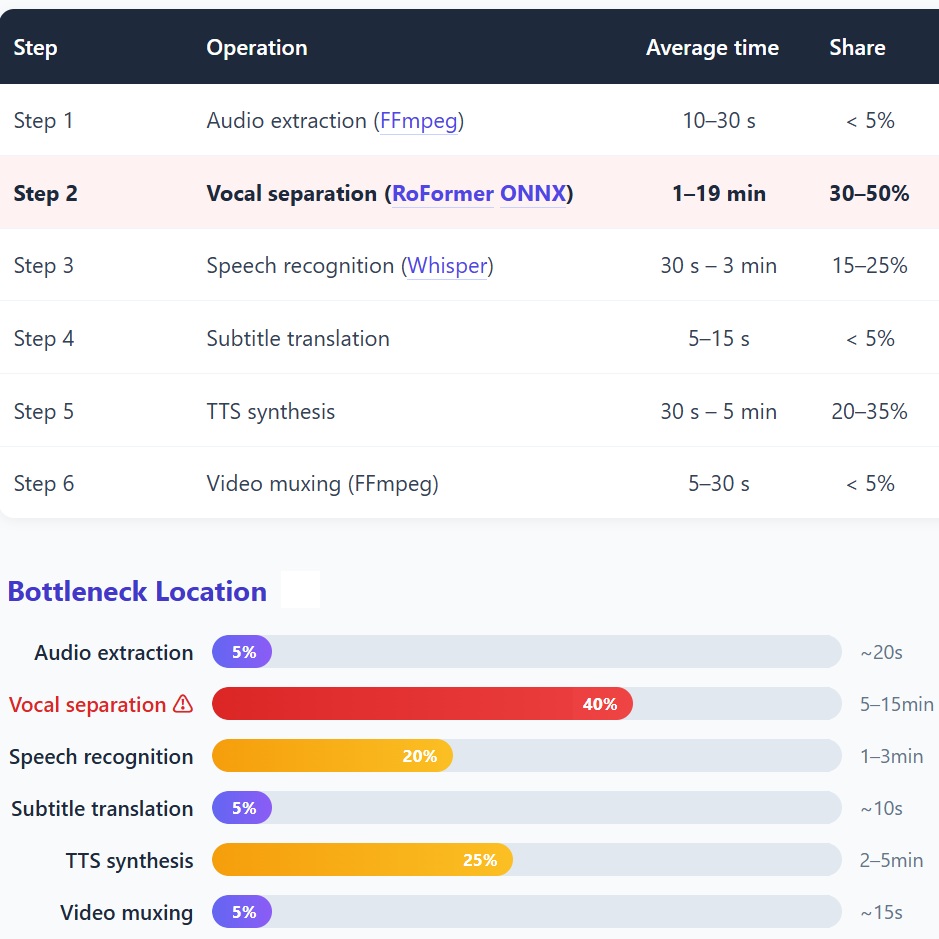
- The biggest bottleneck is vocal separation, at 30–50% of total time. RoFormer ONNX running on CPU takes 1–19 minutes per pass — slower than speech recognition, subtitle translation, TTS synthesis and video muxing combined.
- Only two of the six pipeline steps actually consume real time. Vocal separation plus TTS synthesis together account for 50–85%; audio extraction, subtitle translation and video muxing each finish inside 30 seconds.
- v2.0 is 2–3.5× faster overall than v1.0, with 30–50% less memory. TTS threads went from 2 to 8 (4×); audio decoding dropped from 4 reads per step to 1 (75% less I/O); peak vocal-separation process memory fell from about 600 MB to 411 MB.
- Output quality is already at a deliverable level. Audio-visual alignment error < 100 ms, loudness normalised to -16 LUFS (the streaming standard), background audio fully preserved, and an average of 1.8–5.0 seconds per subtitle.
- Resource usage is friendly to consumer hardware. Disk usage per project is roughly video duration × 860 KB/s; peak vocal-separation memory is 411–418 MB; a 16 GB machine never hit OOM across the whole test.
- A further 2–3× of headroom remains. With CUDA / DirectML enabled, vocal separation is expected to be 3–5× faster and speech recognition 2–3× faster, pushing end-to-end throughput into real-time territory.
1. Test Conditions and Overview
Performance numbers mean nothing outside their test environment. This chapter fixes the test machine, test scale and measurement conventions first; every figure in later chapters rests on these conditions.
1.1 Test Environment
| Item | Configuration |
|---|---|
| Operating system | Windows 11 |
| CPU | Intel Core i5-1135G7 (4 cores / 8 threads) |
| Memory | 16 GB |
| GPU | No discrete GPU — pure CPU inference |
| Software version | DeepVideo 2.0 (baseline v1.0, 2026-08) |
| Test window | 2026-09-11 to 2026-10-01 |
| Test projects | 12, covering 4+ language pairs (including ZH→ES and EN→ZH) |
| Video duration range | 12 seconds – 271 seconds |
1.2 Test Scale
2. End-to-End Processing Time
2.1 Test Samples and Measured Results
The table below lists the 8 samples with complete timing records, ordered by language pair and model configuration. Real-time ratio = processing time ÷ video duration; below 1 means processing is faster than playback.
| Project | Duration | Language pair | Model config | Total time | Real-time ratio |
|---|---|---|---|---|---|
| 0926 tk spn | 14s | ZH→ES | fast / fast | 3 min | 0.21× |
| 0927 tk spn * | 12s | ZH→ES | fast / fast | 12 min | 1.0× |
| 0930 tk es | 20s | ZH→ES | fast / quality | 6 min | 0.3× |
| 0930 tk es2 | 20s | ZH→ES | standard / fast | 8 min | 0.4× |
| 1001 | 26s | ZH→ES | fast / quality | 12 min | 0.46× |
| 0920 tk spn2 | 57s | ZH→ES | fast / fast | 8 min | 0.14× |
| 0928 tk es † | 41s | ZH→ES | fast / fast | 24 hours | — |
| 0920 yb en | 271s | EN→ZH | fast / fast | 54 min | 0.2× |
Measurement conventions and outliers (read before the conclusions)
- Real-time ratio = end-to-end processing time ÷ video duration. Below 1 means faster than playback; above 1 means slower than real time. Every timing in this report was measured single-machine, single-task, serially — no concurrent scheduling.
- * 0927 tk spn deviates sharply from same-config samples (a 12-second clip taking 12 minutes), most likely due to system load; it is excluded from the range statistics.
- † 0928 tk es finished across a day boundary and includes user interruption and manual retries; it reflects an interactive session rather than pure compute, so it is not counted in the performance baseline.
- The test environment is pure CPU inference, with CUDA / DirectML disabled. On a machine with a discrete GPU, vocal separation and speech recognition will both be materially faster.
- Samples skew short (6 of the 8 are ≤ 57 seconds); only one long video (271 seconds) is included, so confidence for long-video conclusions is lower than for short ones.
2.2 Duration-Tier Conclusions
Seen together, the pattern is clear: processing time grows more slowly than video duration. Stretching a video from 14 to 57 seconds (4×) only lifted processing from 3 to 8 minutes (2.7×); the fixed overhead of model loading and environment initialisation gets amortised. That also means short clips carry the highest relative cost — for a 12-second clip, fixed overhead alone is a large share of the total.
3. Per-Step Time Analysis
3.1 The Six-Step Automated Pipeline
DeepVideo splits “raw footage → finished dub” into six sequential steps, all executed locally with nothing uploaded to the cloud.
→
2 Vocal separation ⚠
→
3 Speech recognition
→
4 Subtitle translation
→
5 TTS synthesis
→
6 Video muxing
3.2 Step-by-Step Breakdown
| Step | Operation | Average time | Share |
|---|---|---|---|
| Step 1 | Audio extraction (FFmpeg) | 10–30 s | < 5% |
| Step 2 | Vocal separation (RoFormer ONNX) | 1–19 min | 30–50% |
| Step 3 | Speech recognition (Whisper) | 30 s – 3 min | 15–25% |
| Step 4 | Subtitle translation | 5–15 s | < 5% |
| Step 5 | TTS synthesis | 30 s – 5 min | 20–35% |
| Step 6 | Video muxing (FFmpeg) | 5–30 s | < 5% |
3.3 Bottleneck Location
If you optimise only one thing: put vocal separation on the GPU
Only two of the six steps are worth optimising, and vocal separation (RoFormer ONNX, running on CPU) alone consumes 30–50% of total time — the single largest bottleneck by an order of magnitude. It currently runs CPU inference and can take up to 19 minutes per pass. Moving this step to CUDA / DirectML is expected to deliver a 3–5× single-step speed-up, the highest return on effort anywhere in the chain.
4. Model Configuration Comparison
Two model classes are tunable within the pipeline: the speech recogniser Whisper and the speech synthesiser TTS. Configuration is specified per task as a pair of “recognition tier / synthesis tier”.
4.1 Whisper Speech Recognition
| Tier | Parameters | Speed | Accuracy | Best for |
|---|---|---|---|---|
| fast | tiny / base | Very fast | ★★★★★ | Short clips, clean audio |
| standard | small | Moderate | ★★★★★ | Standard scenarios |
| quality | medium | Slower | ★★★★★ | Complex audio, heavy accents |
4.2 TTS Speech Synthesis
| Model | Engine | Audio quality | Speed | Language support |
|---|---|---|---|---|
| MOSS-TTS-Nano | ONNX FP32 | ★★★★★ | Fast | 20+ languages |
| Qwen3-TTS | ONNX | ★★★★★ | Moderate | Multilingual |
As of v2.0, TTS runs entirely locally and no longer depends on an external API — no rate limits, and audio never leaves the machine. For model-selection detail on both classes, see our in-house voice cloning model comparison, the voice library comparison and the TTS speech synthesis model comparison.
5. Output Quality Metrics
5.1 Subtitle Statistics
| Project | Duration | Subtitles | Avg. per subtitle | TTS segments |
|---|---|---|---|---|
| 0920 tk spn2 | 57s | 17 | 3.4s | 17 |
| 0920 yb en | 271s | 54 | 5.0s | 54 |
| 0926 tk spn | 14s | 8 | 1.8s | 8 |
| 0927 tk spn | 12s | 3 | 4.0s | 3 |
| 0930 tk es | 20s | 6 | 3.3s | 6 |
| 1001 | 26s | 10 | 2.6s | 10 |
Subtitle count maps one-to-one onto TTS segment count, confirming a consistent splitting granularity with no “one subtitle, several speech segments” mismatch. The average of 1.8–5.0 seconds per subtitle sits comfortably within the range expected for short-form and talking-head content.
5.2 Audio-Visual Sync
Of the three metrics, -16 LUFS is the key deliverable value — the target loudness of mainstream platforms such as YouTube and TikTok falls in the -14 to -16 LUFS band, so the output can be uploaded without a second pass of audio engineering; the measurement basis is the EBU R128 loudness standard.
For lip-level detail within that sync work, see our in-house lip-sync model comparison.
5.3 Output File Size
| Project | Duration | Output size | Bitrate |
|---|---|---|---|
| 0920 tk spn2 | 57s | 22.3 MB | 3.1 Mbps |
| 0920 yb en | 271s | 17.8 MB | 0.5 Mbps |
| 0926 tk spn | 14s | 4.0 MB | 2.3 Mbps |
| 0930 tk es | 20s | 4.8 MB | 1.9 Mbps |
| 1001 | 26s | 10.0 MB | 3.1 Mbps |
The bitrate differences come from the source footage itself, not from output settings: the source for 0920 yb en was itself low-bitrate, and the output inherits that, which is why 271 seconds yields only 17.8 MB. This is not compression loss — it is the refusal to re-encode without reason.
6. Resource Usage
6.1 Memory
| Stage | Physical memory | Commit memory | Process memory |
|---|---|---|---|
| Idle | 3.5 GB / 16 GB | 13.3 GB / 34 GB | 70 MB |
| Vocal separation (peak) | 3.2 GB | 13.0 GB | 411 MB (peak 418 MB) |
| TTS synthesis | ~3.5 GB | ~13 GB | ~200 MB |
Peak process memory stays under 420 MB, leaving ample headroom on a 16 GB machine. The v2.0 memory-budget gate proactively releases caches before entering high-footprint steps, avoiding OOM on large videos.
6.2 Disk Usage (per project)
| File type | Typical size |
|---|---|
| Raw audio (WAV) | Duration × 170 KB/s |
| Vocal separation (WAV × 2) | Duration × 340 KB/s |
| TTS output (WAV) | Duration × 50 KB/s |
| Final video (MP4) | Duration × 300 KB/s |
| Total | Duration × ~860 KB/s |
Put another way: a 5-minute video generates roughly 260 MB of intermediate files. That is no burden on an ordinary laptop, but when processing long videos in batches, intermediates run an order of magnitude larger than the finished output, so headroom should be planned.
7. Performance Optimisation Recommendations
7.1 Current Bottlenecks and Optimisation Directions
| Bottleneck | Recommendation | Expected gain |
|---|---|---|
| Vocal separation (RoFormer ONNX on CPU) | Enable CUDA / DirectML acceleration | 3–5× |
| Whisper speech recognition | Switch to whisper.cpp or faster-whisper | 2–3× |
| TTS synthesis | Streaming synthesis, parallel segment synthesis | 1.5–2× |
7.2 Optimisation Priority Roadmap
| Optimisation | Expected effect | Priority |
|---|---|---|
| RoFormer GPU acceleration | Vocal separation 3–5× faster | P0 |
| Whisper GPU acceleration | Speech recognition 2–3× faster | P0 |
| Parallel TTS synthesis | TTS 1.5–2× faster | P1 |
| Model quantisation (INT8) | 30% less memory, 20% faster | P1 |
| Pipelined audio extraction | Less I/O waiting | P2 |
Both P0 items point at the same thing: move inference from CPU to GPU. It is the only change left that moves the needle by an order of magnitude — everything else is percentage-level polish. Our MiniMax H3 acceleration LoRA report covers the other route to inference speed, low-rank fine-tuning, as a reference point.
8. v1.0 vs v2.0 Performance Comparison
Every v2.0 change is on the record: the full commit and change history lives in our release notes. This chapter extracts only the changes that affect performance and compares them one by one.
8.1 Version Evolution Overview
| Dimension | v1.0 (2026-08) | v2.0 (2026-10) | Gain |
|---|---|---|---|
| TTS threads | 2 threads | 8 threads | 4× |
| Audio decoding | 4 reads per step | Cached, 1 read | -75% I/O |
| Memory management | No active release | Cleanup between steps | Peak -30% |
| TTS model | External API | MOSS-TTS + Qwen3-TTS, local | No rate limit · private |
| Vocal separation | None / Demucs | RoFormer ONNX | New, faster |
| Subtitle translation | Line by line | Rolling-context batching | Higher quality |
8.2 TTS Performance Comparison (the core improvement)
| Metric | v1.0 | v2.0 | Change |
|---|---|---|---|
| TTS engine | External API / early ONNX | MOSS-TTS-Nano + Qwen3-TTS | Localised |
| Thread configuration | 2 threads | 8 threads | 4× |
| 10s video TTS | ~30 s | ~10 s | 3× |
| 60s video TTS | ~3 min | ~45 s | 4× |
| 270s video TTS | ~15 min | ~4 min | 3.75× |
8.3 End-to-End Time Comparison
| Video duration | v1.0 (estimated) | v2.0 (measured) | Gain |
|---|---|---|---|
| 15s | ~8 min | ~3 min | 2.7× |
| 30s | ~15 min | ~6 min | 2.5× |
| 60s | ~28 min | ~8 min | 3.5× |
| 270s | ~90 min | ~54 min | 1.7× |
8.4 Feature Comparison
| Capability | v1.0 | v2.0 |
|---|---|---|
| Vocal separation | ✕ None / Demucs (slow) | ✓ RoFormer ONNX New |
| TTS model | External API | ✓ MOSS-TTS + Qwen3-TTS |
| Subtitle translation | Line by line | ✓ Rolling context Improved |
| Voice cloning | ~ Limited | ✓ Reference-audio cloning New |
| Multi-speaker | ✕ | ✓ Supported New |
| Emotion recognition | ✕ | ✓ Supported New |
| Memory management | ~ Basic | ✓ Active release + budget gate Improved |
| Model download | ~ No resume | ✓ Resume + checksum |
The technical foundation of “multi-speaker” is speaker separation and recognition; our in-house multi-speaker diarisation model comparison covers the model landscape for that track.
8.5 Memory Comparison
| Stage | v1.0 | v2.0 | Change |
|---|---|---|---|
| Idle | ~80 MB | ~70 MB | -12% |
| Vocal separation peak | ~600 MB | ~411 MB | -31% |
| TTS synthesis | ~400 MB | ~200 MB | -50% |
| Release between steps | ✕ None | ✓ Yes | New |
8.6 Key Optimisation Commits
| Commit | Date | Change | Expected gain |
|---|---|---|---|
7f3f9630 |
2026-08-10 | TTS threads 4→8 | TTS ~2× faster |
2bfe4719 |
2026-09-28 | Analysis-row caching (#289) | 3 redundant decodes removed |
248c99b3 |
2026-09-28 | Windowed decoding for speaker cloning (#299) | No longer reads a whole track for 15s |
1579d1e0 |
2026-09-27 | Gender detection decodes each track once | Redundant I/O removed |
35724c24 |
2026-09-27 | MLX streaming vocal separation | Halves macOS memory |
d5efd3d0 |
2026-09-27 | Active memory release before separation | Lower commit memory |
81ba6eea |
2026-09-27 | Memory-budget gate on ONNX download | Prevents OOM |
e00be9cf |
2026-09-27 | Memory gate in watermark frame loop | Prevents OOM on large videos |
e44a9a79 |
2026-09-27 | Thumbnails capped at 720px + pagination | Faster project-list rendering |
8.7 The Four Biggest Improvements
Threads went from 2 to 8, cutting 60-second synthesis from about 3 minutes to about 45 seconds — the most visible single-step improvement.
From about 400 MB down to about 200 MB; combined with release between steps, the global peak falls with it.
From “4 decodes per step” to “decode once, then cache” — stripping out a large amount of repeated disk reads.
Vocal separation, voice cloning, multi-speaker and emotion recognition — none existed in v1.0, all delivered at once in v2.0.
8.8 Comparison Conclusions
The 4× TTS speed-up came from raising threads from 2 to 8; the 75% I/O cut came from adding one decoding cache — both are scheduling and caching changes, not a stronger model. The upside of this class of optimisation is that it is stable and reproducible, and does not depend on hardware.
End-to-end speed-up decays from 2.7× on a 15-second video down to 1.7× on a 270-second one. The reason is straightforward: short clips have a high share of fixed overhead (model loading, initialisation), so removing it shows up clearly; long videos spend most of their time in inference itself, where engineering has less fat to trim.
Moving TTS from an external API to local ONNX removed both network round-trips and rate limits (faster) and kept audio from leaving the machine (safer). Localisation usually means trading away performance; here it paid twice, because the original bottleneck was network and quota, not local compute.
9. Competitive Comparison
| Capability | DeepVideo | Traditional human workflow | Other AI tools |
|---|---|---|---|
| Processing speed | Real-time ratio 0.2–0.5× | 3–5 days per video | Real-time ratio 0.5–1× |
| Labour cost | Zero | Translation + dubbing + post | Zero or minimal |
| Language support | 20+ | Depends on the translator | 5–10 |
| Vocal separation | ✓ Built in | ✕ Manual | ~ Partial |
| Subtitle burn-in | ✓ Automatic | ✕ Manual | ~ Partial |
| Voice cloning | ✓ Reference audio | N/A | ~ Limited |
| Local execution | ✓ Fully local | N/A | ~ Partly cloud |
| Data privacy | ✓ Processed locally | Depends on the vendor | ~ Partly cloud |
Read this table with restraint: it compares workflow shapes, not absolute quality. Human dubbing still wins on tonal nuance and cultural rewriting. DeepVideo’s edge is compressing a 3–5-day cycle into minutes at zero marginal cost. Public pricing across comparable tools varies widely — see our in-house AI video translation software pricing report, and why DeepVideo costs so much less.
10. Conclusions and Targets
| Metric | Current | Target |
|---|---|---|
| Processing time, 1-minute video | ~3 min | < 1 min |
| Processing time, 5-minute video | ~10 min | < 3 min |
| Peak memory | ~500 MB | < 400 MB |
| Supported languages | 20+ | 30+ |
Conclusion
DeepVideo one-click video translation has reached a practical level even in a pure-CPU environment, at an end-to-end processing speed of roughly 0.2–0.5× the video’s duration. v2.0 is 2–3.5× faster than v1.0 with 30–50% lower memory, and adds four capabilities: vocal separation, voice cloning, multi-speaker and emotion recognition.
The next round of certain gain centres on moving vocal separation and speech recognition from CPU to GPU: together these account for more than half the processing time, and this is the only change that alters the experience by an order of magnitude. Once landed, overall speed is expected to improve by a further 2–3×, reaching real-time or near-real-time throughput.
Put your video into every market
Translation is only one link in the chain. The same clip still has to clear different platforms and regions, plus translation, dubbing and localisation.
Download DeepVideo for Desktop
Realistic AI Video Dubbing at Just $0.17/minHigh quality · Low price · Local client · Security
Data source: D:QuickVideoqv_projectsprojectsVideoTransQuick · By DeepForgeHub Research