
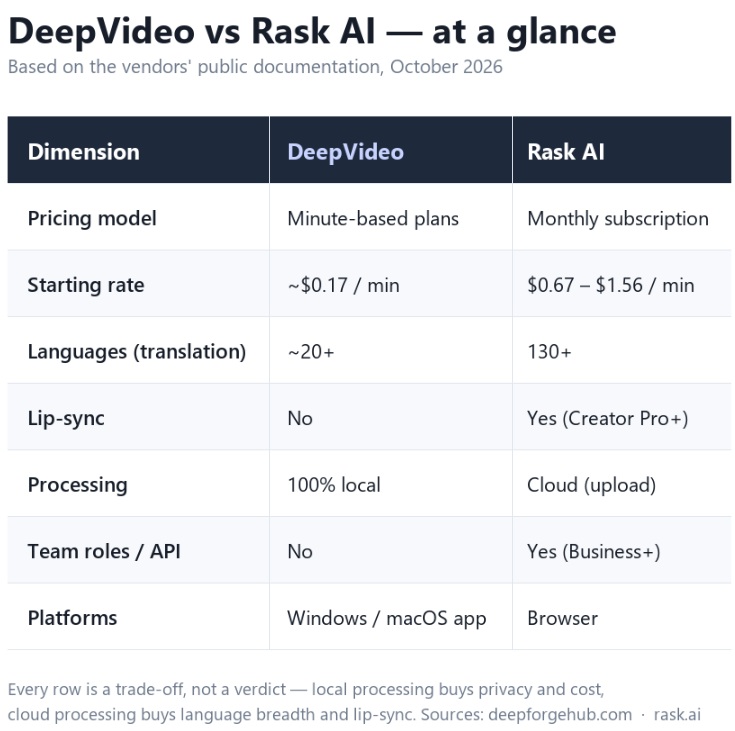
Short answer: they’re built for different jobs. Rask AI is the stronger choice if you need very wide language coverage, lip-sync, and a browser-based team workflow. DeepVideo wins on cost per minute, privacy, and offline desktop processing. Which one is “better” depends entirely on what you’re optimizing for — so here’s a straight breakdown of both.
1. Pricing model — the biggest structural difference
Rask AI is subscription-first. Its published plans (monthly billing, as of October 2026) are:
- Free trial — 3 minutes, one time. There is no permanent free tier.
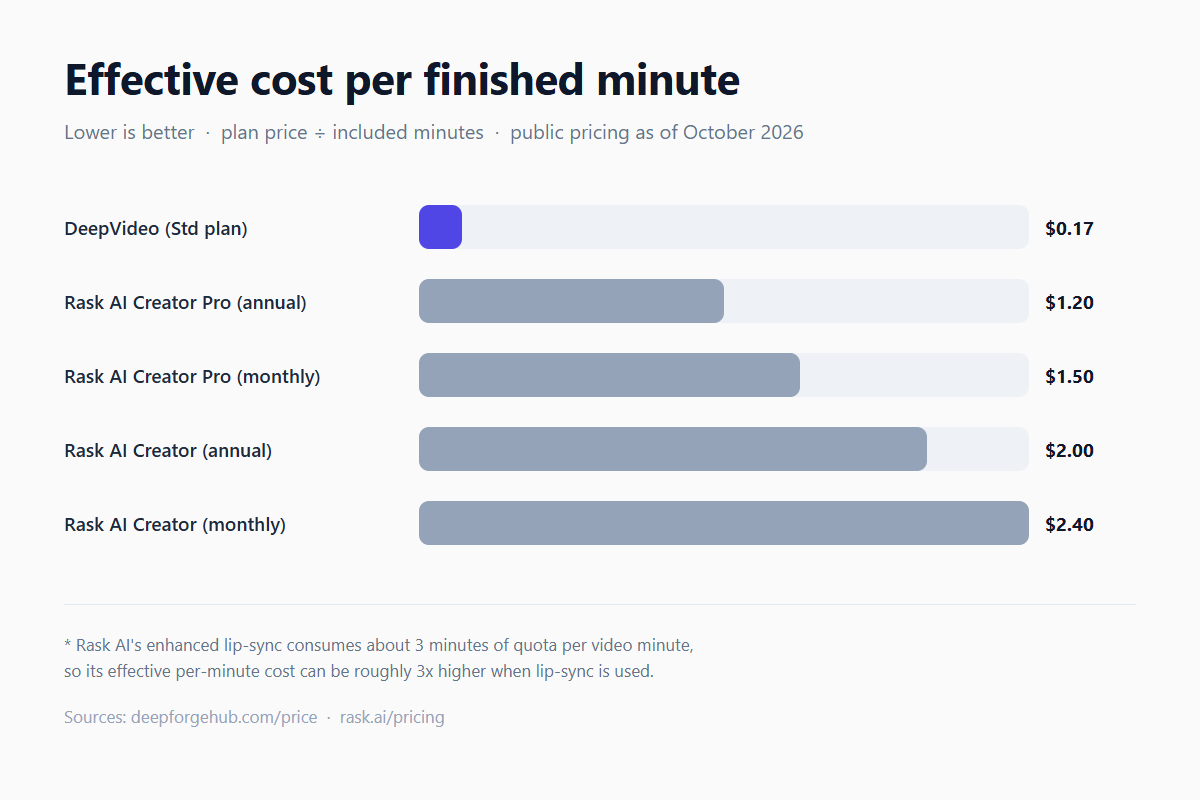
- Creator — $60/mo for 25 minutes (or $50/mo if billed annually)
- Creator Pro — $150/mo for 100 minutes (or $120/mo annually) — lip-sync unlocks at this tier
- Business — $750/mo for 500 minutes (or $600/mo annually)
- Extra minutes top up at $3 each
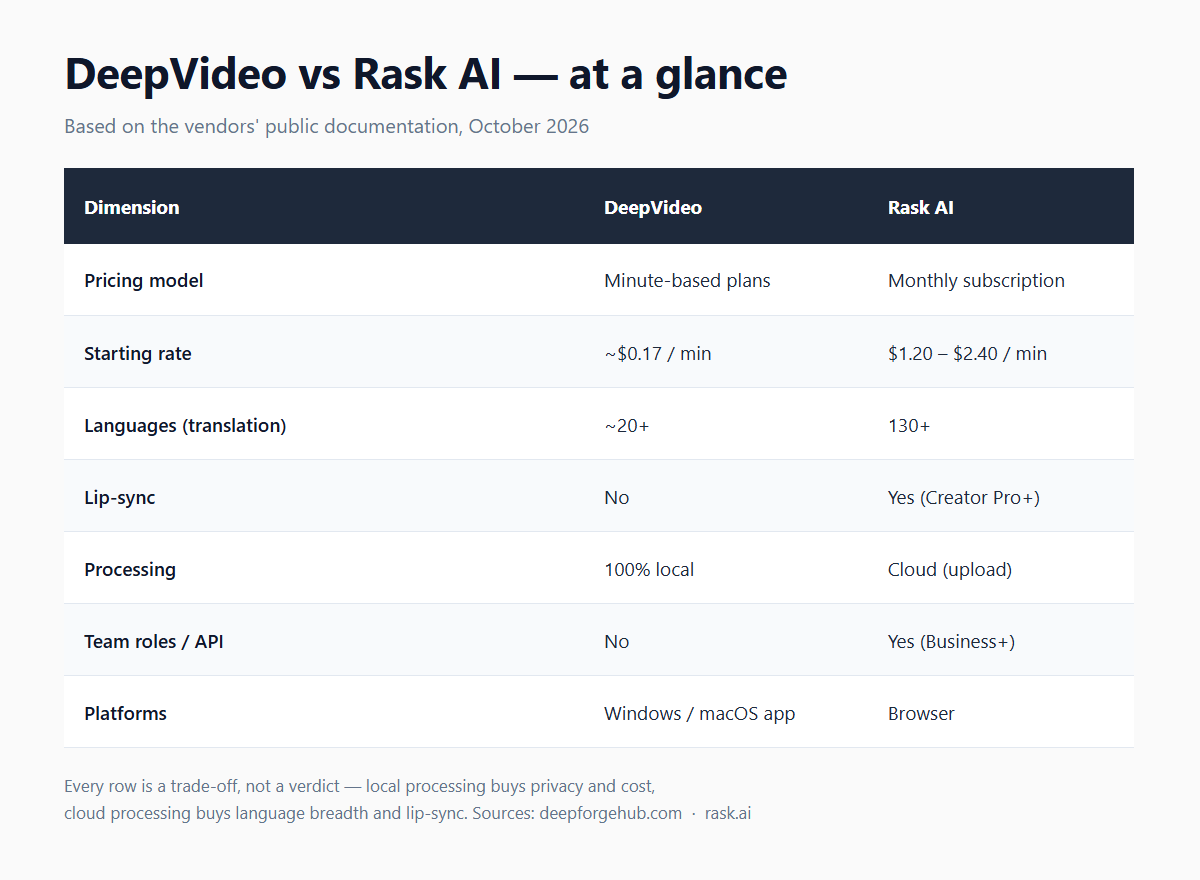
That works out to roughly $1.20–$2.40 per minute of finished video, depending on the plan and billing cycle. One detail worth knowing: Rask’s enhanced lip-sync consumes about 3 minutes of quota per video minute, so if you rely on it your effective cost can roughly triple.
DeepVideo is desktop software sold on a minute-based plan. Plans start at $9.90 for 60 minutes (about $0.17/min), and there’s a free tier you can use without a card — 2 minutes per day. The rate stays flat instead of scaling with the number of languages you output, because the work runs on your own machine rather than on metered cloud capacity.
2. Language coverage
This one goes to Rask AI, clearly. It advertises 130+ languages for translation, with voice cloning in 32 languages. If you need Thai, Tamil, or a niche regional language, that breadth is real and genuinely useful.
DeepVideo covers a narrower set — roughly 20+ languages for translation, with voice cloning in 30+ and 100+ preset dubbing voices. For the major markets (English, Spanish, Japanese, Portuguese, German and so on) that’s usually plenty; if your audience speaks languages outside that range, Rask is the safer bet.
3. Lip-sync
Rask AI offers multi-speaker lip-sync that re-times mouth movements to the new audio track (Creator Pro and above). DeepVideo does not do lip-sync — it focuses on translation, dubbing, and subtitle positioning.
If your content is talking-head footage where mismatched lips would be obvious, that’s a real advantage for Rask. If your videos are B-roll, screen recordings, product demos, or anything where the speaker isn’t in tight close-up, lip-sync matters far less.
4. Privacy — where your files actually go
This is where the two products differ in kind, not just degree. Rask AI is a cloud platform: you upload the video and it’s processed on their servers. DeepVideo runs on your own machine — the audio and video never leave your device, and only the subtitle text is sent out for translation. If you handle unreleased client work, internal training material, or anything under an NDA, “processed locally” is a meaningful difference rather than a marketing line.
5. Workflow, platforms, and scale
Rask AI is browser-based and built for teams: shared glossaries, reviewer roles, batch uploads, a production API with webhooks on higher tiers, and SRT import/export. DeepVideo is a Windows/Mac desktop app aimed at individual creators — no team roles, no API. It does bundle a few extras that Rask doesn’t (built-in watermark and logo removal, subtitle removal, a video downloader), but if you need orchestration and pipeline automation, Rask is the platform-shaped product.
6. Speed
DeepVideo processes everything on your own CPU/GPU, so there’s no cloud queue. In our internal testing on a plain CPU-only laptop, an 18-second clip went end-to-end in about 49 seconds. Rask uses cloud processing with a standard queue on all paid plans (priority processing sits behind higher tiers). Cloud has the advantage of not depending on your hardware; local has the advantage of not depending on anyone else’s queue.
So which should you pick?
- Choose Rask AI if: you need 130+ languages, lip-sync is a hard requirement, you’re a team that wants shared glossaries and an API, or you’d rather not manage local hardware at all.
- Choose DeepVideo if: cost per minute is your main constraint, your footage is sensitive and has to stay local, you want no subscription and a flat per-minute rate, or you just need solid dubbing plus subtitles without lip-sync.
The honest summary: Rask AI is the broader, more “platform” product, and it earns its price if you actually use that breadth. DeepVideo is the cheaper, private, local-first tool — its ~$0.17/min is roughly one-seventh to one-fourteenth of Rask’s effective per-minute rate — but you give up language breadth and lip-sync to get there. Neither is universally better; pick the trade-off that matches your workload.
A caveat on the numbers: all pricing above comes from the vendors’ public pages as of October 2026, and both companies change plans regularly, so check current pricing before you commit. And again — I work on DeepVideo, so weigh that when you read this.
If you want to see what the actual workflow looks like before deciding, the user guide walks through it step by step: DeepVideo video translation user guide.