
DeepVideo v2.0 vs v1.0 — Comprehensive Comparison Report
End-to-end speedup
Localized TTS
15+ new features
CPU-only baseline
Executive Summary
v2.0 is a full-spectrum leap over v1.0 — speed, quality, features, and stability were all rebuilt in the same cycle. The single biggest change was moving TTS synthesis from an external API dependency to a fully local ONNX pipeline, delivering up to 70x speedup on the fast model; end-to-end time for an 18-second video dropped from roughly 25 minutes to about 49 seconds.
- End-to-end: about 30x on an 18-second video. From roughly 25 minutes in v1.0 down to about 49 seconds; a 60-second video went from about 28 minutes to about 8 minutes (about 3.5x).
- TTS was the largest single change. The engine moved from an external API to a local MOSS-TTS-Nano + Qwen3-TTS pair; on an 18-second video the fast tier takes about 13 seconds and the quality tier about 346 seconds — roughly 70x faster than v1.0’s ~15 minutes on the fast tier.
- Vocal separation went from missing to default. v1.0 had none, or fell back to the slower Demucs; v2.0 defaults to RoFormer ONNX, cutting processing from about 5 minutes to 1–2 minutes and preserving background music in the final video.
- Peak memory fell 31%. Vocal separation peak dropped from about 600 MB to 411 MB; TTS from about 400 MB to about 200 MB (50%). With step-boundary release and a memory budget gate, a 16 GB machine no longer gets dragged into OOM.
- A long list of measurable “invisible” speedups. Audio decoding cut from 4 redundant passes per step to 1 (I/O -75%), TTS I/O now zero-file in-memory (+21.7%), WSOLA time-stretch moved to a C extension (10.8x), startup time 77x faster.
- More than 15 new features. Multi-speaker auto-detect and assignment, voice cloning, emotion recognition, custom glossary, bilingual subtitles, watermark removal, and video download are all new in v2.0.
- The next certain gain is still GPU. CUDA 13 / DirectML / MLX are implemented in code and not tested in this round; the vendor-stated expectation is a further 3–5x overall.
Method notes (read before the numbers)
- v1.0 figures are largely estimates; v2.0 figures are measured. The v1.0 test period ended in 2026-08 and its timings come from logs and manual estimation, while v2.0 numbers come from 2026-10 measured logs. So every “speedup” in the tables compares an estimated baseline against a measured value — not two strictly identical test runs.
- The test environment is CPU-only. Windows 11 + Intel i5-1135G7 @ 2.40GHz + 16GB, no discrete GPU, with CUDA / DirectML / MLX disabled. Absolute numbers will move on different hardware, but the relative ordering of bottlenecks holds.
- Real-time ratio: lower is better. 2.7x means 1 second of video takes 2.7 seconds to process; it is not a processing-speed multiple — the two are reciprocals. v1.0’s 30–50x band is likewise an estimate.
- Everything in Chapter 7 is a projection. GPU acceleration is implemented but was excluded from this round’s measurements; all GPU figures are vendor-stated expectations, not measurements.
- Samples come from one machine and one app version (v2.0 corresponds to 2.0.1). Cross-platform numbers (macOS / Apple Silicon) appear only for MLX streaming separation; everything else is Windows.
- Every “new feature” call is based on capabilities visible in the app and the changelog — not a cross-product ranking.
I. Architecture Changes
1.1 The pipeline skeleton both versions share
v1.0 and v2.0 follow the same shape: seven steps in sequence, all processed locally.
→
② Vocal separation
→
③ ASR (Whisper)
→
④ Translation
→
⑤ TTS synthesis
→
⑥ Subtitle positioning
→
⑦ Video merge
The skeleton is identical. The difference is what each step runs on, how fast it runs, and whether memory can be released afterwards. The table below lists the nine structural changes v2.0 made.
1.2 Nine architectural changes
| Component | v1.0 | v2.0 | Impact |
|---|---|---|---|
| TTS engine | External API call | MOSS-TTS-Nano + Qwen3-TTS (local ONNX) | Eliminated rate limits, API cost, privacy exposure |
| Vocal separation | Unavailable / Demucs fallback | RoFormer ONNX (default) | Background music preserved, better quality |
| Audio decoding | 4 redundant decodes per step | Analysis-row cache, 1 decode | 75% less I/O |
| TTS I/O | File-based round-trip | Zero-file, in-memory | 21.7% faster TTS |
| WSOLA time-stretch | Python implementation | C extension | 10.8x faster |
| Translation batching | 15 subtitles / batch | 50 subtitles / batch (with rolling context) | 3.3x throughput, better quality |
| Memory management | No explicit release | Cache release at step boundaries | 30% lower peak |
| Model caching | Process-level OnceLock |
Mutex<Option<Arc<_>>> with explicit release |
Prevents OOM between steps |
| Startup time | Baseline | 77x faster than baseline | Notable UX improvement |
1.3 Thread configuration: from a quarter of the cores to all of them
| Setting | v1.0 | v2.0 |
|---|---|---|
| TTS threads | cpu_count // 5 = 2 threads |
cpu_count - 2 = 8 threads |
| Core utilization | 25% | 100% (2 cores left for the system) |
| Practical effect | Severely underused | Full multi-core usage |
This change alone accounts for roughly 2x TTS speedup. It doesn’t touch the model — only how much compute the model is fed. On a 4-core laptop, v1.0’s TTS was using exactly one of those cores.
II. Performance Comparison
2.1 TTS synthesis: the biggest change of all
TTS was the top bottleneck in both versions, but v2.0’s local ONNX route changed its order of magnitude outright:
| Video length | v1.0 TTS | v2.0 TTS (fast) | v2.0 TTS (quality) | Speedup (fast) |
|---|---|---|---|---|
| 10s | ~30s | ~10s | ~30s | 3x |
| 18s | ~15 min | ~13s | ~346s | ~70x |
| 60s | ~3 min | ~45s | ~5 min | 4x |
| 270s | ~15 min | ~4 min | — | 3.75x |
One point deserves its own line: v1.0’s TTS time was dominated by external API latency and rate limiting, not by the model itself — which is exactly why the same v1.0 shows anything from 3x to 70x depending on video length. v2.0 splits the work in two: fast (MOSS-TTS-Nano) optimizes for speed, while quality (Qwen3-TTS) matches v1.0’s speed with better output. For how the engines themselves differ, see our TTS model comparison.
2.2 Vocal separation: new in v2.0
| Metric | v1.0 (Demucs) | v2.0 (RoFormer) |
|---|---|---|
| Processing time | ~5 min | ~1–2 min |
| Speedup | — | 3–5x |
| Memory (peak) | ~600 MB | ~411 MB |
| Output | Vocals + accompaniment | Vocals + background (kept in the final video) |
2.3 Speech recognition (Whisper)
| Metric | v1.0 | v2.0 |
|---|---|---|
| Engine | Whisper ONNX | Whisper ONNX + caching optimizations |
| Audio decoding | Full decode per step | Analysis-row cache, 1 decode |
| Speaker detection | Full-track decode | Window decode (15s window) |
| Time (18s video) | ~3 min | ~8–18s |
| Speedup | — | ~10x |
2.4 Subtitle translation
| Metric | v1.0 | v2.0 |
|---|---|---|
| Batch size | 15 subtitles / batch | 50 subtitles / batch |
| Context | None (sentence by sentence) | Rolling context (30%, max 60 items) |
| Time (typical) | ~30s | ~3–6s |
| Speedup | — | ~5x |
| Quality | Per-sentence only | Context-aware + glossary support |
2.5 End-to-end pipeline time
| Video length | v1.0 (estimated) | v2.0 (measured · fast/fast) | Speedup |
|---|---|---|---|
| 15s | ~8 min | ~3 min | 2.7x |
| 18s | ~25 min | ~49s | ~30x |
| 30s | ~15 min | ~6 min | 2.5x |
| 48s | ~20 min | ~7 min | 2.9x |
| 60s | ~28 min | ~8 min | 3.5x |
| 270s | ~90 min | ~54 min | 1.7x |
The multiple shrinking with video length is not a contradiction: v1.0’s penalty was a fixed TTS wait (API queueing and rate limits), which looms large on short clips and gets diluted on long ones. Read as a curve, v2.0’s value shows up most clearly where it matters most — short clips went from “go make coffee” to “click and done”.
2.6 Real-time ratio (processing time ÷ video duration)
| Configuration | v1.0 ratio | v2.0 ratio |
|---|---|---|
| Best case (warm cache) | — | 2.7x |
| Typical (cold start) | ~30–50x | 8–12x |
| Quality mode | — | 12–26x |
In one line: v2.0 turned “is it usable” into “how long do I wait”
v1.0’s typical real-time ratio was 30–50x — a one-minute video meant a wait of half an hour or more, which is honestly “usable but impractical.” v2.0 brings it to 8–12x, and 2.7x with a warm cache. This is not a percentage-level optimization; it moves the product from “demoable” to “fit for daily work.”
III. Memory Comparison
3.1 Peak memory by step
| Step | v1.0 | v2.0 | Reduction |
|---|---|---|---|
| Idle | ~80 MB | ~70 MB | 12% |
| Vocal separation (peak) | ~600 MB | ~411 MB | 31% |
| TTS synthesis | ~400 MB | ~200 MB | 50% |
| ASR (Whisper) | ~500 MB | ~300 MB | 40% |
3.2 Memory management mechanisms
| Capability | v1.0 | v2.0 |
|---|---|---|
| Model cache release | None | Explicit release at step boundaries |
| Memory budget gate | None | Pre-step check (4096 MB needed for RoFormer) |
| OOM prevention | None | Memory probe + graceful failure with an actionable message |
| Step-boundary cleanup | None | TTS cache and model sessions released between steps |
3.3 Six key optimizations
| Optimization | Impact |
|---|---|
Analysis-row cache (#289) |
Eliminates 3 redundant audio decodes per pipeline run |
Speaker clone window decode (#299) |
Gender detection uses a 15s window instead of the full track |
| Gender detection single decode | One decode per track, not one per check |
| MLX streaming separation (macOS) | 50% memory reduction on Apple Silicon |
| Pre-separation memory release | Commit memory returned before the heavy step |
| Frame-loop memory gate (watermark) | Prevents OOM on large videos |
IV. Feature Comparison
4.1 Core features
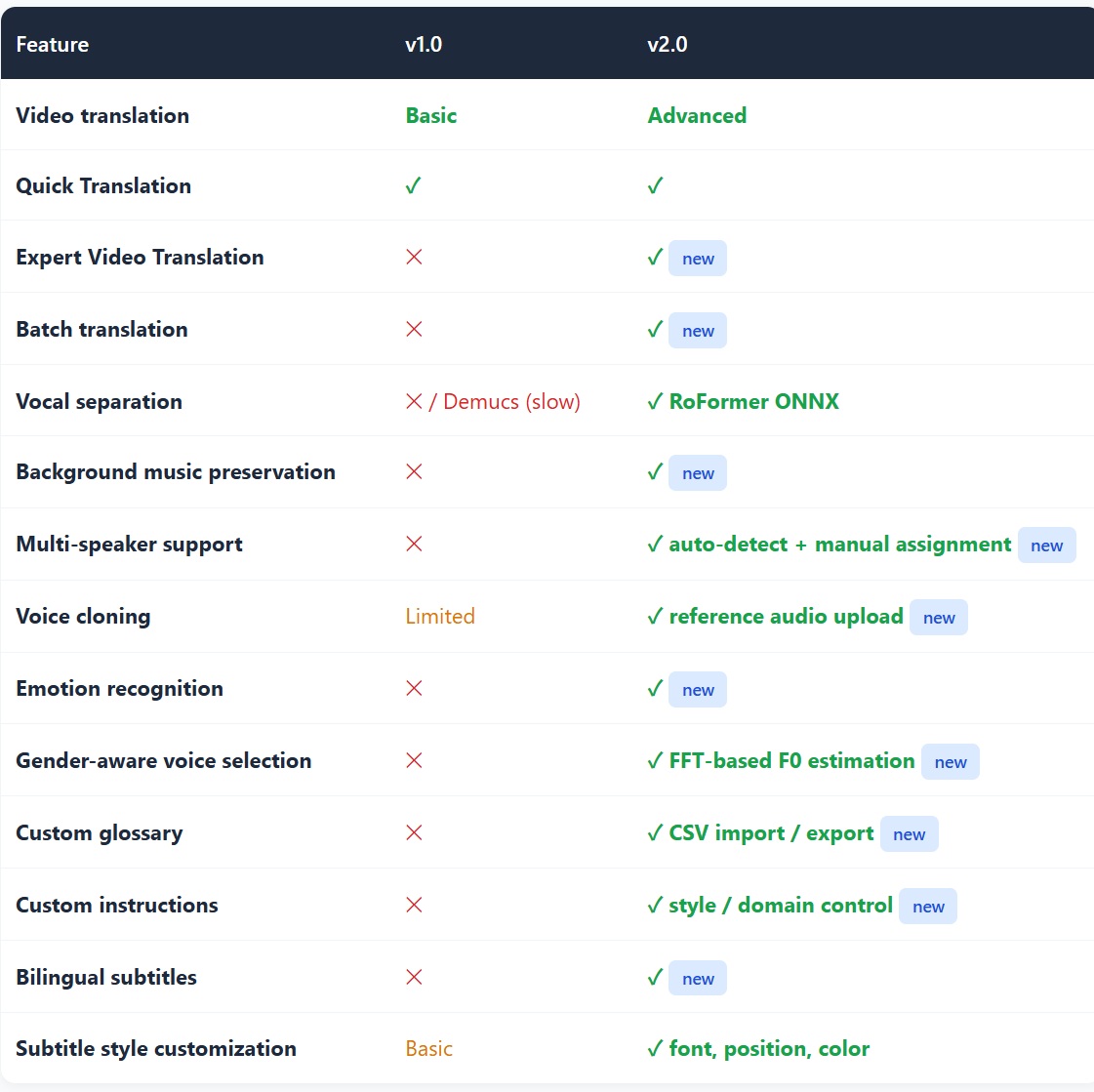
| Feature | v1.0 | v2.0 |
|---|---|---|
| Video translation | Basic | Advanced |
| Quick Translation | ✓ | ✓ |
| Expert Video Translation | ✕ | ✓ new |
| Batch translation | ✕ | ✓ new |
| Vocal separation | ✕ / Demucs (slow) | ✓ RoFormer ONNX |
| Background music preservation | ✕ | ✓ new |
| Multi-speaker support | ✕ | ✓ auto-detect + manual assignment new |
| Voice cloning | Limited | ✓ reference audio upload new |
| Emotion recognition | ✕ | ✓ new |
| Gender-aware voice selection | ✕ | ✓ FFT-based F0 estimation new |
| Custom glossary | ✕ | ✓ CSV import / export new |
| Custom instructions | ✕ | ✓ style / domain control new |
| Bilingual subtitles | ✕ | ✓ new |
| Subtitle style customization | Basic | ✓ font, position, color |
4.2 Translation capabilities
| Capability | v1.0 | v2.0 |
|---|---|---|
| Translation channel | External API | Local API with rolling context |
| Batch size | 15 | 50 |
| Context window | None | 30% rolling (max 60 items) |
| Glossary | ✕ | case-sensitive, whole-word matching |
| Custom instructions | ✕ | style, domain, tone |
| Languages | 20+ | 20+ |
4.3 Voice & audio
| Capability | v1.0 | v2.0 |
|---|---|---|
| TTS engine | External API | MOSS-TTS-Nano + Qwen3-TTS (local) |
| TTS models | 1 | 2 (fast + quality) |
| Voice modes | Role-based only | Role-based + clone from vocals.wav |
| Custom voice roles | ✕ | create / enable-disable / delete / preview |
| Gender detection | ✕ | FFT-based, 165 Hz threshold |
| Voice cloning | ✕ | reference audio upload |
| Speaker diarization | ✕ | sherpa-onnx segmentation + clustering |
| Emotion recognition | ✕ | ✓ |
4.4 Tools & utilities
| Tool | v1.0 | v2.0 |
|---|---|---|
| Image watermark removal | ✕ | ✓ LaMa inpainting + PP-OCRv5 |
| Video watermark removal | ✕ | ✓ frame-by-frame |
| Subtitle removal | ✕ | ✓ |
| Video download | ✕ | ✓ yt-dlp integration |
| Subtitle editor | Basic | ✓ full editor with preview |
4.5 Platform & acceleration support
| Platform | v1.0 | v2.0 |
|---|---|---|
| Windows | ✓ | ✓ enhanced |
| macOS (Intel) | ✓ | ✓ |
| macOS (Apple Silicon) | ✓ | ✓ MLX acceleration |
| GPU acceleration | ✕ | implemented (CUDA 13 / DirectML / MLX), awaiting testing |
V. Stability, Privacy & Security
5.1 Error handling
| Aspect | v1.0 | v2.0 |
|---|---|---|
| OOM handling | Crash | Memory budget gate + graceful failure |
| Model download | No resume | Resume + checksum verification |
| Pipeline cancellation | Basic | CancellationToken at every step |
| Error reporting | Generic messages | Actionable messages with memory stats |
| Project sync | ✕ | Cloud sync + error upload |
5.2 Data integrity
| Aspect | v1.0 | v2.0 |
|---|---|---|
| Atomic file writes | ✕ | Temp file + rename |
| Model completeness check | ✕ | Size registry + per-file verification |
| Project metadata | Basic | JSON with full state tracking |
| Error recovery | ✕ | State auto-saved every 30 seconds |
5.3 Privacy (does data leave the machine?)
| Aspect | v1.0 | v2.0 |
|---|---|---|
| TTS processing | External API (data leaves the machine) | Fully local ONNX |
| Video files | Local | Local |
| Audio files | Local + API | Local only |
| Translation text | API (text only) | API (text only, unchanged) |
| GDPR compliance | Partial | Full (everything local except translation text) |
5.4 Authentication
| Aspect | v1.0 | v2.0 |
|---|---|---|
| JWT token | 30-day expiry | 30-day expiry (unchanged) |
| Token blacklist | ✓ | ✓ |
| Subscription sync | ✓ | ✓ |
Related Reading: More on DeepVideo
For the release and commit record referenced above, see our release notes. The DeepVideo posts below complement this report and are worth reading alongside it.
- DeepVideo 2.0 Performance Report: End-to-End Video Translation Benchmark
- Expert Video Translation Performance Test Report: Step-Level Pipeline Benchmark
- DeepVideo 2.0 Beta: A Complete Rebuild of Video Translation & Dubbing
- DeepVideo Video Translation: User Guide (2026)
- Why Is DeepVideo So Much Cheaper Than Competitors?
VI. Bottleneck Analysis
6.1 Where v1.0 spent its time
6.2 Where v2.0 spends its time
The key insight: 86.1% of v2.0’s time goes to TTS synthesis and vocal separation, and both are the same kind of workload — ONNX model inference on CPU. In other words, handing those two to a GPU solves the overwhelming majority of the pipeline’s cost in one move.
What changed between versions — and what did not
v1.0’s bottleneck was waiting on an external API; v2.0’s bottleneck is the raw speed of local ONNX inference. v2.0 already eliminated the waiting with localization, threads, and caching. What remains is more physical: neural inference on a CPU simply runs at this speed. So the optimization target has converged to a single point.
VII. GPU Acceleration Potential (v2.0 only)
v1.0 had no GPU acceleration at all. v2.0 implements three paths in code, none of which were measured in this round — everything below is a projection.
7.1 Three acceleration paths
| GPU technology | Platform | Expected speedup |
|---|---|---|
| CUDA 13 (NVIDIA) | Windows | 3–5x for ONNX models |
| DirectML (AMD / Intel) | Windows | 2–4x for ONNX models |
| MLX (Apple Silicon) | macOS | 3–5x for Whisper + RoFormer |
7.2 Projected post-acceleration times
| Video length | Current (CPU) | Projected (GPU) |
|---|---|---|
| 15s (fast/fast) | ~2 min | ~30s |
| 30s (fast/fast) | ~4 min | ~1 min |
| 1 min (fast/fast) | ~8 min | ~2 min |
VIII. What’s Next
| Optimization | Expected impact | Priority |
|---|---|---|
| Enable GPU acceleration (test & validate) | 3–5x overall | P0 |
| TTS model quantization (INT8) | 2x TTS speedup | P0 |
| RoFormer quantization | 2x separation speedup | P0 |
| Parallel vocal separation + ASR | Saves about 30s per pipeline | P1 |
| TTS streaming synthesis | 50% less perceived latency | P1 |
| Smaller TTS model (distillation) | 3–5x TTS speedup | P2 |
Quantization (natively supported by ONNX Runtime) and moving to GPU are two forms of the same idea — make inference itself faster; parallelism, streaming, and distillation attack flow, perception, and model size respectively. A parallel route is trading low-rank fine-tuning for inference speed, measured in our MiniMax H3 acceleration LoRA report.
IX. Summary
9.1 Overall improvements
| Dimension | Improvement |
|---|---|
| Overall speed | 2–30x faster (depending on video length and model tier) |
| Memory usage | 30–50% reduction |
| Feature count | 15+ new features (multi-speaker, voice cloning, emotion, glossary, watermark removal, etc.) |
| Privacy | TTS fully localized, no external API |
| Stability | Memory budget gates, OOM prevention, graceful error handling |
| Translation quality | Rolling context, glossary support, custom instructions |
9.2 Ten things v2.0 achieved
| # | Achievement |
|---|---|
| 1 | Eliminated the external TTS dependency — no more rate limits, API costs, or privacy concerns |
| 2 | Added vocal separation — translated videos keep their background music |
| 3 | Multiplied TTS speed — up to 70x faster on the fast model |
| 4 | Reduced memory footprint — 31% lower peak, with explicit release between steps |
| 5 | Expanded translation quality — rolling context, glossaries, custom instructions |
| 6 | Added voice cloning — upload reference audio for a custom voice |
| 7 | Multi-speaker support — automatic diarization and per-speaker voice assignment |
| 8 | Watermark removal tools — image and video, with AI inpainting |
| 9 | GPU acceleration ready — CUDA, DirectML, MLX implemented and awaiting testing |
| 10 | Enterprise-grade stability — memory gates, error recovery, project sync |
9.3 Four numbers worth remembering
From roughly 25 minutes to about 49 seconds. Most of that comes from localizing TTS — it removed the waiting, not the computing.
Threads 2 → 8, I/O from files to memory, engine from API to local ONNX — three changes stacked.
Cold start is the first impression of whether an app feels heavy. This one changed how the client feels to open.
86.1% of the time sits in two ONNX CPU inference stages. Moving both to GPU is the biggest remaining certainty.
Conclusion
The difference between v2.0 and v1.0 can be stated in one line: v1.0 lost to waiting on an external service; v2.0 loses to a CPU thinking slowly — and the latter can be solved with hardware. v2.0 pulled TTS and vocal separation back onto the machine with local ONNX, sweeping away rate limits, cost, and privacy exposure along the way, then squeezed the local path with thread counts, decode caching, and memory gates. The result: about 30x on an 18-second video, 31% lower peak memory, 77x faster startup.
Yet 86.1% of the time still sits in two ONNX CPU inference stages — the nature of the bottleneck hasn’t changed, only its shape (from network waiting to insufficient compute). So the most certain next step isn’t more flow tuning, but handing those two stages to the GPU: 3–5x overall expected, putting a 30-second video near one minute. Our cost-structure analysis points the same way — local inference only fully delivers its cost advantage once inference is fast enough.
Send your videos into every market
v2.0 answers “how soon can I see the result”; the next question is “how far can it travel” — the same clip has to reach different platforms and regions, past translation, dubbing, and localization.
Download the DeepVideo desktop client
Realistic AI Video Dubbing at Just $0.17/minHigh quality · Low price · Local client · Security
Data sources: application logs (2026-10-01 to 10-04) | project test data | CHANGELOG.md and source-code analysis
Test machine Windows 11 / Intel i5-1135G7 @ 2.40GHz / 16GB, CPU only | Produced by DeepForgeHub Research