
Video Download Platforms: Global Comparison
Open-source engines · Desktop clients · Web parsers · Mobile apps · Cloud fetch — free and paid — September 2026
Site coverage · Fidelity · Stability · Throughput & automation · Usability · Cost transparency · Security & compliance
Executive Summary
Video downloading in 2026 has split into two layers: engines and shells. The engine layer has exactly one de facto standard — yt-dlp: 1,800+ sites, community updates on a near-daily cadence, and recovery from every YouTube rule change within 24–72 hours. Nearly every web parser, desktop client and mobile app is a wrapper around it. The shell layer above is fragmented: free and open-source options like Stacher, JDownloader 2, Seal and MeTube; one-time-purchase tools like 4K Video Downloader+ and Downie; cloud-fetch services like PikPak and Xunlei; and the least transparent category of all — web parsers, where SSSTik.io converts a 2–3 download free tier into a $9.99/week subscription trap, and SaveFrom.net / Y2Mate monetise through ads and redirects.
The single most important technical change in 2026: since November 2025, YouTube’s download protection has required a PO token plus an external JavaScript runtime (Deno 2.3+ or Node.js 22+). That single move turned “can I get 4K?” into an engineering problem — tools that fail to keep up silently fall back to 360p or error out entirely. Stability is therefore the top-weighted factor in 2026 selection, and it is the direct reason the free and open-source camp has overtaken commercial clients.
The core conclusion in one sentence: judge a download platform on three things, not on its interface — ① does the engine track the community’s daily updates (i.e. will it still work in three months); ② is processing local (web parsers route your link through someone else’s server); ③ is the payment model legible (subscription traps and “free trials” are this category’s biggest hazard). On those three axes the free camp — yt-dlp, Stacher, Seal, MeTube — is now ahead on capability, leaving paid tools two defensible niches: zero-configuration convenience (4K Video Downloader+, Downie) and cloud-side fetching (PikPak).
Key findings:
- The real dividing line between free and paid is maintenance cost, not features. yt-dlp is free but asks you to accept a command line and self-updating. 4K Video Downloader+ is effectively selling insurance against “the day the platform changes the rules and you would rather not debug it yourself.” For occasional users that premium is reasonable; for anyone with batch or automation needs it is pure overhead.
- Web parsers are the most dangerous category, and the danger correlates with “free”. A trustworthy parser has exactly three traits: it needs only a URL, never a login, and never an extension install. Anything asking for your platform credentials should be refused outright; the “download button” that triggers an instant redirect is the primary delivery channel for malware and phishing.
- The quality ceiling is set by the platform, not the downloader. A downloader can only fetch the stream the platform already exposes. A “no-watermark” TikTok download returns TikTok’s own compressed CDN file; “supports 4K/8K” only ever means “takes the highest available stream if the source has one,” never “preserves the original bitrate.”
- Mobile is one of the few battlegrounds where open source clearly wins. Seal (Android, yt-dlp backend, distributed via F-Droid) and ytdlnis are free, open source and feature-complete; store-distributed “universal downloaders” carry ads, over-broad permissions and delisting risk; on iOS there is no equivalent, only fragile Shortcuts workarounds.
- Cloud fetch is the most efficient form factor and the least accountable. PikPak’s regional tier starts around $2.51/month (10TB, 6MB/s cap) and its global tier around $5.79–10/month (20MB/s); Xunlei’s P2SP remains the fastest path to mainstream Chinese-language content under strict content filtering; 115’s long-term VIP has risen from ¥800 to ¥1,150. Cloud fetch pulls links on the provider’s servers — your task executes on someone else’s machine, which is the essential difference from every other form.
- Three hard lines: ① DRM-protected streams (Netflix, Disney+, Prime Video features) are unbreakable by any tool in this generation — anything claiming otherwise is a scam; ② using someone else’s work as commercial material is infringement — the download act itself is generally tolerated for personal use, but redistribution and commercial use never are; ③ some jurisdictions (Germany, Japan among them) have standalone penalties for circumventing technical protection measures, which conflicts directly with corporate compliance policies.
1. Six Form Factors, Six Different Risk Profiles
“Video download” is one button on a product page and six different engineering problems underneath. The first selection question is not which tool, but which form factor your scenario belongs to — because the risk structure differs completely between them.
| Form factor | Interaction | Representatives | Best for | Primary risk |
|---|---|---|---|---|
| ① Open-source engine Engine / CLI |
Command line, scripts, called by other software | yt-dlp, you-get, lux, BBDown | Developers, automated pipelines, long-term archiving | Steep learning curve; dependent on continuous updates |
| ② Desktop client Desktop GUI |
Install, paste link, click | Stacher, JDownloader 2, 4K Video Downloader+, Downie | General users, playlist and channel downloads | Free-tier caps and subscriptions; often closed source |
| ③ Web parser Browser |
Paste a link in the browser, nothing to install | cobalt.tools, SnapTik, SSSTik.io, SaveFrom.net | One-off downloads, temporary devices, mobile browsers | Ads and malware, subscription traps, link passes through a third party |
| ④ Mobile app | In-app on phone or tablet | Seal, ytdlnis, NewPipe | Phone-first workflows, social short-form video | Store delisting, over-broad permissions; iOS largely locked |
| ⑤ Cloud fetch | Hand the link or magnet to a cloud account | PikPak, Xunlei, 115, Real-Debrid | Magnets and large files, cloud transfer, weak networks | Accountability black box (tasks run on their servers), price hikes, tiered throttling |
| ⑥ Official offline | Subscribe, then cache inside the app | YouTube Premium, Netflix, Bilibili Premium | Legitimate offline viewing | Tied to subscription, encrypted files, no export or reuse |
One premise has to be stated up front: DRM. Netflix, Disney+ and Prime Video features are protected by Widevine / PlayReady, with keys and decryption handled inside hardware security modules. No downloader in this generation can break it. Any product claiming “one-click Netflix 4K original files” is either a scam — you pay and receive a screen recording or an empty file — or is walking you directly into legal exposure. What can be downloaded is always one of three things: publicly accessible web video, streams the platform itself exposes (YouTube DASH, various HLS endpoints), and content you uploaded or are licensed to use.
2. The Engine Layer: One De Facto Standard
The engine layer is not “one option among several” — it is the foundation the whole ecosystem sits on. Once you understand this layer, “which downloader site is best” almost always reduces to “which build of yt-dlp does it wrap.”
2.1 Engine overview
| Engine | Maintainer | Site coverage | Core capability | Status in 2026 |
|---|---|---|---|---|
| yt-dlp | Community (youtube-dl fork) | 1,800+ | Fully parameterised formats, subtitles, metadata, playlists; the backend for a large share of GUIs and web parsers | Active, near-daily releases; fastest anti-bot response |
| youtube-dl | ytdl-org | 1,000+ | The classic implementation; subject of the 2020 DMCA takedown | Effectively unmaintained since 2021; do not start new work on it |
| you-get | soimort | Mainstream international and Chinese sites | Good Chinese-site coverage, lightweight, single Python dependency | Usable, but release cadence has slowed |
| lux | iawia002 | Mainstream international and Chinese sites | Single-file Go binary — the lowest-friction install of the group | Stable; coverage narrower than yt-dlp |
| BBDown | nilaoda | Bilibili specialist | Premium-tier quality, series, danmaku and subtitles handled together | The default for Bilibili downloads |
| N_m3u8DL-RE | nilaoda | Generic HLS / DASH | Segment-stream downloader, usually paired with a sniffing tool | A standard component in technical workflows |
| Streamlink | Streamlink community | Live streams | Recording and remuxing Twitch and similar live platforms | Purpose-built for live, consistently maintained |
| aria2 | aria2 community | General downloads | Multi-connection, resumable; widely used as yt-dlp’s acceleration backend | Maintained; infrastructure rather than a consumer tool |
2.2 Deep dive: yt-dlp
yt-dlp 9.0 De facto standard
yt-dlp is the only tool in 2026 that downloads everything today and still will tomorrow. Its moat is not a feature list but response time: whenever YouTube, TikTok or Instagram adjust their anti-bot measures, the community typically lands a fix within 24–72 hours and ships a release within a week. Commercial clients are constrained by their release cycles, web parsers by their operators, while yt-dlp has thousands of contributors maintaining extractors in parallel.
Its boundary is engineering surface rather than ease of use: format selection expressions, subtitle embedding, metadata writing, SponsorBlock segment removal, filtering playlists by date or duration, and cookie import for member-only content are all parameter-driven. The price is accepting a command line — or wrapping a GUI around it (see section 3). For teams, the real value is scriptability: turning download, transcode, archive and ingest into a scheduled job is something no GUI client can do.
Strengths
- Best site coverage anywhere, and the only tool that reliably recovers after a platform change
- Zero cost, zero quotas, no watermark, no ads and no tracking
- Fully local execution — links never pass through a third-party server
- Scriptable, suited to batch, scheduled and NAS-archival workflows
- Handles subtitles, metadata, chapters and thumbnails, so output is archive-ready
- Powers most GUIs and parsers, making it the ecosystem’s foundation
Weaknesses
- Command line only — a hard barrier for non-technical users
- Since November 2025 it needs an additional JS runtime (Deno / Node 22+), adding another setup step
- 403s and parse failures require reading logs and tuning flags; there is no support desk
- Stops when the download finishes — no transcode, editing or post-processing
- Member-only content requires cookie import, which raises account-security trade-offs
3. Desktop Clients: What You Actually Buy Is Insurance
Desktop clients are wrappers around an engine. In 2026 this camp splits cleanly: the free side all reuse yt-dlp (Stacher, Tartube, and JDownloader indirectly), while the paid side builds its own parsers (4K Video Downloader+, Downie, ByClick). The free side is more capable but asks users to tolerate occasional manual updates; the paid side is smoother but depends on the vendor’s release cycle whenever a platform changes the rules.
3.1 Client overview
| Tool | Platforms | Engine | Free tier | Price (check the vendor page) | Positioning |
|---|---|---|---|---|---|
| Stacher | Win / Mac / Linux | yt-dlp + FFmpeg | Fully free | $0 | yt-dlp with checkboxes — the power user’s wrapper |
| JDownloader 2 | Win / Mac / Linux | Proprietary + plugins | Fully free, open source | $0 | Link grabbing and queue management; best-in-class for multi-host work |
| 4K Video Downloader+ | Win / Mac / Linux | Proprietary | Daily download limit | One-time purchase (roughly $15–45 by tier) | Consumer benchmark; playlists and channels in one click |
| Downie | macOS native | Proprietary | No free tier (trial only) | About $19.99 one-time | The smoothest native experience on Mac |
| ByClick Downloader | Windows | Proprietary | Trial | Annual subscription | Browser auto-detection, paste and go |
| Internet Download Manager | Windows | Proprietary | 30-day trial | One-time purchase | General download manager; video sniffing is a side feature |
| VideoProc Converter | Win / Mac | Proprietary | Trial limits | From about $29.95 | Download, transcode and compress in one package |
| Allavsoft | Win / Mac | Proprietary | Trial | Subscription | Download plus format conversion for transcode-heavy users |
| ClipGrab | Win / Mac / Linux | yt-dlp | Fully free | $0 | Minimal four-site support, lightweight and ad-free |
| Tartube | Win / Linux | yt-dlp | Fully free, open source | $0 | Channel mirroring and archive management; dated UI, unique job |
| SnapDownloader | Win / Mac | Proprietary | No free tier | Subscription, priced at the high end | Batch plus built-in proxy for multi-IP scenarios |
3.2 Deep dive: four representatives
Stacher 8.8 Free & open source
Stacher moves most of yt-dlp’s surface area into a graphical interface: format selection, subtitle embedding, metadata writing, SponsorBlock, playlist ranges and output templates are all checkboxes, and presets are shareable. It tracks upstream closely, so after an anti-bot change recovery is usually one application update away.
Its limits are the flip side of that fidelity: when a download fails with a 403, you are the retry logic, and once the file lands there is no next step — no transcode, no editing, no organisation. It does not answer “what happens after the download”; it simply makes the download itself extremely transparent.
Strengths
- Full yt-dlp capability at zero cost, across all three desktop platforms
- Parameters visualised — far cheaper to learn than the CLI while keeping advanced options
- Bundles FFmpeg, so audio/video merging never breaks
- Tracks upstream closely, so recovery after platform changes is fast
Weaknesses
- Still yt-dlp underneath; parse failures mean reading logs yourself
- No post-download workflow (transcoding, editing, subtitle processing)
- Cookie import for member-only content remains a manual configuration
- Engineer-oriented interface rather than consumer-grade polish
JDownloader 2 8.5 Free & open source
JDownloader 2 is a download manager rather than a video downloader — it handles cloud-drive direct links, file hosts, magnets and web video in one place. The real weapon is the link grabber: paste a page of URLs and it resolves every downloadable asset and runs them concurrently, with plugins that step in when a captcha appears.
For batch and multi-source workflows its throughput is the highest of any GUI client. The price is a dated interface, time-consuming initial setup, a Java runtime dependency, and the fact that it is heavy overkill for “download one YouTube video.”
Strengths
- Queue and concurrency management is the strongest in its class for large batches
- Covers video sites plus file hosts and cloud direct links — the widest span of any client
- Remote management, so it can run unattended on a small always-on host
- Completely free and open source, with no quotas and no ads
Weaknesses
- Interface and interaction feel a generation old; onboarding cost is real
- Java dependency makes startup and resource use heavy
- Site compatibility depends on plugin updates and occasionally breaks
- Over-engineered for single-source, single-file downloads
4K Video Downloader+ 8.0 Consumer benchmark
It is the consumer market’s de facto benchmark: paste a link, pick a resolution, wait for the merge, and playlists or whole channels download in one click with subtitles extracted along the way. The interface is smooth enough that documentation is almost unnecessary. For users who simply want the path of least resistance, this is the lowest-decision-cost option.
The pricing model is a one-time purchase rather than a subscription, which is comparatively friendly in this category. But be clear about what is being bought: maintenance of a proprietary parser. When YouTube tightens its protections you wait for the vendor’s release — a structural gap against the community’s 24–72 hour fix window.
Strengths
- Best consumer-grade experience; near-zero learning cost and friendly to non-technical users
- Mature playlist and whole-channel downloads with bundled FFmpeg for reliable merging
- One-time purchase rather than subscription, so lifetime cost is predictable
- Supports 4K/8K and 360° video with convenient subtitle extraction
Weaknesses
- Free tier caps daily downloads; heavy use forces payment
- Stability depends on the vendor’s release cycle and recovers slowly during anti-bot escalations
- Closed source with far narrower site coverage than yt-dlp; niche sites often fail
- The parsing path is vendor-controlled and opaque
Downie 7.7 Mac native
Downie is the best path on Mac: a native interface, deep system integration (browser extension, share sheet) and a direct hand-off to Permute once the download completes. On a pure Mac workflow it removes all of the friction involved in finding tools, installing dependencies and configuring environments.
The limitations are equally clear: it is only optimal inside the Mac ecosystem, cross-platform teams cannot standardise on it, the absence of a free tier means even trying it costs money, and coverage and stability are still bound to a proprietary parser’s release cadence.
Strengths
- Highest macOS integration, with smooth extension and share-sheet workflows
- One-time purchase with no subscription; pairs with a transcoding tool for a closed loop
- Native on Apple Silicon with good performance and efficiency
Weaknesses
- macOS only, so cross-platform teams cannot standardise
- No free tier — evaluation requires payment
- Site coverage and anti-bot recovery lag yt-dlp
- Batch and automation capability is weaker than JDownloader or yt-dlp
4. Web Parsers: Most Convenient, Least Deserving of Default Trust
Web parsers are the only form factor that is zero-install, cross-device and instantly available — and precisely because the bar is so low, this is where business models go wrong most easily. The test is simple: a trustworthy parser needs one URL. No login, no extension, no credit card.
4.1 Parser overview
| Site | Platforms supported | Free tier | Monetisation | Risk rating |
|---|---|---|---|---|
| cobalt.tools | YouTube, TikTok, Instagram, X, Bilibili and other mainstream platforms | Free, ad-free, no tracking | Open-source project funded by donations; self-hostable | Low (open source, auditable) |
| SSSTik.io | TikTok specialist | Only 2–3 downloads, then paywalled | Subscription (about $9.99/week) | High (subscription trap, difficult cancellation) |
| SnapTik | TikTok | Free tier output carries a watermark | Subscription around $4.99–9.99/month | Medium (deliberately degraded free tier) |
| SaveFrom.net | About 8 mainstream sites | Quality frequently capped at 720p | Ads and redirects | High (pop-ups, fake download buttons) |
| Y2Mate | About 5 mainstream sites | Ad-heavy, throttled | Primarily advertising | High (redirects and fake buttons) |
| SnapSave | About 4 social platforms | Free but heavily ad-supported | Advertising | Medium |
4.2 Deep dive: one model to copy, one to avoid
cobalt.tools 8.0 Open source, self-hostable
cobalt is the only genuinely recommendable paradigm in this category: the interface is an input box and a button, with no ads, no pop-ups and no registration wall; the code is AGPL-licensed and self-hostable, so once you deploy it, it stops being “a parser that routes links through a third party” and becomes “your own private resolution service” — a decisive difference for privacy- and compliance-sensitive work.
Its weaknesses are narrower platform coverage than yt-dlp (YouTube support has fluctuated historically) and the absence of queues, history or batch capability. For “occasionally grab a public video” it is the first choice; for bulk archiving it is only an entry point.
Strengths
- Zero install, zero ads, zero tracking — the cleanest privacy design in the category
- AGPL open source and self-hostable, removing the third-party server from the path
- Minimal interface that works equally well in a mobile browser
- No account required and no subscription trap
Weaknesses
- Narrower platform coverage than yt-dlp, with historically unstable YouTube support
- Public instances may queue or rate-limit; speed depends on their bandwidth
- No queues, history, batch or automation features
- On a public instance your link still passes through their servers
SSSTik.io 4.9 What to avoid
SSSTik is presented separately as the cautionary example because its technology is fine and its business model is not — which is exactly the trap shape this category produces. The free allowance is 2–3 downloads, after which a “free trial” converts into a subscription of about $9.99 per week; users widely report being charged without understanding the terms, and cancellation requires digging through multiple layers of settings. Weekly billing means the annualised cost far exceeds any one-time desktop licence.
Measured on capability it is not bad: watermark removal quality is adequate, processing is fast, the interface is clean. The problem is that your marginal cost of using it is unbounded. The conclusion is blunt: if you use these sites at all, stay inside the free allowance and never leave payment details; if the need is recurring, move to an open-source option such as Seal or ytdlnis.
Strengths
- Watermark removal and processing speed are adequate; the interface is clean
- Nothing to install; works in mobile and desktop browsers
- Supports MP3 audio extraction
Weaknesses
- Free allowance of only 2–3 downloads before forced conversion
- About $9.99/week billing with an extremely high annualised cost
- Opaque terms, difficult cancellation, clustered billing complaints
- Heavy ads and redirects; poor mobile experience
- TikTok only — the narrowest platform coverage in the report
5. Mobile: One of the Few Open-Source Wins
Mobile is one of the very few areas where open source clearly beats commercial products. The reason is distribution: app stores have tightened review and delisting policies for downloader apps, pushing compliant commercial products to weaken their features, while open-source projects ship through F-Droid or GitHub and sidestep that constraint entirely.
5.1 Mobile overview
| App | Platform | Engine | Distribution | Price | Assessment |
|---|---|---|---|---|---|
| Seal | Android | yt-dlp | F-Droid / GitHub | Free, open source | The de facto best phone download experience, with a complete Material interface |
| ytdlnis | Android | yt-dlp | F-Droid / GitHub | Free, open source | Even more complete (playlists, custom templates, aria2) |
| NewPipe | Android | Custom extractors | Official site / F-Droid | Free, open source | Privacy-first YouTube client with offline downloads |
| SnapTube | Android | Undisclosed | Mostly third-party download sites | Free with ads / IAP | Muddled distribution, high ad and permission risk |
| VidMate | Android | Undisclosed | Mostly third-party download sites | Free with ads | Repeated bundling and advertising controversies; not recommended |
5.2 Deep dive: Seal
Seal 8.4 Mobile benchmark
Seal proves that “mobile plus open-source engine” is viable: it packages yt-dlp into an Android app and exposes the common parameters through a Material interface, with no Python environment and no root required after install. For phone-first users — especially people collecting short-form video material — it is currently the best combination of experience and capability.
Its trade-offs also come from distribution: staying off the store means updates are manual and users are responsible for verifying the source; cookie handling is weaker than the desktop version; and once a download completes it performs no editing or transcoding. There is no iOS equivalent — Apple’s sandbox and store policy make this path largely unavailable, leaving only fragile Shortcuts scripts.
Strengths
- Free and open source, with capability matching the core of desktop yt-dlp
- No Python environment or root needed — install and use
- Material design with smooth mobile interactions
- Supports playlists, subtitle and metadata embedding, and command templates
Weaknesses
- Not on the Play Store, so updates are manual and sourcing is on the user
- Cookie and member-content handling is weaker than desktop clients
- No post-download processing (transcoding or editing)
- No iOS counterpart, which fragments cross-platform team workflows
6. Self-Hosted and Automated: Downloading as Infrastructure
This category has a clearly defined user: someone with a NAS or always-on mini host who wants “subscribe to a channel and it lands in the library automatically.” It is not a download tool but download infrastructure — and in 2026 more people are moving from “install a client” to “deploy a service.”
6.1 Self-hosted options
| Option | Form | Deployment | Core capability | Best for |
|---|---|---|---|---|
| MeTube | Web UI service | Docker / own server | A web shell over yt-dlp: multi-user, queues, playlists, scheduled downloads | A shared household download entry point |
| Pinchflat | Web service (RSS-driven) | Docker | Subscribe to channels or playlists, auto-check and download new uploads — the *arr philosophy | Long-term channel archiving |
| Parabolic | Desktop GUI (Linux-centric) | Local install | A GNOME-style wrapper over yt-dlp, clean and simple | Linux desktop users |
6.2 Deep dive: MeTube
MeTube 8.5 Self-hosted
MeTube turns yt-dlp from a personal tool into a team service: anyone on the same network can submit a job from a web page, the server executes it in queue, and files land in shared storage. For teams that need one shared download capability, this eliminates the duplicated work of installing the tool on every machine and maintaining a separate version on each — the engine is updated once, on the server.
The price is operational responsibility: Docker, storage mounts and retry logic for anti-bot failures are all yours to handle. But for anyone who already runs a NAS, that cost was already in the budget and the marginal effort is close to zero.
Strengths
- One person deploys, many people use — the most efficient team setup
- Centralised engine updates instead of per-device maintenance
- Queues, subscriptions and scheduling enable unattended archiving
- Data and links stay entirely inside your own network
Weaknesses
- Requires an always-on server or NAS, with hardware and ops overhead
- Docker and storage configuration are unfriendly to non-technical users
- Anti-bot induced job failures still need human troubleshooting
- No post-download processing or media-library scraping
7. Cloud Drives and Offline Fetch: Most Efficient, Least Transparent
Cloud fetch outsources the download itself: you hand over a link or magnet, the provider’s datacentre pulls it at enterprise bandwidth, and you then retrieve it locally in seconds or stream it online. It is the most efficient form factor for weak networks and magnet content — and the only category in this report where your task executes on someone else’s machine.
7.1 Cloud drive and offline fetch overview
| Platform | Positioning | Free tier | Price (indicative — check the vendor page) | Offline fetch capability | Primary risk |
|---|---|---|---|---|---|
| PikPak | Singapore-based cloud download drive | 6GB storage | Regional from about $2.51/month; global about $5.79–10/month | Cloud fetch of magnets, direct links and social links; 10TB; 6MB/s regional and 20MB/s global | Accountability and account-policy uncertainty; large regional pricing gaps |
| Xunlei | Chinese P2SP downloader plus cloud drive | Basic free tier | Frequent membership promotions | P2SP acceleration is fastest for mainstream popular content; instant streaming via cloud drive | Strict content filtering, so flagged resources always fail; legacy of ads and bundled software |
| 115 Drive | Chinese high-capacity archive drive | About 150GB | VIP capacity tiers (long-term tiers have risen sharply) | Strong instant-transfer library, mature offline download, 4K transcoding on VIP | Content monitoring and interception, continuous price rises; avoid large prepayments |
| Baidu Netdisk | Largest Chinese consumer cloud drive | 2TB but heavy throttling on the free tier | Membership tiers (premium focus) | Offline download supported, but resource screening is strict | Free-tier throttling, content review, links expire easily |
| Quark Drive | Chinese cloud drive within a browser ecosystem | Basic free allowance | Membership tiers | Supports magnet and link fetch, mostly used as “transfer then stream” | Copyright sweeps; the whole sector is tightening |
| Aliyun Drive | Chinese cloud drive | Comparatively good free experience | Membership tiers | Not positioned around magnets or general offline fetch | Storage-first, not a download tool |
| Real-Debrid | Multi-host and multi-drive link unlocking service | No free tier | Low-cost recurring subscription | Converts hundreds of file-host and cloud links into high-speed direct links | Terms and compliance boundaries are ambiguous; stability is sensitive to enforcement |
| AllDebrid | Same category, competing service | No free tier | Subscription | Comparable direct-link unlocking with cloud download support | As above, with frequent feature changes |
7.2 Deep dive: two representatives
PikPak 7.5 Cloud fetch
PikPak’s model is legible: it sells not storage but cloud fetching on enterprise bandwidth. Hand it a magnet or a media link and its datacentre does the pulling; you then retrieve the file instantly or stream it directly. For bandwidth-constrained users or those working around local network limits, that is the efficiency optimum. The two-tier pricing (roughly $2.51 and $5.79 upward) stratifies by region, and annual billing is about 16% cheaper than monthly.
Three things must be understood in advance: ① jobs run on its servers, so you cannot audit its content policy; ② pricing is tightly bound to region, and travelling across regions triggers throttling and upgrade prompts; ③ the free tier’s fetch allowance is very small, making it a trial rather than a usable plan.
Strengths
- The most efficient cloud fetch — a decisive advantage on weak networks or in transit
- 10TB storage plus online streaming, with a complete mobile experience
- Regional tier at around $2.51/month gives one of the lowest costs per terabyte available
- Handles magnets, direct links and social platform links uniformly
Weaknesses
- Jobs execute on third-party servers, and content policy is not transparent
- Regionally stratified pricing; cross-region use is throttled
- The free allowance is insufficient for practical use
- Account policy and compliance posture carry uncertainty
Xunlei 6.7 P2SP at scale
For popular resources, Xunlei’s acceleration remains the most effortless option in the Chinese market: P2SP combines peer sources with its own caches, so even older content can saturate a connection, and the integrated cloud drive enables download-and-stream in one step. That is a moat built over two decades.
Two structural problems have never been resolved. First, content filtering: the platform actively intercepts certain material, the job simply fails and there is no appeals path. Second, the speed gap between members and non-members, which is a de facto paywall. Newer client versions address surface issues like advertising and bloat without touching either mechanism. For users who need predictable download capability, Xunlei is better treated as a popular-resource accelerator than a general-purpose download tool.
Strengths
- P2SP leads the domestic market on popular content, and even rescues older niche resources
- Download and cloud drive are integrated, enabling instant streaming without landing the file
- Complete Chinese-language resource ecosystem with a low barrier to entry
- Promotional membership pricing is friendly (for example 13 months around CN¥168)
Weaknesses
- Strict content interception — flagged content always fails with no recourse
- The member/non-member speed gap constitutes a de facto paywall
- Legacy of advertising and bundled software; cracked builds are extremely risky
- Speed on non-popular content depends entirely on source health
8. Official Offline Download: The Only Genuinely Risk-Free Option
Official offline is not a download tool but a subscription entitlement. It has one advantage no third-party tool can match: fully legitimate, cannot break, and never has to fight anti-bot measures. The price is equally clear — files are encrypted and bound to the app, so they cannot be exported, edited or reused.
| Platform | Entitlement | Indicative price | Capability boundary |
|---|---|---|---|
| YouTube Premium | In-app offline cache (plus background play and ad removal) | Subscription, regional tiers | Offline cache plays in-app only and produces no exportable file |
| Netflix | In-app downloads (selected titles, with expiry) | Subscription (tier governs resolution and concurrency) | DRM-protected and non-exportable; downloads expire |
| Disney+ | In-app downloads (same model as Netflix) | Subscription | DRM-protected and non-exportable |
| Bilibili | Premium-member cache and offline viewing | Premium membership | Cache files are encrypted and play in-app only |
| Spotify | Offline listening (audio) | Premium subscription | Encrypted cache, plays in-app only |
The key judgement: if your need is “watch it offline,” official offline is always the first choice — zero incremental cost, zero risk, zero maintenance. Only when the need becomes “I want the file itself” (as material, for archiving, for editing, for translation and dubbing) do you need third-party tools, and at that point you are in the compliance discussion of section 13.
9. Capability Matrix
Eleven of the most representative options across all six form factors, aligned on six hard criteria. This table answers one question: which row should your scenario be reading?
| Option | Form factor | Site coverage | Max quality | Batch / queue | Local processing | Free usability | Learning curve |
|---|---|---|---|---|---|---|---|
| yt-dlp | Open-source engine | 1,800+ | Source maximum (8K/HDR) | Unlimited via scripting | Fully local | Completely free | High |
| Stacher | Desktop GUI | 1,800+ (inherited) | Source maximum | Playlists and batch | Fully local | Completely free | Medium |
| JDownloader 2 | Desktop GUI | Hundreds (incl. drive links) | Source dependent | Best concurrent queues | Fully local | Completely free | Medium-high |
| 4K Video Downloader+ | Commercial desktop | Mainstream sites | 4K/8K when available | Playlists and channels | Fully local | Daily download cap | Low |
| Downie | Commercial desktop (Mac) | Mainstream sites | Source maximum | Basic batch | Fully local | No free tier | Low |
| cobalt.tools | Web / self-hostable | Mainstream platforms | Source maximum | No queue | Public instance uses their servers | Completely free | Very low |
| SSSTik.io | Web parser | TikTok only | Source maximum | None | Link passes through servers | 2–3 downloads only | Very low |
| Seal | Mobile app | 1,800+ (inherited) | Source maximum | Playlists | Fully local | Completely free | Medium |
| MeTube | Self-hosted service | 1,800+ (inherited) | Source maximum | Queues plus scheduling | Your own network | Completely free | Needs ops work |
| PikPak | Cloud fetch | Magnets, direct and social links | Cloud transcoded | Cloud job queue | Jobs run on third-party servers | 6GB trial | Low |
| Xunlei | Client plus cloud drive | P2P, magnets, direct links | Source dependent | Strong concurrent queues | Includes cloud acceleration nodes | Basic free but throttled | Low |
10. Scenario Recommendations
Everyday personal use — a few downloads
For something quick without installing software, cobalt takes a pasted link with no ads and no tracking. If it becomes routine, move to Stacher — full yt-dlp capability at zero cost, configured once and then permanent.
Content sourcing — quality first
When material feeds an editing pipeline, you need the source’s highest stream and the correct audio track. Use yt-dlp with locked-down format expressions and metadata, plus subtitle extraction; wrap it in Stacher if you want a UI. Avoid web parsers — quality is silently downgraded.
Whole-channel or playlist archiving
Deploy once and it keeps up automatically. Give Pinchflat the channel URLs and it polls for new uploads continuously; MeTube is better when several people share one download entry point.
Phone-first — short-form material
Install Seal from F-Droid on Android: the core of desktop yt-dlp, completely free. Never install an unknown APK for “no watermark,” and never use a weekly-billed parser.
Weak networks, magnets, large files
Cloud-side fetching on enterprise bandwidth, then instant local retrieval or streaming — the most efficient path for weak networks and large files. Accepting it means accepting that jobs run on someone else’s servers.
Offline viewing only — zero risk
In-app caching through YouTube Premium, Netflix or Bilibili Premium. Legitimate, stable, and it never breaks — at the cost of non-exportable, non-reusable files. If the need is simply “to watch,” stop here.
11. Decision Framework
A four-step method: risk first, capability second, price last
Step 1 — Can this content be downloaded at all? If it is a Netflix, Disney+ or Prime Video feature, the answer is no: DRM is unbreakable, so go straight to official offline. If it is your own upload or content you are licensed to use, skip to step 3. If it is someone else’s public work, continue to step 2.
Step 2 — Do you want to watch it, or use it? For your own viewing, official offline or a local download is fine (personal use is generally tolerated). To cut it into work, publish it or use it commercially, you need permission first — and there is no technical substitute for that step.
Step 3 — Where is your technical radius? Comfortable with a command line or willing to configure an environment once → yt-dlp (with Stacher as the interface). Want zero configuration → 4K Video Downloader+, or Downie on Mac. Phone-first → Seal. Running a NAS → MeTube / Pinchflat.
Step 4 — Only now consider price. Judge by frequency: fewer than roughly 50 downloads a year, free options are entirely sufficient and paying is waste; weekly downloads or automated batch work, a one-time licence (4K VDW, Downie) beats a subscription; if you need cloud fetching for magnets or weak networks, PikPak’s regional tier is the best value in that segment.
Remember the order: compliance → feasibility → capability → cost. Comparing prices first is the most common way to get burned in this category — especially when a “free trial” funnels you into weekly billing.
12. Scoring and Head-to-Head Evaluation
Note: these are not official benchmark scores and not vendor benchmarks. They were compiled for this report from 2026 public sources (project repositories and release histories, vendor pricing pages, third-party reviews and user complaint records) to compare the overall suitability of different download approaches. The same capability is worth different amounts under different usage profiles, so section 12.6 adds a weight-sensitivity analysis.
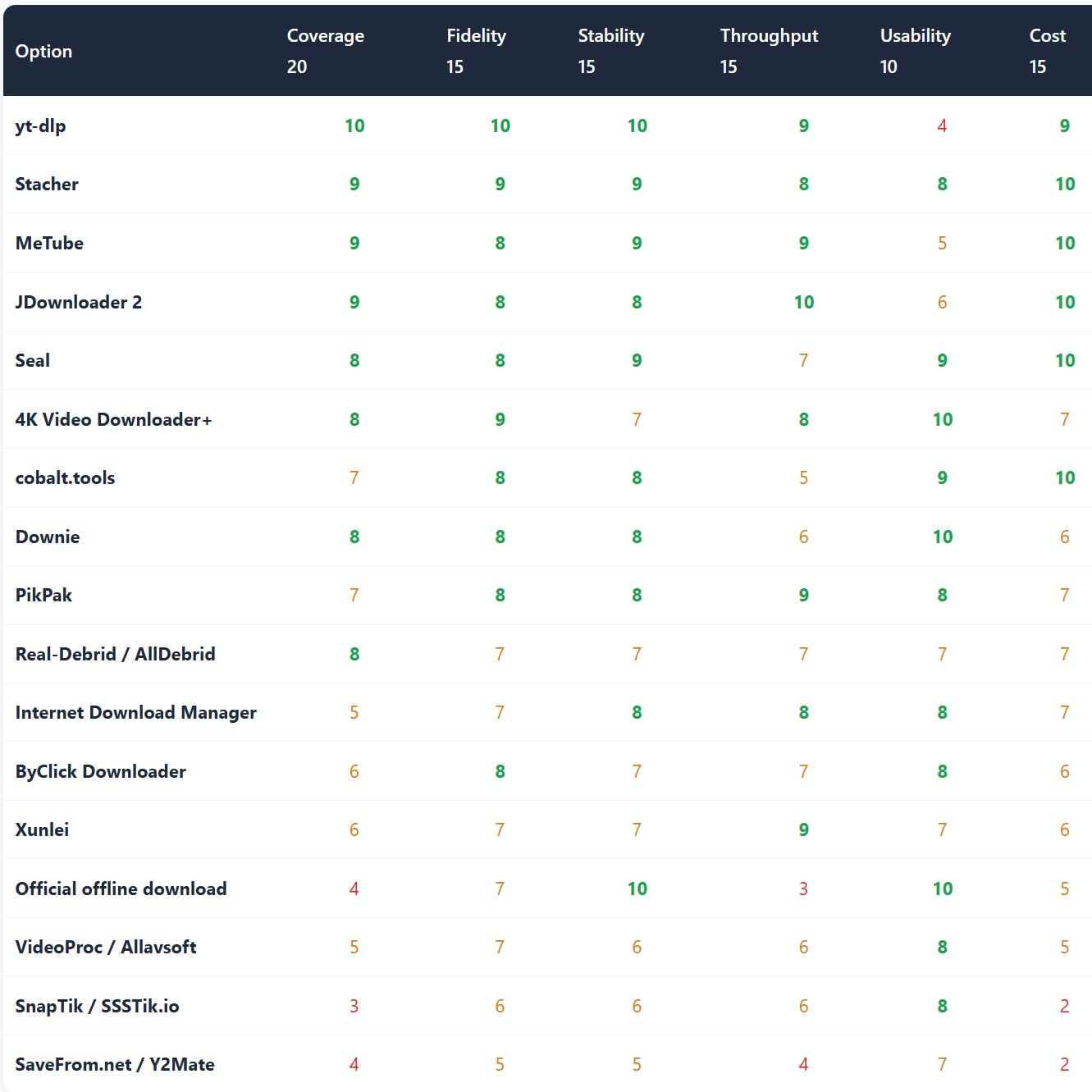
12.1 Scoring dimensions and weights
| Dimension | Weight | What it measures | Why this weight |
|---|---|---|---|
| Site coverage | 20 | Number of supported sites, niche-site support, speed of adding new platforms | Coverage determines whether the tool can solve your specific problem at all |
| Quality and format fidelity | 15 | Access to the source’s highest stream, absence of re-compression, subtitle and audio-track integrity | For material use, quality cannot be recovered after the fact |
| Stability and update speed | 15 | Recovery window after anti-bot escalations, maintenance activity | 2026’s biggest variable (the PO token change) is decided entirely here |
| Throughput and automation | 15 | Concurrency, queue management, playlists and channels, scriptability | Batch and automation separate “works” from “works well” |
| Usability and cross-platform reach | 10 | Onboarding cost, GUI availability, desktop and mobile coverage | Determines whether non-technical users can operate independently |
| Cost and payment transparency | 15 | Whether the free tier is usable, billing period, cancellation difficulty, hidden terms | The category’s biggest hazard is opacity rather than price, so this weights alongside fidelity |
| Security, privacy and compliance | 10 | Ad and malware exposure, whether links traverse third parties, ToS and legal boundaries | Risk is total-loss when triggered, but it can be avoided by choosing the right form factor |
12.2 Overall weighted scores
| Option | Weighted score | Stars | Form factor |
|---|---|---|---|
| yt-dlp |
9.0
|
★★★★★★ | Open-source engine |
| Stacher |
8.8
|
★★★★★☆ | Desktop GUI |
| MeTube |
8.5
|
★★★★★☆ | Self-hosted |
| JDownloader 2 |
8.5
|
★★★★★☆ | Desktop GUI |
| Seal |
8.4
|
★★★★★☆ | Mobile |
| 4K Video Downloader+ |
8.0
|
★★★★★ | Commercial desktop |
| cobalt.tools |
8.0
|
★★★★★ | Web / self-hosted |
| Downie |
7.7
|
★★★★☆ | Commercial desktop (Mac) |
| PikPak |
7.5
|
★★★★☆ | Cloud fetch |
| Real-Debrid / AllDebrid |
6.9
|
★★★★ | Multi-host unlocking |
| Internet Download Manager |
6.9
|
★★★★ | General download manager |
| ByClick Downloader |
6.8
|
★★★★ | Commercial desktop |
| Xunlei |
6.7
|
★★★★ | Client plus cloud drive |
| Official offline download |
6.6
|
★★★☆ | Subscription entitlement |
| VideoProc / Allavsoft |
6.0
|
★★★☆ | Download and transcode suite |
| SnapTik / SSSTik.io |
4.9
|
★★☆☆ | Short-form video parser |
| SaveFrom.net / Y2Mate |
4.1
|
★★☆☆ | Ad-driven parser |
Excluded from scoring: youtube-dl (effectively unmaintained since 2021, kept only as a historical reference), you-get / lux / BBDown / N_m3u8DL-RE / Streamlink / aria2 (all engine-layer components whose capabilities are already represented by the yt-dlp row, so listing them separately would dilute the table), Pinchflat / Parabolic / Tartube / ClipGrab / ytdlnis / NewPipe (open-source projects equivalent in nature to Stacher and MeTube), and SnapTube / VidMate (distribution channel and permission risks are too high to be viable recommendations). The capabilities and limitations of all of these are described in sections 3 to 8.
12.3 Seven-dimension detail
| Option | Coverage 20 |
Fidelity 15 |
Stability 15 |
Throughput 15 |
Usability 10 |
Cost 15 |
Security 10 |
|---|---|---|---|---|---|---|---|
| yt-dlp | 10 | 10 | 10 | 9 | 4 | 9 | 9 |
| Stacher | 9 | 9 | 9 | 8 | 8 | 10 | 8 |
| MeTube | 9 | 8 | 9 | 9 | 5 | 10 | 8 |
| JDownloader 2 | 9 | 8 | 8 | 10 | 6 | 10 | 7 |
| Seal | 8 | 8 | 9 | 7 | 9 | 10 | 8 |
| 4K Video Downloader+ | 8 | 9 | 7 | 8 | 10 | 7 | 7 |
| cobalt.tools | 7 | 8 | 8 | 5 | 9 | 10 | 10 |
| Downie | 8 | 8 | 8 | 6 | 10 | 6 | 7 |
| PikPak | 7 | 8 | 8 | 9 | 8 | 7 | 5 |
| Real-Debrid / AllDebrid | 8 | 7 | 7 | 7 | 7 | 7 | 4 |
| Internet Download Manager | 5 | 7 | 8 | 8 | 8 | 7 | 6 |
| ByClick Downloader | 6 | 8 | 7 | 7 | 8 | 6 | 6 |
| Xunlei | 6 | 7 | 7 | 9 | 7 | 6 | 4 |
| Official offline download | 4 | 7 | 10 | 3 | 10 | 5 | 10 |
| VideoProc / Allavsoft | 5 | 7 | 6 | 6 | 8 | 5 | 6 |
| SnapTik / SSSTik.io | 3 | 6 | 6 | 6 | 8 | 2 | 5 |
| SaveFrom.net / Y2Mate | 4 | 5 | 5 | 4 | 7 | 2 | 2 |
Scores are relative, on a 0–10 scale. Green marks a relative strength, amber is acceptable, red is a clear weakness. Weighted score = Σ(dimension score × weight) ÷ 100. Note the two ad-driven parsers: their fidelity and usability are actually passable (the 6 range), but cost transparency (2) and security and compliance (2–5) drag the weighted total below 5 — which is precisely the structural point this report makes: pricing and compliance risk can swallow a technical advantage whole.
12.4 Dimension champions
1,800+ sites, and the only option that reliably adds extractors soon after a new platform appears. Every commercial product claiming broad support actually covers less.
Both take the source’s highest stream (4K/8K where available) and preserve subtitles and multiple audio tracks. yt-dlp wins on total format control, 4K VDW on one-click simplicity.
Typical recovery window after an anti-bot escalation is 24–72 hours. This is 2026’s most important single capability, and the reason the free camp has overtaken commercial clients.
Concurrent queues and link grabbing are the best in class, covering both video sites and drive direct links. Nothing rivals it at batch scale.
Paste, choose a resolution, wait. No documentation needed. The default answer for non-technical users, at the cost of payment and vendor-dependent stability.
Zero cost, zero quotas, zero subscription traps, and no payment details ever required. Every full score in this dimension belongs to open source.
AGPL open source and deployable on your own infrastructure; once self-hosted, links no longer pass through any third-party server. The only privacy answer in the web parser category.
Enterprise-bandwidth cloud fetching, 10TB storage and a low regional entry price make it the efficiency leader for weak networks and large files — provided you accept third-party execution.
12.5 Head-to-head verdicts
① yt-dlp vs 4K Video Downloader+
On capability: yt-dlp wins (1,800+ sites versus mainstream coverage, 24–72 hour recovery versus waiting for a release, $0 versus a licence fee). On convenience: 4K VDW wins (zero learning curve versus a command line). Verdict: choose yt-dlp if you have recurring or automated needs; choose 4K VDW if you download a dozen things a year.
② Stacher vs JDownloader 2
Stacher wins at “precision single-file downloads” — parameters visualised, fine control over formats and subtitles. JDownloader 2 wins at “batch and multi-source” — concurrent queues, link grabbing, drive direct links. Verdict: Stacher for videos, JDownloader 2 for a pile of links. They do not actually compete.
③ cobalt.tools vs SaveFrom.net
cobalt wins decisively (8.0 vs 4.1): no ads, no tracking, open source and self-hostable, whereas SaveFrom monetises through ads and redirects, frequently caps quality at 720p, and its fake download buttons are a primary malware vector. Verdict: keep cobalt as your only parser bookmark.
④ PikPak vs Xunlei
Efficiency: PikPak wins (enterprise-bandwidth cloud fetch, 10TB, works across regions). Domestic popular content: Xunlei wins (P2SP remains the strongest accelerator for older and mainstream film and TV resources). Both are opaque on compliance; Xunlei filters explicitly, PikPak simply does not disclose. Verdict: PikPak for weak networks, large files and magnets; Xunlei for popular Chinese-language resources.
⑤ SSSTik.io vs Seal (mobile)
Seal wins decisively (8.4 vs 4.9): both answer “get watermark-free video on my phone,” but Seal is free, open source, covers every major platform and never asks for payment details, while SSSTik offers 2–3 free downloads before converting to $9.99/week with difficult cancellation. Verdict: Android users have no reason to use a weekly-billed short-form parser.
⑥ Official offline vs third-party downloaders
Legitimacy: official offline wins outright (a subscription entitlement with zero compliance risk). Usability: third-party downloaders win (they produce editable files; official caches cannot be exported). Verdict: if the need is to watch, use official offline; only when you need the file itself do you enter the compliance discussion around third-party tools. These are not the same question.
12.6 Weight sensitivity: does the ranking survive a different profile?
| Usage profile | Weight changes | Top three | What changes |
|---|---|---|---|
| Everyday personal occasional, hates fiddling |
Usability +15 → 25; throughput −10 → 5; fidelity −5 → 10 | ① Stacher ② 4K Video Downloader+ ③ Seal | yt-dlp drops out of the top three on a usability score of 4; official offline climbs noticeably |
| Creator sourcing fidelity and automation first |
Fidelity +10 → 25; throughput +5 → 20; cost −5 → 10 | ① yt-dlp ② MeTube ③ Stacher | yt-dlp stays first and widens its lead; every parser falls out of the top eight |
| Long-term archiving / NAS unattended, keeps up with uploads |
Stability +10 → 25; throughput +10 → 25; usability −5 → 5 | ① MeTube ② yt-dlp ③ JDownloader 2 | A self-hosted option tops the table for the first time; every consumer paid client drops out of the top three |
Sensitivity conclusion: yt-dlp remains in the top two under all three profiles, the only option unaffected by profile choice, while consumer paid clients reach the top three only under the “everyday personal” profile — they win on usability, not capability. All three parser categories (including cobalt) fail to reach the top three under any profile, which suggests parsers should be positioned as emergency tools rather than primary solutions.
13. Technical Outlook: 2026–2027
| Trend | Current state | Implication for selection |
|---|---|---|
| Anti-bot measures keep escalating | Since November 2025 YouTube requires a PO token plus an external JS runtime (Deno 2.3+ / Node 22+) | The weight on stability keeps rising; the gap between daily-updated community tools and release-cycle-bound commercial tools will widen |
| Cloud fetch becomes mainstream | PikPak, Xunlei and 115 move fetching into the datacentre, with local retrieval as an afterthought | Efficiency improves, but “jobs execute on a third-party server” becomes the new default risk |
| Downloading becomes infrastructure | Self-hosted options like MeTube and Pinchflat converge with the *arr ecosystem | NAS owners should prefer a service over installing a client on every device |
| Mobile distribution tightens | Stricter store review pushes open-source apps toward F-Droid and GitHub sideloading | Mobile capability will stay open-source-led; iOS still has no equivalent |
| The download is no longer the endpoint | Pipelines extend toward download → watermark removal → translation and dubbing → publishing | Choose tools with a post-processing interface: scriptable yt-dlp plugs into downstream chains far more easily than a GUI |
14. Key Findings
- The real competition in this category happens at the engine layer, not the interface layer. With 1,800+ sites, a 24–72 hour recovery window and zero cost, yt-dlp is simultaneously the foundation of free and paid products alike. The first question about any downloader is always: whose engine is it, and how often does it update?
- The top-weighted factor in 2026 selection has shifted from fidelity to stability. The PO token and JS runtime requirements turned downloading into continuous engineering: a tool that stops being maintained will one day silently fall back to 360p or fail outright, and users rarely notice immediately.
- The free/paid divide is maintenance cost, not capability. The free camp (yt-dlp, Stacher, Seal, MeTube, JDownloader 2) takes five of the top ten places. Paid tools retain value in exactly two places: zero configuration (4K VDW, Downie) and cloud fetching (PikPak, Xunlei).
- Web parsers concentrate the risk, and the risk correlates with “free.” SSSTik-class sites are technically competent, but weekly billing and painful cancellation drag their weighted score from the 6 range down to 4.9; SaveFrom and Y2Mate monetise via ads, and their fake download buttons are a primary malware vector. A trustworthy parser has exactly three traits: one URL, no login, no extension.
- Cloud fetch is the most efficient form factor, and the only one where your job runs on someone else’s machine. PikPak’s regional tier at around $2.51/month is the best value, at the cost of opaque content policy and regional pricing limits; Xunlei remains the fastest route to popular Chinese-language content, but content filtering is a hard constraint.
- The real ceiling is legal, not technical. DRM content is unbreakable; personal viewing and commercial redistribution are acts of entirely different legal character; and providing circumvention tools can attract liability in multiple jurisdictions. In enterprise settings, “is this asset licensed?” belongs in the workflow as a mandatory checkpoint, not as an after-the-fact fix.
Downloaded it — now what?
Downloading is only the start of the asset pipeline. DeepVideo turns “a downloaded video” into “a publishable multilingual version” — 100% local processing with no cloud upload, Voice Clone dubbing in 30+ languages, 100+ preset voices, and a free tier of 18 minutes total plus 2 minutes daily.
Explore DeepVideo →
Realistic AI Video Dubbing at Just $0.17/minHigh quality · Low price · Local client · Security
Free tier: 18 minutes total + 2 minutes daily · Local processing, no cloud upload
DeepForgeHub Research · Video Download Platforms: Global Comparison · September 2026
deepforgehub.com · Compiled from public sources; scores are not official benchmarks