
Video Watermark Removal: Global Comparison
Masking · Per-frame Inpainting · Propagation-based · Diffusion-based — Free and Paid — September 2026
Restoration quality · Watermark coverage · Throughput · Ease of use · Cost · Batch integration · Compliance
Executive Summary
Video watermark removal in 2026 has split into two worlds. The free / open-source camp is driven by academic models reaching production maturity: ProPainter (ICCV 2023) pushed propagation-based inpainting to PSNR 35.33 / SSIM 0.9748 at 0.249s per frame thanks to mask-guided sparse attention; MiniMax-Remover (NeurIPS 2025) distilled Wan2.1-1.3B into a 6-step diffusion remover with an 85% success rate — roughly an order of magnitude faster than DiffuEraser — making generative inpainting usable as a tool for the first time; and video-subtitle-remover (VSR) compressed the whole pipeline (PaddleOCR detection + mask generation + LaMa/STTN/ProPainter engines) into a double-clickable package that has become the de facto standard in Chinese-speaking communities. The paid camp sells convenience, not algorithms: HitPaw’s one-click desktop workflow ($109.99/year), ObjectRemover’s intelligent routing between ProPainter and MiniMax-Remover, Adobe After Effects’ frame-by-frame quality ceiling via Content-Aware Fill ($22.99/month), and pay-as-you-go cloud pipelines from Alibaba Cloud IMS / Tencent Cloud MPS for enterprise batch work.
One-sentence conclusion: the algorithms have been commoditized — free options now match most paid products on quality. The real dividing lines are three non-technical barriers: (1) VRAM and deployment (top open-source models can blow past 32GB at 1080p), (2) compliance (removing mandatory AI content labels is explicitly illegal in China), and (3) invisible watermarks (the statistical fingerprint embedded in AI-generated video, which no tool in this report can remove). The question has shifted from “which tool cleans best” to “where did my footage come from, can it run offline, and can I legally publish the result?”
Key findings:
- Free is already good enough — but it charges two non-monetary currencies. VSR, ProPainter and MiniMax-Remover outperform most paid SaaS on objective metrics. The price is an NVIDIA GPU requirement (VSR explicitly does not support CPU-only machines; AMD needs DirectML and official) plus a real setup curve. Paid value concentrates almost entirely on “laptops without a discrete GPU” and “people who refuse to tinker.”
- The field switched tracks in 2025: propagation → generation. ProPainter-style methods carry pixels across frames via optical flow — the most temporally stable, but they blur on large occlusions. MiniMax-Remover, DiffuEraser and VACE invent content with diffusion, which wins on static backgrounds with large masks, at the cost of speed and occasional hallucinated objects. The 2026 consensus is dual-engine routing (generative for static scenes, propagation for moving cameras), which ObjectRemover has already productized.
- Watermark type picks the tool, not the other way round. Static corner logos are nearly universal. Semi-transparent watermarks are the industry-wide weak spot (brightness shifts and edge halos). Scrolling text is a disaster for per-frame pipelines (temporal flicker). Full-frame tiled watermarks are effectively unsolvable. And the invisible statistical fingerprint of AI-generated video sits completely outside this generation of tools.
- Pricing models hide more traps than prices do. Kapwing’s free tier caps at 7 conversions per day and stamps its own watermark on output; Media.io gives 3 credits per day while aggressively upselling to $13.99/month; AniEraser charges in credits without publishing the conversion rate. Desktop subscriptions (HitPaw at $29.99/month) are the worst-value form factor for low-frequency users.
- Compliance is the biggest variable of 2026. China’s Measures for Labeling AI-Generated Synthetic Content (effective 2025-09-01) explicitly prohibits maliciously deleting, altering, forging or concealing required AI labels — and prohibits providing tools or services for others to do so. As of 2026-06-14, Douyin, Kuaishou, Xiaohongshu and WeChat Video enforce mandatory AI labeling platform-wide, with platforms claiming AI-detection accuracy above 98%. On 2026-04-28, regulators penalized CapCut, Maoxiang and Dreamina for inadequate labeling enforcement. De-watermarking your own footage is a tool; stripping mandatory AI labels is a violation — that line exists in every jurisdiction.
1. First, Separate Four Different Things Called “Watermark Removal”
It is one button on a product page and four different technologies underneath. The first selection step is not picking a tool — it is identifying which category your watermark falls into, and whether it can be “restored” at all.
| Approach | Mechanism | Perceived result | Typical tools |
|---|---|---|---|
| ① Masking Sticker / Crop / Blur |
Cover with a sticker, blur or mosaic, or crop the watermarked edge away | Obviously fake; cropping destroys composition | CapCut stickers, Photoshop Clone Stamp, any NLE |
| ② Per-frame inpainting Frame-by-frame |
Extract frames, reconstruct each with an image inpainting model (LaMa etc.), re-encode | High quality on static frames, but temporal flicker on motion | IOPaint (formerly LaMa Cleaner), Cleanup.pictures, Pixlr |
| ③ Propagation-based Video-native |
Propagate neighbouring-frame pixels into the occluded region with optical flow; spatio-temporal transformers keep coherence | Most temporally stable, but soft / textureless on large masks | ProPainter, E2FGVI, FGT, STTN, FuseFormer |
| ④ Diffusion-based Generative |
A diffusion model invents the occluded content, optionally steered by text | Best on static backgrounds with large masks; occasional hallucinated objects | MiniMax-Remover, DiffuEraser, VideoPainter, VACE |
One boundary must be stated up front: AI-generated video (Sora 2, Veo 3 and similar) carries two watermarks — a visible on-screen mark, and a per-frame statistical fingerprint embedded across the sequence. Approaches ①②③④ address only the first. The second is scanned directly by platform classifiers as a sequence-level signature, and not one tool in this report can defeat it. Any product claiming to “pass AI detection” should be required to produce reproducible third-party verification.
2. Free / Open-Source Camp: Global Contenders
Open-source video inpainting went through a “hand-me-down” cycle in 2024–2026: conference models now get usable engineering wrappers within months, and the Chinese-speaking community contributed the most mature all-in-one package. The shared cost of this camp is a GPU and an environment build.
2.1 Camp overview
| Solution | Origin | Approach | Best-fit watermarks | License note |
|---|---|---|---|---|
| video-subtitle-remover (VSR) | YaoFANGUK (China) | OCR detection + multi-engine ③/② | Hard subtitles, station logos, fixed text marks | Open-source bundle; unusable without an NVIDIA GPU |
| ProPainter | S-Lab, NTU · ICCV 2023 | ③ Propagation (mask-guided sparse attention) | Moving shots, small-to-medium masks | Primarily academic license; confirm before commercial use |
| MiniMax-Remover | MiniMax (China) · NeurIPS 2025 | ④ Diffusion (6-step distillation + adversarial training) | Static backgrounds, large masks | Weights released; verify commercial terms in the official repo |
| DiffuEraser | Open-source community (2024–2025) | ③+④ Hybrid (ProPainter prior + diffusion refinement) | Shots needing structural fidelity | Open source; complex pipeline, low success rate |
| VACE (Wan2.1-VACE) | Alibaba Tongyi Wanxiang (China) | ④ General video editing backbone | Compound needs (remove + replace + generate) | Apache-2.0 — cleanest commercial path here |
| E2FGVI | Alibaba DAMO / Nankai (China) | ③ Propagation (flow-guided) | Moderate occlusion, naturally moving shots | Open source; thin engineering support |
| STTN | Research (2020) | ③ Spatio-temporal transformer | Routine fixed marks on live-action video | Open source; a veteran now overtaken in quality |
| FGT | Research (AAAI 2024) | ③ Flow-guided transformer | Medium occlusion where texture matters | Open source; high VRAM demand |
| IOPaint (incl. LaMa) | Community / SAIC | ② Per-frame image inpainting | Image watermarks, animation video | Open source; video needs your own frame pipeline |
| VideoX-Fun | Alibaba PAI (China) | ④ Diffusion video editing base | Large masks needing generative fill | Open source; for researchers, not an end product |
2.2 Deep dives
video-subtitle-remover 8.1 Best overall (open source) Free
VSR is the single most practical option for Chinese-speaking users in this report, and the most convincing answer to whether open source can actually ship. It strings three scattered academic models (LaMa, STTN, ProPainter) plus PaddleOCR detection into one coherent pipeline, with a GUI and a one-click Windows bundle that lets people who have never touched CUDA run it. Its positioning is precise: watermarks and subtitles that are burned into the pixels — the core pain of re-editing clips, archiving old films, reusing course material, and pre-processing for localization. Engines are switchable by content type, and scene-change detection (backend/scenedetect) prevents cross-cut contamination. The limits are equally clear: the NVIDIA requirement is the sharpest one (AMD unsupported officially); full auto-detection will mangle shop signs and book text in frame; and where subtitles sit on top of faces or complex texture, all three engines produce soft output.
Pros
- Zero cost, no usage caps, batch processing — near-zero marginal cost
- Fully local: footage never leaves the machine (the only option for confidential material)
- Three engines in one tool, switchable by content, no pipeline assembly required
- Lossless-resolution output; region-level repair instead of whole-frame regeneration
- Chinese documentation, one-click bundle, active community (12k+ GitHub stars)
Cons
- NVIDIA-only; CPU-only and AMD users are locked out
- Source install means CUDA + cuDNN + PaddlePaddle + PyTorch, with frequent version conflicts
- Frame-by-frame processing is slow; long videos are purely time-bound (a “skip detection” flag speeds it up but risks damage)
- Built for subtitles and text marks — mediocre on complex graphic logos
- Auto-detection can delete legitimate on-screen text; human confirmation advised
ProPainter 7.7 Open source Temporal-consistency benchmark
ProPainter is the de facto standard for propagation-based inpainting and the baseline every paper compares against. Its key idea — mask-guided sparse attention, applying spatio-temporal attention only where repair is needed — delivers a rare combination of best-in-cohort quality and lower compute than STTN or FuseFormer. Its value is not “prettiest” but “steadiest”: flow propagation guarantees temporal coherence, so moving shots (handheld, follow, pan) never exhibit the ghosting that generative models show when an occluder sweeps through. The real problems are engineering ones: reproduction-level VRAM is brutal above 1080p, forcing downscaling or high-end cards, and the license is primarily academic — commercial use must be confirmed case by case.
Pros
- Best-in-cohort objective metrics; widely used as a baseline (high credibility)
- Strongest temporal consistency; no flicker or ghosting on moving shots
- More efficient than peers (lower FLOPs, 0.249s/frame)
- Integrated by multiple products (VSR, ObjectRemover), indicating ecosystem trust
Cons
- Blurry on large occlusions — cannot “invent” texture; suited to small-to-medium masks
- High VRAM; 1080p+ requires downscaling or tiling, 4K output unrealistic
- Academic licensing means commercial use is not a given
- Research code, no GUI — you write your own wrapper and batching
MiniMax-Remover 8.0 Generative efficiency king Open weights
MiniMax-Remover is the most important engineering breakthrough in this space in 2025. Diffusion inpainting had been slow and dependent on auxiliary priors (optical flow, text prompts, DDIM inversion) while requiring CFG — doubling model evaluations per step. Its two-stage design fixes both: stage one replaces text prompts with learnable contrastive condition tokens and removes all cross-attention layers from the DiT blocks, injecting conditioning directly into the self-attention stream, so the same weights serve with or without conditional control; stage two distills the model on 10K self-generated high-quality samples and adds a minimax adversarial regime (inner loop searches for adversarial “bad” noise, outer loop trains robustness against it), yielding artifact-free results without CFG and without inventing objects that were never there. The outcome: 85% success at 6 steps against DiffuEraser’s 56.67%, and DAVIS PSNR 36.56 against 34.42 — faster and better simultaneously.
Pros
- 6-step inference; an order of magnitude faster than comparable diffusion methods
- Beats DiffuEraser / ProPainter / VACE / VideoPainter on both success rate and PSNR
- No CFG, no optical flow, no text prompts — a remarkably simple engineering path
- 1.3B parameters: far easier to deploy than 5B-class video diffusion models
- Best-in-class on static backgrounds with large masks
Cons
- Less stable than propagation methods on dynamic backgrounds (multi-object success drops in the paper’s own tables)
- Still compute-hungry; not real-time on ordinary laptops
- No official GUI — integration work required (community ComfyUI nodes exist)
- Commercial terms must be verified with the publisher; do not assume Apache/MIT
DiffuEraser 7.2 Open source
DiffuEraser’s idea is “don’t start over”: run ProPainter to produce a propagation-based result as a prior, then use Stable Diffusion’s visual priors with DDIM inversion to restore detail, finishing with two PCM refinement steps. This earns it the highest SSIM (0.9818) of its cohort — the strongest structural fidelity — while converging more easily and hallucinating less than pure diffusion. The costs are a complex pipeline with many dependencies (including an optional 20-step motion adapter and DDIM inversion), heavy inference, and a success rate (57.41%) well below MiniMax-Remover (85%+). It suits “quality first, time available” work and stands as the textbook example of the hybrid propagation-plus-generation route.
Pros
- SSIM 0.9818, the highest here — structure and texture both preserved
- Seeded by a propagation result, so it fabricates far less than pure diffusion
- The best reference implementation for learning hybrid inpainting
Cons
- Among the lowest success rates (57%); complex scenes need reruns
- Many pipeline stages and optional steps; tuning cost is high
- Slow, and inherits ProPainter’s VRAM problems as its prior stage
- No finished GUI — a research repository
VACE (Wan2.1-VACE) 7.4 Apache-2.0 Cleanest license
VACE is not a watermark remover; it is a video editing backbone that can do removal, replacement, reference-guided generation and outpainting. On removal-specific metrics it trails ProPainter and MiniMax-Remover clearly (PSNR 31.92). Its value is licensing and generality: Apache-2.0 removes essentially all commercial licensing friction, and the same pipeline handles compound requests — remove the watermark, repaint the background, add a new element. For teams that already have video-generation infrastructure, VACE is more economical than assembling three specialized models.
Pros
- Apache-2.0: cleanest commercial path in the open-source camp
- One pipeline covers removal, replacement and generation — high reuse
- Maintained by a Chinese team with strong documentation and community support
Cons
- Removal quality below specialized models; success rate modest
- Compute demand is that of a video diffusion backbone — not lightweight
- Built for researchers, not shipped as a product
3. Paid / Commercial Camp: Global Contenders
Paid products share one value proposition: hide the GPU, the environment and the parameters behind a single upload button. They differ in billing model (subscription / credits / per-second / free tiers), watermark coverage, and whether they offer batch and enterprise capability.
3.1 Camp overview
| Product | Form factor | Billing & price anchor | Free tier | Strength / weakness |
|---|---|---|---|---|
| Adobe After Effects | Desktop pro software | ~$22.99/month subscription | 7-day trial | Quality ceiling on complex texture / weak: fully manual, steep curve |
| ObjectRemover | Online SaaS | Tiered subscription (Low / Standard / Pro) | Trial credits | ProPainter + MiniMax-Remover smart routing / weak: upload required |
| HitPaw Video Watermark Remover | Desktop (Windows only) | $29.99/month · $109.99/year | Free tier capped at 1 minute | Most polished consumer one-click flow / weak: PC-only, pricey, no real free tier |
| Cutout.pro | Online SaaS | Subscription + credits | Limited trial | Region auto-detection + batch / weak: tracking fails on complex texture, semi-transparent marks leave brightness shifts |
| LinoCut | Online SaaS | Per-second credits (5 credits/second) | 100 credits/day + 100/month | Generous free tier, transparent billing / weak: 50MB upload cap, 1080P output ceiling |
| Kapwing | Online editor | Subscription | 7 conversions/day, output watermarked | Integrated with editing / weak: heavy free-tier limits, basic masking-only quality |
| VEED.io | Online editor | Subscription | Free tier capped at 10 minutes | Among the better online fill quality / weak: buried feature, network-dependent |
| Apowersoft Watermark Remover | Desktop | Subscription / perpetual | Trial | Veteran and easy / weak: AI lags newer watermark types, blur artifacts common |
| PicWish | Online SaaS | Subscription + credits | Limited trial | Good on compact fixed marks / weak: local blurring on complex texture, weak video tracking |
| AniEraser | Online + mobile app | $19.99/month · $59.99/year (credits) | Very limited | Mobile availability / weak: struggles with moving backgrounds, opaque credit math |
| Media.io | Online SaaS | $13.99/month · $39.99/year | 3 credits/day | Simple UI / weak: heavy upsell, slow access from China, large-file failures, vague privacy policy |
| CapCut Pro / Kuaiying | Desktop + mobile (China) | Basics free; membership unlocks advanced features | Basic features free | Smoothest Chinese ecosystem, mobile convenience / weak: removal is a side feature, residue on complex marks, no batch |
| Alibaba Cloud IMS / Tencent Cloud MPS | Cloud API (enterprise) | Pay-as-you-go | — | Best batch throughput and stability; embeddable / weak: dev work required, cost scales with volume |
3.2 Deep dives
Adobe After Effects (Content-Aware Fill) 7.4 Quality ceiling
After Effects is the “no shortcuts” option: it does not guess, it makes you paint. Roto Brush propagation plus Content-Aware Fill handles semi-transparent watermarks, complex texture backgrounds and watermarks sitting on faces — precisely where every automated tool collapses — and it tops multiple independent roundups on complex-texture quality. Its cost is not money ($22.99/month is cheap by professional standards) but human time: a 30-second complex shot can consume half a day and demands genuine post-production skill. For professionals it is essential; for “someone who wants to grab a clip quickly” it is the worst possible choice — which is exactly why it scores only 7.4 overall: near-perfect on quality, near-bottom on efficiency and ease.
Pros
- The quality ceiling for complex texture and semi-transparent watermarks — everything automated fails there
- No resolution or duration limits; master-grade 4K+ output
- Fully controllable: selection, timeline, manual patching — no uncontrollable AI hallucination
- Complete toolset (clone, patch, tracking) that integrates with editing
Cons
- Extremely low throughput; frame-by-frame manual work makes long videos infeasible
- Steep learning curve requiring real post-production skill
- Desktop-only, needs a capable workstation, no batch automation
- Subscription cost compounds across a team
ObjectRemover 7.8 Intelligent routing
ObjectRemover is the first productized implementation of the dual-engine routing practice that defines 2026, and the most instructive paid design in this report. Before processing it builds a lightweight scene profile — sampling low-resolution frames to measure background motion outside the mask, motion inside the mask, and edge colour contrast — then: relatively static backgrounds go to MiniMax-Remover (diffusion fill excels at inventing large regions when context is stable), dynamic backgrounds go to ProPainter (propagation keeps temporal coherence and reduces ghost reappearance on moving cameras), and low edge contrast with visible background motion also goes to ProPainter. Users never learn which backend ran. The weaknesses: footage must be uploaded to the cloud, and for watermarks — small, often static targets — routing is arguably over-engineering.
Pros
- Routing exploits the complementary strengths of both model families; higher success on real footage than any single backend
- Zero configuration — no need to understand flow vs diffusion; pick a quality tier
- Brush and text targeting; handles non-text objects too
- Explicit “low tier runs ProPainter” policy keeps cost predictable
Cons
- Cloud upload required — poor fit for privacy or compliance audits
- Routing thresholds are neither visible nor adjustable; failures cannot be diagnosed
- The Low tier is limited, so real usage costs land on higher tiers
- Built for object removal; pure watermark removal is over-capability
HitPaw Video Watermark Remover 7.6 Most polished consumer tool
HitPaw is the most “consumer product” entry in the category: one-click flow, friendly UI, roughly 95% success on static watermarks, approachable for people with no post-production background. Its problems are the same consumer problems: Windows only (no Mac, no mobile), a high subscription price ($109.99/year would buy the hardware-free equivalent of two or three open-source alternatives), a 1-minute free cap that makes evaluation impossible, and poor resolution of Chinese short-video platform links. Positioning: a reasonable pick for a Windows user who will not install an environment, processes modest volumes, and accepts an annual fee; the worst-value form factor for high-volume batch users.
Pros
- One-click experience with the lowest learning cost; high static-watermark success (~95%)
- 4K support and batch processing; renders locally without uploading
- Three manual repair modes (smooth / edge / texture) as fallback when AI fails
- Strong brand recognition; abundant tutorials and community resources
Cons
- Windows only — Mac and mobile users are excluded entirely
- High subscription price; worst value for low-frequency use
- Free tier capped at 1 minute, so effects cannot be validated before paying
- Edge residue on dynamic watermarks is repeatedly noted in independent roundups
- Poor platform integration for Chinese services; cannot parse links
Media.io Video Watermark Remover 6.4 Online representative
Media.io is the representative sample of “overseas online tool” and the lowest-scoring entry in this report (6.4). It collects the full set of online-tool pathologies: a tiny free allowance (3 credits/day) with aggressive upsell, free output capped at 720P, frequent large-file upload failures, slow access from China, an unclear privacy policy, and no support for parsing Chinese platform links. Functionally it covers only simple corner marks; semi-transparent watermarks leave obvious artifacts. Its viable niche is narrow: occasional processing of small overseas clips. Its main value here is as a negative reference — demonstrating that “online plus a free tier” gives users almost no reason to stay when there is no quality advantage.
Pros
- Browser-only, zero install, cross-platform (including mobile browsers)
- Simple UI; quick on basic corner marks
- Part of the Wondershare ecosystem, so it chains with other online tools
Cons
- 3 free credits per day with heavy upsell pressure; fragmented experience
- Free output capped at 720P — a direct quality loss
- Obvious traces on semi-transparent watermarks; a low capability ceiling
- Slow access from China, large-upload failures, vague privacy terms
- No Chinese platform link parsing; footage must be downloaded and re-uploaded
CapCut Pro / Kuaiying 7.0 Chinese ecosystem gateway
CapCut’s value is not that it removes watermarks well but that it is already in the workflow: import, erase, grade and export in one interface, the smoothest Chinese-language experience, consistent across mobile and desktop, with basics free. For “erase a corner logo while editing,” it is the cheapest option available. Treating it as a dedicated removal tool disappoints: complex marks leave visible residue, there is no batch mode, and semi-transparent or dynamic marks are effectively unsupported. It is a gateway, not a solution. One compliance note: as one of the platforms penalized by Chinese regulators on 2026-04-28 for inadequate AI-labeling enforcement, the CapCut ecosystem operates under heightened scrutiny.
Pros
- Zero context-switching cost with editing; works as you go
- Basics free, full platform coverage including mobile
- Chinese UI and asset ecosystem; imports Chinese platform links directly
- Smart erase leverages in-house vision models with an edge on face-heavy footage
Cons
- Removal is a side feature; obvious residue on complex watermarks
- No batch processing; manual one-by-one work is slow
- Modest quality retention; visible loss in erased regions
- Advanced features require membership, and the ecosystem faces heavy regulatory scrutiny
Cloud APIs (Alibaba Cloud IMS / Tencent Cloud MPS) 7.7 Enterprise batch
Cloud APIs do not compete on “which cleans best” — they solve scale: hundreds or thousands of videos a day, wired into your own CMS, with audit logs and compliance credentials. No desktop application is viable at that point. Alibaba Cloud IMS and Tencent Cloud MPS provide media processing pipelines in which watermark handling is one stage alongside transcoding, moderation and delivery. The price is integration work, plus unit costs that scale linearly with volume (against the near-zero marginal cost of open source). Above roughly 300 videos per day, cloud APIs usually cost less in total than the labour required to maintain an open-source cluster.
Pros
- Best batch throughput and stability for high-concurrency production
- Combines with transcoding, moderation and delivery into one pipeline
- Full domestic compliance credentials; audit-friendly; avoids product-level legal risk
- No self-hosted GPU cluster, no operations burden
Cons
- Requires development work; not an off-the-shelf product, so up-front engineering cost is real
- Pay-as-you-go pricing becomes significantly more expensive than self-hosting at scale
- Footage must go to the cloud — unusable for privacy-sensitive material
- Removal is one generic capability among many, not a specialized optimum
4. Capability Matrix: Watermark Type × Solution
This is the page to read first. Find your watermark’s column, then build the shortlist.
| Watermark type | Best free / open source | Best paid | Difficulty | Key note |
|---|---|---|---|---|
| Static corner logo fixed position and size |
VSR, ProPainter | HitPaw, Cutout.pro, CapCut | Easy | Nearly every tool handles it, typically 90%+ success; free options win on value decisively |
| Scrolling text / marquee text moves over time |
VSR (OCR + per-frame tracking), ProPainter | ObjectRemover, After Effects | Medium | Per-frame image pipelines flicker badly here; you need a video-native (propagation or diffusion) approach |
| Semi-transparent watermark overlaid, background shows through |
ProPainter (soft on large masks) | After Effects (the only reliable route) | Hard | The industry-wide weak spot: brightness shifts and edge halos are near-universal without human intervention |
| Dynamic tracked watermark moves or scales with the shot |
MiniMax-Remover (static bg) / ProPainter (moving shots) | ObjectRemover (intelligent routing) | Hard | Automatic tracking is mandatory; tools like Cutout.pro fail to track over complex texture |
| Full-frame tiled watermark repeated across the whole frame |
No effective option | No effective option | Extreme | Mask area is too large — repair becomes whole-frame regeneration, which current methods fail or badly artifact |
| AI content label (explicit) Sora 2 / Veo 3 visible marks |
Technically removable | Technically removable | Legally prohibited in China | Explicitly illegal there: neither maliciously removing AI-generated content labels nor providing tools to do so is permitted |
| AI statistical fingerprint (implicit) per-frame sequence signature |
None | None (claims require independent verification) | Currently unsolved | Platform classifiers read the sequence signature, not the pixels; output remains detectable after visible marks are erased |
5. Recommendations by Scenario
Creator · High-volume clip sourcing
Volume, batch, willing to set up once, and you have an NVIDIA card. Marginal cost is zero and the setup pays for itself. No discrete GPU? Fall back to LinoCut for its larger free allowance.
Broadcast-grade · Complex shots
Semi-transparent watermarks, marks on faces, 4K master delivery — where automation collapses entirely, frame-by-frame manual work is the only reliable path.
Real footage · Handheld motion
Moving backgrounds should go propagation-first to avoid the ghost reappearance diffusion models show when an occluder sweeps past. For zero effort, let ObjectRemover route automatically.
Tripod · Large occlusion
Tripod footage, interiors, large objects or large mask areas — diffusion fill is strongest at inventing content in stable contexts, and 6-step inference is fast enough.
One-off · Occasional need
Do not buy an annual subscription for this. Use a free allowance or a tool you already own; CapCut is ideal for erasing a corner logo mid-edit.
Enterprise · Hundreds per day
Past the point where maintaining your own cluster costs more than the API, stability, compliance credentials and pipeline integration become the requirements — desktop software stops being viable.
Privacy-sensitive · Footage cannot leave
Medical, legal, unreleased or client-confidential material — local inference is the only path. No online SaaS (including ObjectRemover) qualifies.
Commercial use · No legal exposure
The reality that ProPainter and DiffuEraser are primarily academic-licensed must be faced. VACE’s Apache-2.0 is the cleanest commercial choice in the open-source camp.
6. Decision Framework
The four-step filter
Step 1 — Can it be removed at all? Full-frame tiled watermarks and AI statistical fingerprints are not a tool-selection question; they are a feasibility question. Do not procure anything for those two cases.
Step 2 — Can the footage leave the building? Any confidential material or audit requirement immediately collapses the shortlist to local-only options (VSR, ProPainter, MiniMax-Remover, VACE) and eliminates every online SaaS.
Step 3 — Is the background moving? Static camera with large occlusion → generative (MiniMax-Remover). Handheld, panning, parallax → propagation (ProPainter). Both → routing (ObjectRemover) or manual engine switching (VSR).
Step 4 — What is the volume and frequency? Once → a free tier or a tool you already own. A few per week → configure open source locally once. Dozens per day → buy convenience with desktop software. Hundreds per day or more → cloud API pipeline.
Remember this: free options lose on barriers to entry, paid options lose on cost structure, and compliance is the shared ceiling on both. The order of selection is always compliance → feasibility → quality → cost, never the reverse.
7. Scoring and Effectiveness Evaluation
Methodology disclosure: these are not official benchmarks. Each score synthesizes three sources: (1) published academic benchmarks (PSNR / SSIM / success rate on DAVIS and Pexels, feeding the Restoration Quality dimension); (2) public third-party roundups and measured reports (feeding Coverage, Ease of Use and Batch dimensions); (3) official public pricing and license terms (feeding Cost and Compliance dimensions). These sources are not fully commensurable, so this table is a ranking aid, not an absolute performance claim. All pricing reflects publicly available information as of September 2026.
7.1 Scoring dimensions and weights
| Dimension | Weight | Definition and basis |
|---|---|---|
| Restoration quality & temporal consistency | 25% | Published benchmarks (PSNR / SSIM / success rate) combined with roundup quality verdicts; emphasis on flicker and ghost reappearance on motion |
| Watermark coverage & auto-location | 18% | Handling of dynamic, semi-transparent and scrolling marks; automatic detection and tracking versus mandatory manual masking |
| Throughput | 12% | Per-frame and per-clip time, VRAM footprint, availability of speed shortcuts |
| Ease of use & deployment | 12% | GUI availability, whether CUDA setup is mandatory, professional skill required |
| Cost & billing transparency | 13% | Free allowance, subscription price, clarity of credit conversion, total-cost curve at volume |
| Batch & workflow integration | 10% | Batch queues, API availability, fit with existing editing and publishing pipelines |
| Compliance & license safety | 10% | Commercial-use licensing, local processing, conformance with labeling law, copyright exposure |
7.2 Overall scores
| # | Solution | Camp | Overall score | Rating |
|---|---|---|---|---|
| 1 | video-subtitle-remover | Open source |
8.1
|
★★★★★ |
| 2 | MiniMax-Remover | Open weights |
8.0
|
★★★★★ |
| 3 | ObjectRemover | Paid SaaS |
7.8
|
★★★★★ |
| 4 | ProPainter | Open source |
7.7
|
★★★★★ |
| 5 | Cloud APIs (IMS / MPS) | Paid cloud |
7.7
|
★★★★★ |
| 6 | HitPaw | Paid desktop |
7.6
|
★★★★★ |
| 7 | Adobe After Effects | Paid desktop |
7.4
|
★★★★★ |
| 8 | VACE | Open source |
7.4
|
★★★★★ |
| 9 | LinoCut | Paid SaaS |
7.4
|
★★★★★ |
| 10 | Cutout.pro | Paid SaaS |
7.3
|
★★★★★ |
| 11 | DiffuEraser | Open source |
7.2
|
★★★★★ |
| 12 | AniEraser | Paid SaaS |
7.1
|
★★★★★ |
| 13 | CapCut Pro / Kuaiying | Membership |
7.0
|
★★★★★ |
| 14 | IOPaint (LaMa per-frame) | Open source |
6.8
|
★★★★★ |
| 15 | Media.io | Paid SaaS |
6.4
|
★★★★★ |
Products listed in the overview tables but excluded from scoring (Kapwing, VEED.io, Apowersoft, PicWish): either general editing platforms where removal is a side feature, or already represented by a same-category entry — duplicating them would dilute the table. Their capabilities are described in the section 3 overview.
7.3 Dimension-by-dimension scores
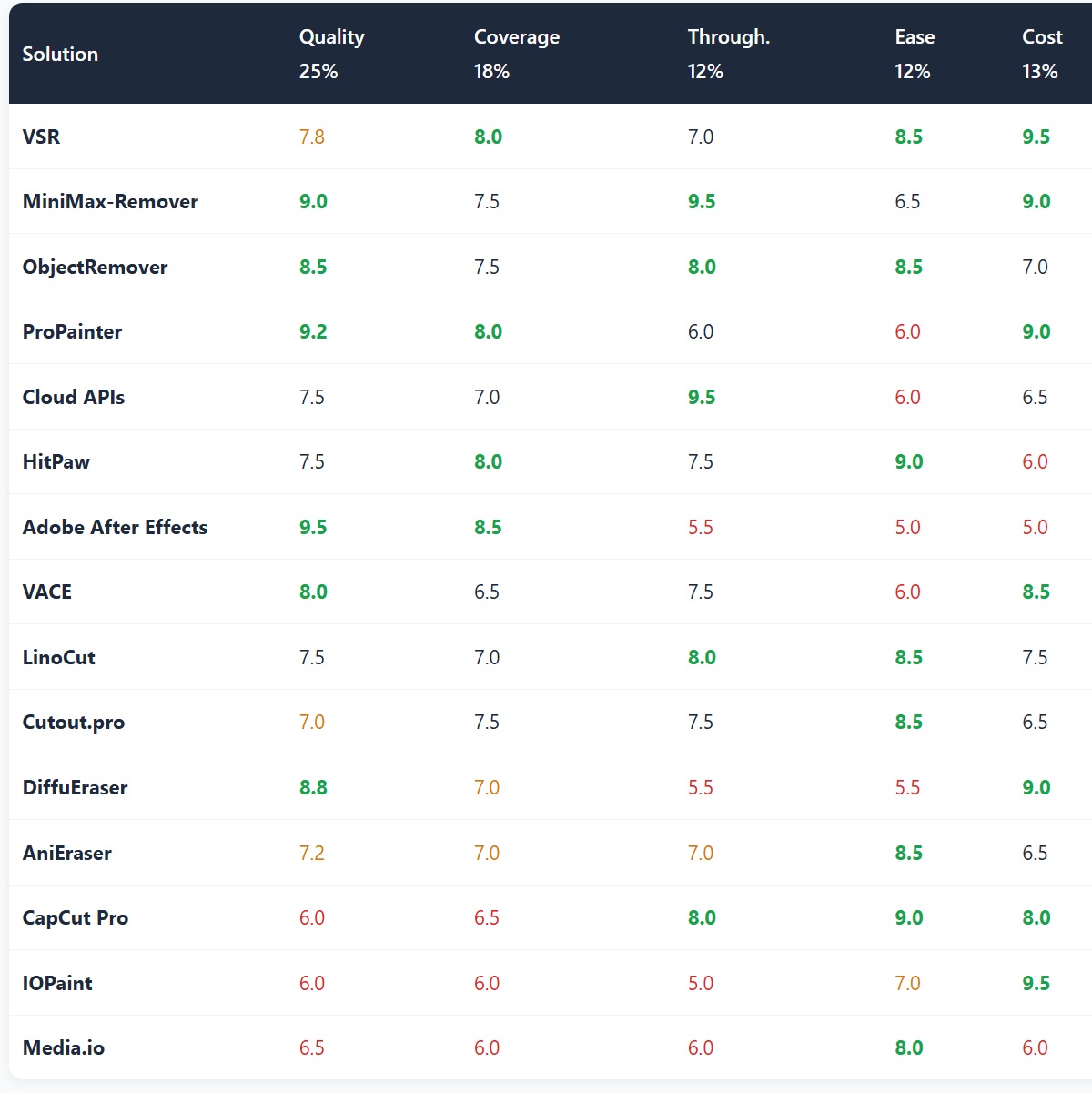
| Solution | Quality 25% |
Coverage 18% |
Through. 12% |
Ease 12% |
Cost 13% |
Batch 10% |
Comply 10% |
|---|---|---|---|---|---|---|---|
| VSR | 7.8 | 8.0 | 7.0 | 8.5 | 9.5 | 8.0 | 8.5 |
| MiniMax-Remover | 9.0 | 7.5 | 9.5 | 6.5 | 9.0 | 7.0 | 6.5 |
| ObjectRemover | 8.5 | 7.5 | 8.0 | 8.5 | 7.0 | 7.0 | 7.5 |
| ProPainter | 9.2 | 8.0 | 6.0 | 6.0 | 9.0 | 7.0 | 6.0 |
| Cloud APIs | 7.5 | 7.0 | 9.5 | 6.0 | 6.5 | 9.5 | 9.0 |
| HitPaw | 7.5 | 8.0 | 7.5 | 9.0 | 6.0 | 8.5 | 7.0 |
| Adobe After Effects | 9.5 | 8.5 | 5.5 | 5.0 | 5.0 | 6.5 | 9.0 |
| VACE | 8.0 | 6.5 | 7.5 | 6.0 | 8.5 | 6.5 | 9.0 |
| LinoCut | 7.5 | 7.0 | 8.0 | 8.5 | 7.5 | 6.0 | 7.0 |
| Cutout.pro | 7.0 | 7.5 | 7.5 | 8.5 | 6.5 | 7.5 | 7.0 |
| DiffuEraser | 8.8 | 7.0 | 5.5 | 5.5 | 9.0 | 6.5 | 6.0 |
| AniEraser | 7.2 | 7.0 | 7.0 | 8.5 | 6.5 | 6.5 | 7.0 |
| CapCut Pro | 6.0 | 6.5 | 8.0 | 9.0 | 8.0 | 7.0 | 5.5 |
| IOPaint | 6.0 | 6.0 | 5.0 | 7.0 | 9.5 | 6.0 | 9.0 |
| Media.io | 6.5 | 6.0 | 6.0 | 8.0 | 6.0 | 6.5 | 6.0 |
Legend: green marks a clear strength for that dimension (≥ 8% above the dimension’s mean); amber is mid-field; red is a clear weakness. No solution leads on all seven dimensions — which is precisely why selection must follow the scenario.
7.4 Dimension champions
9.5 / 10. The only reliable answer for complex texture and semi-transparent watermarks — at the price of manual frame-by-frame work. ProPainter (9.2) and MiniMax-Remover (9.0) are close behind on the open-source side.
8.5 / 10. Everything from static corner marks to semi-transparent and scrolling text, because a human can intervene wherever automation fails. On automatic detection, VSR and HitPaw tie for first at 8.0.
Both 9.5 / 10. The former is the local inference efficiency benchmark at 6 steps; the latter is elastic throughput, effectively unbounded at scale.
9.0 / 10. Both achieve “no need to understand the technology.” The difference is that HitPaw is a dedicated tool while CapCut is already in your workflow.
9.5 / 10. Zero marginal cost is open source’s ultimate weapon: with your own GPU, processing ten thousand videos costs the same as processing one.
9.5 / 10. Queues, concurrency, APIs and audit logs all in place. HitPaw (8.5) and VSR (8.0) are the best desktop alternatives.
All 9.0 / 10. Cloud APIs win on credentials and audit trails, VACE on Apache-2.0, IOPaint on fully local processing with a permissive license. At the other end sit CapCut (5.5) and ProPainter / DiffuEraser (6.0, primarily academic licenses).
8.1 / 10, and first under all three weighting profiles tested below. It wins no single dimension outright, yet sits at the highest point of overall usability.
7.5 Head-to-head verdicts
Five matchups covering the decisions that actually stall a selection.
Matchup 1: Propagation vs diffusion
ProPainter vs MiniMax-Remover. On DAVIS SSIM it is close (0.9748 vs 0.9842), but the decisive gap is success rate: MiniMax-Remover 85.18% at 6 steps versus ProPainter 56.67%, widening on multi-object scenes to 85.18% against 53.09%. Verdict: static backgrounds with large masks go generative; moving shots go propagation — they are complements, not substitutes, which is exactly the logic behind ObjectRemover’s router.
Matchup 2: Open-source bundle vs commercial desktop
VSR vs HitPaw. Quality is close on static marks (HitPaw around 95% success), but the cost structures are opposites: VSR is free, uncapped and batch-capable; HitPaw is $109.99/year, with a 1-minute free cap and Windows only. Verdict: with an NVIDIA card, choose VSR — the saving is substantial; only fall back to HitPaw without a discrete GPU or with zero appetite for setup.
Matchup 3: Manual craft vs full automation
After Effects vs the open-source field. On semi-transparent watermarks and marks sitting on faces, every automated option (ProPainter, MiniMax-Remover, Cutout.pro, HitPaw) produces brightness shifts or soft texture; only After Effects delivers a shippable result. But a 30-second complex shot costs half a day, and its throughput score of 5.5 is near the bottom. Verdict: top-tier quality is bought with time, not with software licenses.
Matchup 4: Free online vs paid desktop
Media.io / Kapwing vs HitPaw. The hidden costs of free online tools are systematically underestimated: Kapwing’s free tier allows 7 conversions per day and stamps its own watermark on output; Media.io gives 3 credits per day with free output capped at 720P — meaning “one use, one non-commercial deliverable.” Verdict: free online suits emergency previews only; for finished work, choose local open source or paid desktop.
Matchup 5: Self-hosted vs cloud API (the scale threshold)
VSR self-hosted vs Alibaba Cloud IMS / Tencent Cloud MPS. Self-hosting has near-zero marginal cost, but its hidden cost is labour: GPU machines, environment maintenance, fault diagnosis, batch scripting. Verdict: below roughly 300 videos per day self-hosting is cheaper; above roughly 300 per day, or whenever audit and compliance credentials are required, the cloud API wins on total cost and risk. The threshold shifts with your team’s engineering depth.
7.6 Robustness check: three weighting profiles
Any weighted score depends on its weights. To test whether these conclusions are merely artifacts of the chosen weights, the ranking is recomputed under three typical usage profiles with identical per-dimension raw scores.
| Solution | Profile A: High-volume creator Quality 15 / Coverage 15 / Throughput 20 / Ease 18 / Cost 18 / Batch 8 / Compliance 6 |
Profile B: Broadcast quality Quality 35 / Coverage 20 / Throughput 8 / Ease 8 / Cost 7 / Batch 7 / Compliance 15 |
Profile C: Enterprise batch & compliance Quality 18 / Coverage 15 / Throughput 12 / Ease 8 / Cost 12 / Batch 20 / Compliance 15 |
|---|---|---|---|
| VSR | 8.2 (1st) | 8.1 (1st) | 8.1 (tied 1st) |
| MiniMax-Remover | 8.1 (2nd) | 8.0 (tied 2nd) | 7.9 (3rd) |
| Cloud APIs | 7.6 (4th) | 7.7 (6th) | 8.1 (tied 1st) |
| ObjectRemover | 7.8 (3rd) | 7.9 (4th) | 7.7 (4th) |
| HitPaw | 7.6 (tied 4th) | 7.6 (7th) | 7.6 (5th) |
| Adobe After Effects | 6.7 (12th) | 8.0 (tied 2nd) | 7.3 (8th) |
| ProPainter | 7.4 (9th) | 7.8 (5th) | 7.4 (7th) |
| VACE | 7.2 (11th) | 7.6 (tied 7th) | 7.5 (6th) |
| CapCut Pro | 7.4 (tied 9th) | 6.6 (13th) | 6.8 (12th) |
What the check shows: (1) VSR ranks first under all three profiles (8.2 / 8.1 / 8.1), so “the open-source bundle is the best overall answer” does not depend on the weights and can be quoted with confidence. (2) After Effects is the most weight-sensitive option: tied second in the broadcast profile (8.0) yet twelfth in the creator profile (6.7) — its value is entirely a function of whether you will trade time for quality, so “is After Effects good?” has no single answer. (3) Cloud APIs rise to tied first in the enterprise profile (8.1) but score only 7.6 for creators, confirming that scale is their only core value. (4) Conversely, no claim that one tool is simply “best” survives scrutiny: not one of the fifteen entries stays in the top three across all three profiles.
8. The Exception That Needs Its Own Section: AI-Generated Video
Everything above rests on one assumption: a watermark is a layer on top of the picture, and removing it reveals what was underneath. AI-generated video breaks that assumption.
Take Sora 2 as the example. Its output carries two watermarks:
| Layer | Form | Can removal tools handle it? | Can platform detection be evaded? |
|---|---|---|---|
| Layer 1: visible watermark | A visible on-screen mark | Yes. ProPainter / VSR / MiniMax-Remover all remove it cleanly | No. Output is still classified as AI-generated |
| Layer 2: statistical fingerprint | Per-frame statistical features embedded across the sequence; invisible to the eye | No. All fifteen solutions in this report fail here | No. Classifiers read sequence signatures, not pixels |
Third-party testing records a structural pattern: after cleaning Sora 2 output with free tools, all three test samples were detected by Instagram’s and TikTok’s AI-content classifiers within 48 hours of upload. The visible watermark is a courtesy marker for human reviewers; the statistical fingerprint is the technical screening layer. Erasing the first leaves the second intact.
For anyone trying to pass AI detection
There are services that specifically claim to strip statistical signatures (targeting the Sora and Veo families). Two baseline judgments apply:
- Technical claims must be independently reproducible. Require any “passes AI detection” claim to come with a reproducible third-party verification process and samples. A vendor’s own test is not evidence.
- Even if it worked technically, it does not work legally. In China, removing AI-generated content labels — explicit or implicit — is prohibited by Article 10 of the Measures for Labeling AI-Generated Synthetic Content, and platforms respond to such attempts with permanent bans and blacklisting. This is not a question of tool quality.
9. Compliance Red Lines (the most important section of this report)
A watermark remover is neutral in itself — it can be a productivity tool for organizing your own footage or a means of evading copyright and regulation. The difference is not the tool; it is the use.
9.1 Three hard lines in China
Red line 1: AI content labels may not be removed
China’s Measures for Labeling AI-Generated Synthetic Content (jointly issued by the Cyberspace Administration of China, MIIT, MPS and NRTA, effective 2025-09-01) requires service providers to ensure explicit labels are present when content can be downloaded, copied or exported (Article 4), and to embed implicit labels in file metadata. Article 10 states plainly: no organization or individual may maliciously delete, alter, forge or conceal the labels required by these Measures, nor provide tools or services to others for that purpose.
- Explicit labels: visible “AI-generated” notices in the interface or on the picture;
- Implicit labels: technical markers embedded in file data (metadata, digital watermarks).
Penalties: the cyberspace authority may order correction, issue a warning, and impose fines of RMB 10,000 to 100,000. Platforms apply escalating sanctions: first offense warning plus 7-day throttling → content removal plus 15-day account throttling → account demotion plus 30-day publishing restriction → permanent ban plus blacklisting.
Red line 2: third-party copyright watermarks may not be removed for republication
Removing copyright watermarks, platform marks or attribution from someone else’s work for republication can constitute copyright infringement (moral rights of attribution, integrity of the work) and may violate unfair-competition rules on misrepresentation. Major video platform terms of service uniformly prohibit re-uploading content with platform watermarks removed for commercial purposes.
Where lawful use ends: your own footage, licensed footage, purchased commercially usable assets (removing a temporary preview watermark), and uses that qualify as fair use.
Red line 3: enforcement intensity is rising through 2026
- CAC’s “Qinglang — Rectifying AI Application Disorder” special action (notice dated 2026-04-30, four months): inadequate enforcement of AI content labeling is the headline target, covering all accounts with no exemptions.
- 2026-04-28: CapCut, Maoxiang and Dreamina were penalized by CAC for inadequate labeling enforcement — platforms summoned, ordered to correct, warned, with responsible individuals handled strictly.
- 2026-06-14: Douyin, Kuaishou, Xiaohongshu and WeChat Video enforced mandatory AI labeling platform-wide; content without compliant labels is not distributed. Platforms claim AI-detection accuracy above 98%.
- The technical reality: even after explicit watermarks are removed, implicit watermarks remain available for tracing. Regulators and platforms treat attempts to tamper with or remove labels as an aggravating factor.
9.2 How this maps to tool selection
| Use case | Compliance judgment | Effect on selection |
|---|---|---|
| Removing an old logo or legacy watermark from your own footage | Compliant | No restrictions; local open source is optimal (zero cost, footage never leaves) |
| Removing a preview watermark from purchased or licensed assets | Compliant | No restrictions; select by volume and frequency |
| Removing burned-in subtitles as localization prep | Compliant (own or licensed footage) | VSR is purpose-built for this |
| Removing third-party watermarks for republication | Infringement risk | Not changed by the tool chosen; no tool makes it lawful |
| Removing mandatory AI content labels | Explicitly illegal | Knowingly providing tools or services for this is also prohibited (Article 10) |
| Processing confidential or personal footage | Assess upload exposure | Local-only options are mandatory; online SaaS is excluded outright |
In one line: compliance is not a checkbox after selection — it is the first step of selection. Establish that the source and use are lawful, then choose the tool.
10. Key Findings
- Free options now match most paid products on quality; the dividing line has moved to non-technical barriers. VSR (8.1) and MiniMax-Remover (8.0) occupy the top two places overall, ahead of every paid SaaS. Paid value is concentrated almost entirely on users without a discrete GPU and users unwilling to configure an environment.
- 2025 saw a technology shift from propagation to generation. MiniMax-Remover’s 6-step distillation (85.18% success versus DiffuEraser’s 56.67%) turned diffusion inpainting into a usable tool, while ProPainter’s propagation route remains irreplaceable on moving shots. The correct 2026 answer is scene-based routing, not picking a side.
- Watermark type determines outcomes more than brand does. Static corner marks are universal; scrolling text demands video-native methods; semi-transparent watermarks need human intervention (After Effects) to be solved reliably; full-frame tiled watermarks and AI statistical fingerprints remain unsolvable. Classifying your requirement first saves substantial procurement trial-and-error.
- The hidden costs of “free online” are systematically underestimated. Output watermarks, 3–7 conversions per day, 720P free-tier ceilings — these limits usually prevent a commercially usable deliverable. The genuinely zero-cost path is local open source, and it requires an NVIDIA card.
- Open-source licensing is an overlooked commercial risk. ProPainter and DiffuEraser are primarily academic-licensed and require confirmation for commercial use; VACE (Apache-2.0) is the cleanest option in the camp. “It runs” is not the same as “I can sell it.”
- Compliance is the one dimension in this report that cannot be optimized. Article 10 of the labeling Measures prohibits both removing AI labels and providing tools for that purpose. Between the 2026 enforcement campaign, platform detection rates above 98%, and the penalties already levied against major platforms, this line has no ambiguity left.
Keep video processing on your own machine
DeepVideo is a locally run AI video translation and dubbing client: Voice Clone across 30+ languages, 100+ preset voices, TTS with lip sync — audio and video stay on your device and are never uploaded.
Try DeepVideo Free
Realistic AI Video Dubbing at Just $0.17/min
High quality · Low price · Local client · Security
Free tier: 18 minutes total + 2 minutes daily · Local processing, no cloud upload
DeepForgeHub Research · Video Watermark Removal: Global Comparison · September 2026
deepforgehub.com · Compiled from public sources; scores are not official benchmarks