
Why Is DeepVideo So Much Cheaper Than Competitors?
The secret is in our architecture: 100% local desktop processing vs. cloud-based SaaS
The Short Answer
Most AI video translation tools (HeyGen, Rask AI, Synthesia, ElevenLabs) run their AI models in the cloud. Every time you translate a video, they pay for server time, bandwidth, and storage—and pass those costs to you through credit systems, per-minute pricing, and hidden overages.
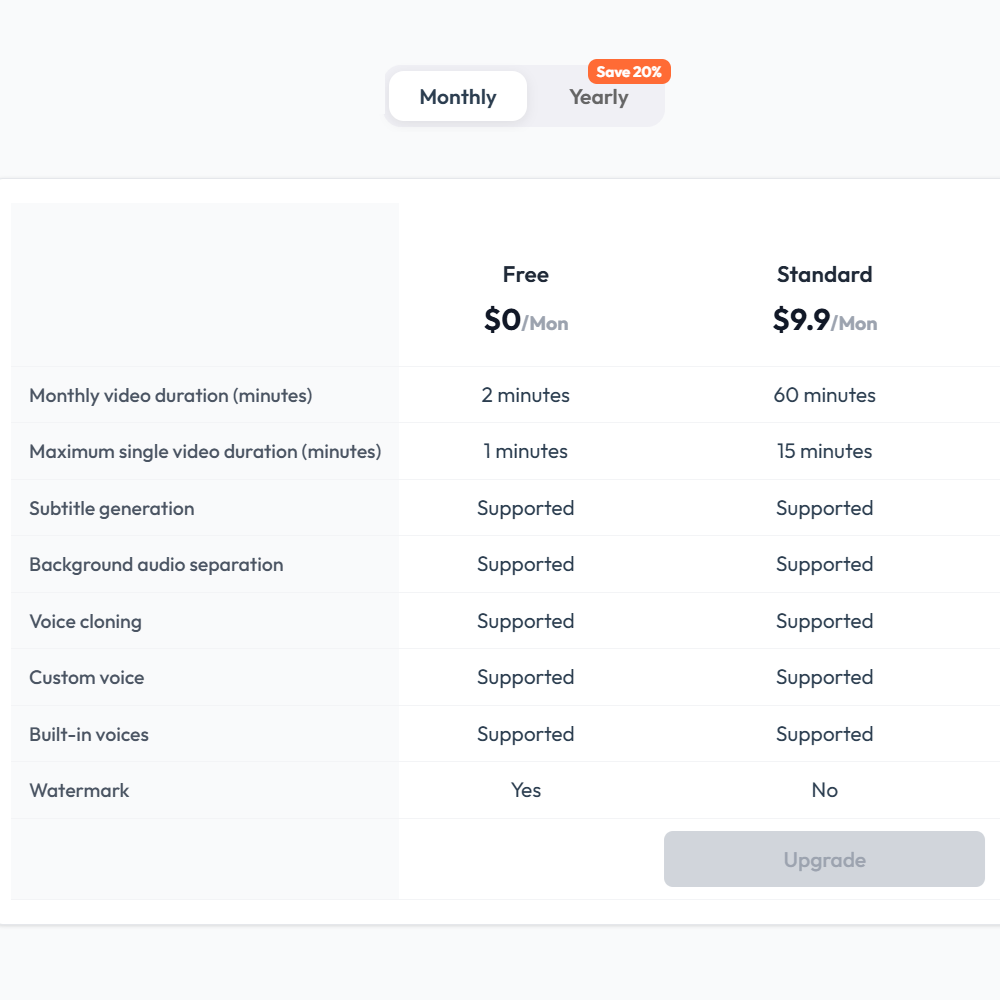
DeepVideo is different. Our AI runs 100% on your computer. There is no cloud server cost for us, which means there’s no per-minute charge for you. Once you subscribe, you can translate as much as you want within your plan’s limits—no surprise bills, no credit burn surprises.
Cloud SaaS vs. Local Desktop: The Fundamental Difference
☁️ Cloud-Based SaaS (HeyGen, Rask, ElevenLabs)
- AI runs on their servers
- Every minute of translation = server cost for them
- Pass costs to you via credits or per-minute fees
- Lip-sync often costs 2–3x more
- Translation into 3 languages = 3x the cost
- Typical cost: $2–$8 per minute
✅ DeepVideo (Local Desktop)
- AI runs on YOUR computer
- No server cost for us = no per-minute charge for you
- Pay once per month, translate freely
- Voice cloning, background separation included
- Translation into multiple languages = no extra cost
- Effective cost: $0.17 per minute
Price Comparison: $/Minute of Translated Video
When you compare the effective cost per minute of translated video, the difference is staggering: (See our detailed pricing comparison for full details)
| Product | Entry Plan | $/Minute | Hidden Costs |
|---|---|---|---|
| DeepVideo | $9.90/mo (60 min) | $0.17/min | None. Local processing. |
| HeyGen | $29/mo (600 credits) | ~$2.42/min | Avatar IV burns 20 credits/min |
| Rask AI | $60/mo (25 min) | ~$2.40/min | Lip-sync costs 3x minutes |
| ElevenLabs Dubbing | $22/mo (9 min) | ~$2.44/min | Per-language billing trap |
| Synthesia | $29/mo (~10 min) | ~$2.90/min | Custom avatar add-on $1,000/yr |
| Perso Dubbing | $6.99/mo (7 min) | $1.00/min | Lip-sync costs 3x credits |
| Papercup | Per project | ~$8.00/min | Enterprise-only pricing |
The 5 Hidden Cost Traps in Cloud SaaS Pricing
1. Credit System Obfuscation
HeyGen advertises “600 credits” in their Creator plan—but Avatar IV (their best model) burns 20 credits per minute. That means 600 credits = only 30 minutes of video, not 600 minutes. Always calculate the effective $/min for YOUR use case.
2. Lip-Sync Surcharges
Rask AI, GeckoDub, and Perso Dubbing all charge 2–3x more for lip-sync. A 10-minute video with lip-sync might cost you 20–30 minutes of credits. DeepVideo doesn’t offer lip-sync at all, so there’s no surcharge to add — the flat per-minute rate is the whole bill.
3. Per-Language Billing
ElevenLabs Dubbing v2 charges per language. Translate one video into Spanish, French, and German? That’s 3x the minutes consumed. DeepVideo has no per-language surcharge.
4. Premium Model Surcharges
HeyGen’s older models cost 3–5 credits/min, but Avatar IV costs 20 credits/min. Creatify’s Veo 3 model costs 10 credits for just 8 seconds. Always check which model is included in your plan.
5. Per-Seat Pricing
Kapwing, HeyGen Business, and Topview Team all charge per seat. Add 3 team members? Your bill triples. DeepVideo is per-device, not per-seat.
Why Local Processing is Better (Beyond Price)
- Privacy: Your videos never leave your computer. No upload, no cloud storage, no data breach risk.
- Speed: No upload/download time. Translation starts instantly and runs at GPU speed.
- Offline capability: Works without internet (after initial setup).
- No rate limits: Cloud services often throttle during peak hours. Local processing has no such limits.
- No subscription lock-in: Your processed files are on YOUR disk, not their server.
The Trade-Off: Why Isn’t Everyone Doing This?
Local desktop processing requires a decent computer (8GB+ RAM, modern CPU/GPU). Cloud SaaS works on any device with a browser—including phones and Chromebooks.
But if you’re a professional content creator, marketer, or business user working on a desktop or laptop, DeepVideo’s local architecture gives you professional-grade translation at a fraction of the cost.
Try DeepVideo Free
18 minutes of translation + 2 minutes daily refill. No credit card required.
100% local processing. Your videos never leave your machine.